Quick Answer
To backup AT&T email, add the mailbox to an IMAP app with your full address and a 16-character secure mail key in the Password box. AT&T refuses the normal account password in apps that have no AT&T sign-in window.
After that, tick the folders to keep and save them as PST, EML or MBOX files. Each AT&T address needs a key of its own.
AT&T Mail keeps your att.net, sbcglobal.net or bellsouth.net messages on AT&T's servers and deletes a mailbox that stays unused. A copy on your own PC is the one AT&T cannot remove. Signing in over IMAP takes five entries. The first section puts all five on one card.
My own run used a Windows IMAP app on a test mailbox from another provider, so every file count on this page belongs to that mailbox. Each AT&T value comes from AT&T's own support pages, read on 2 November 2026.
Which Server Do You Type to Backup AT&T Email on Any of Its 12 Domains?
Copy the server from the yellow card into the Imap Server box and keep Secure Port ticked. AT&T's email settings page gives one server for ameritech.net, att.net, bellsouth.net, currently.com, flash.net, nvbell.net, pacbell.net, prodigy.net, sbcglobal.net, snet.net, swbell.net and wans.net. Only the address in the Email box changes from one domain to the next. Univik lists the SMTP and POP3 servers on its AT&T Email IMAP settings page.
name@att.netYour whole address on any of the 12 domains, with the @ and the domain.- Password
- A 16-character secure mail keyNot your AT&T account password. The next sections explain where the key comes from.
- Imap Server
imap.mail.att.netCopy this server name letter for letter.- Imap Port
993993 is already filled in.- Secure Port
- Ticked (SSL)This box arrives ticked and should stay that way.
Find suggests a server for the address you typed. Check its answer against the card before you press Add. Saving mail to files needs no outgoing server, so the Add Email Account window has no SMTP box to fill.
What Does AT&T Require Before a Desktop App Can Sign In?
The rule from AT&T is short. Its email app page says an app must use either OAuth or a secure mail key. OAuth means the app opens an AT&T sign-in window. The Add Email Account window has a Password box and no such window, so a secure mail key is the route for this backup.
You make the key while signed in to the profile of your AT&T account. On the Settings page you choose to add a secure mail key, type a nickname and select Create. Copy the 16 characters before you leave the page. AT&T's key page lists every step.
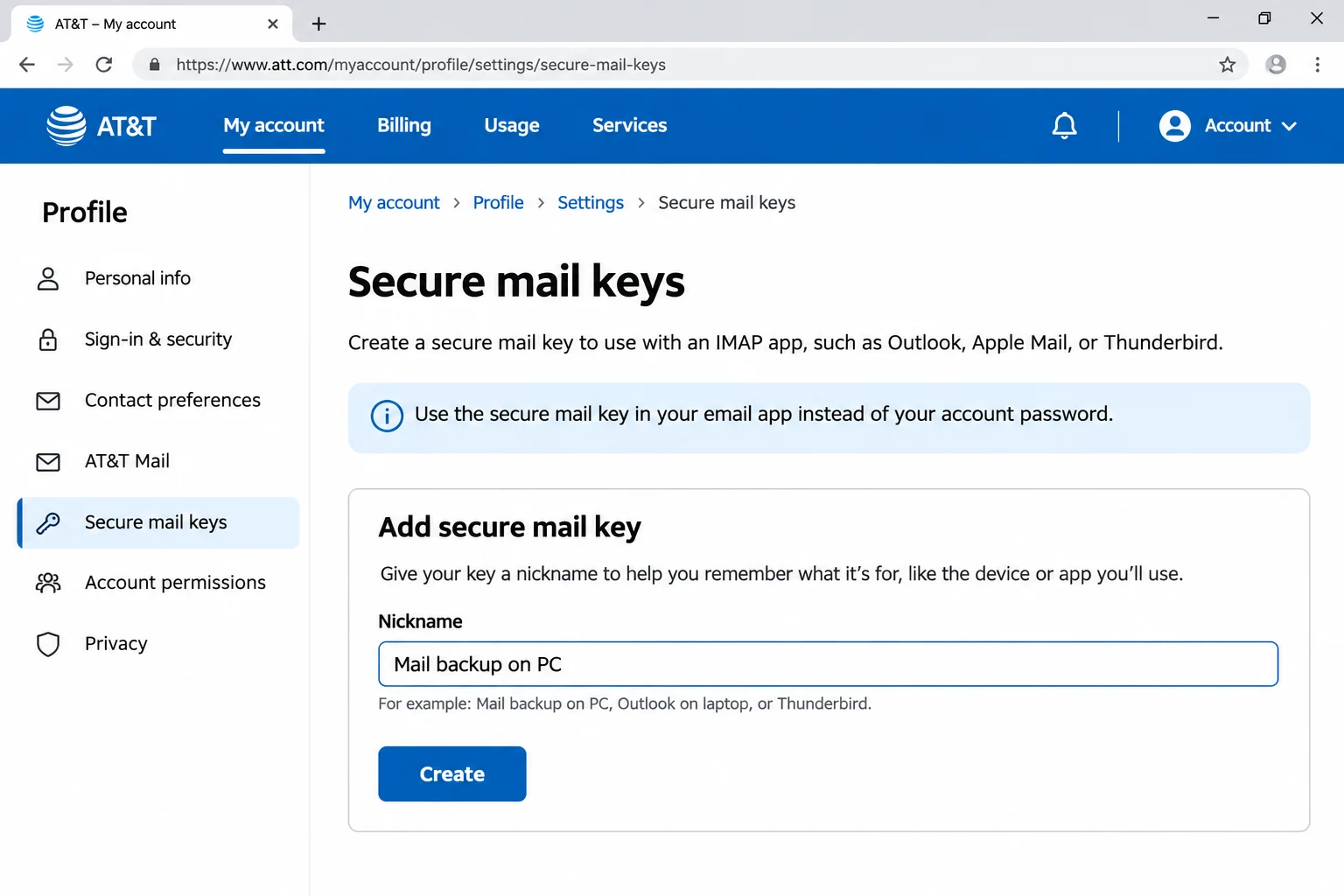
What Do You Paste Into the Password Box If AT&T Wants a Secure Mail Key?
The AT&T account password still opens webmail. Only an app that has no AT&T sign-in window needs the key.
| Where you sign in | Email box | Password |
|---|---|---|
| A browser at currently.com | Full AT&T address | Your AT&T account password |
| A mail app with an AT&T sign-in window | Full AT&T address | Nothing typed, the sign-in window handles it |
| The Password box of an IMAP backup app | Full AT&T address | A 16-character secure mail key |
A key never expires and a new account password does not cancel it. AT&T asks for a separate key for each email address and subaccount, so three sbcglobal.net addresses need three keys. An alias or a disposable address uses the key of the address it is linked to. When AT&T locks or blocks an account it deletes the keys for safety and you create new ones.
What Happens to att.net Saved Mail When AT&T Empties an Unused Mailbox?
AT&T sets a 12-month clock. Its Check Your AT&T Mail page says a mailbox not used for 12 months counts as inactive and its contents are deleted. Signing in within three years recovers the account, but the page states that the original content and settings do not come back.
AT&T's restore page adds a second limit. It can restore deleted emails from the past 7 days only. Any att.net saved mail older than that has to come from a copy that you made yourself.
An IMAP login does not give you such a copy. The app shows what the AT&T server holds, so a deletion in the app reaches the server too. The longer answer sits in Is IMAP a backup? with the server-side detail.
Who Needs to Backup AT&T Email Before an Account Change?
- A legacy address holder You keep an old bellsouth.net or pacbell.net address and open it rarely. To backup sbcglobal.net email, follow the same steps.
- A customer leaving AT&T service You plan to cancel your plan and want the years of mail saved first.
- A locked-out user AT&T once locked your account and your keys vanished. You want files that no key controls.
- A records keeper You file mail by case or year and want plain files your archive tools can open.
How Do You Backup AT&T Email Step by Step With a Secure Mail Key?
Start with the key. After that come the account entry, the folder ticks, the format choice under Export and a click on Save.
My test used Univik IMAP Backup, IMAP backup software built for Windows. It reaches the mail server directly, so no Outlook profile is needed. These five steps run down the screen from top to bottom.
- Make the secure mail key. Sign in to the profile of your AT&T account, add a secure mail key under Settings and copy the 16 characters. Repeat this for every address you plan to save.
- Add the account. Select Open, point to Email Accounts and choose Add account. Enter all five values from the settings card. Type your full address in Email and paste the key into the Password box. Expand Advance Settings for the server fields. Secure Port starts ticked.
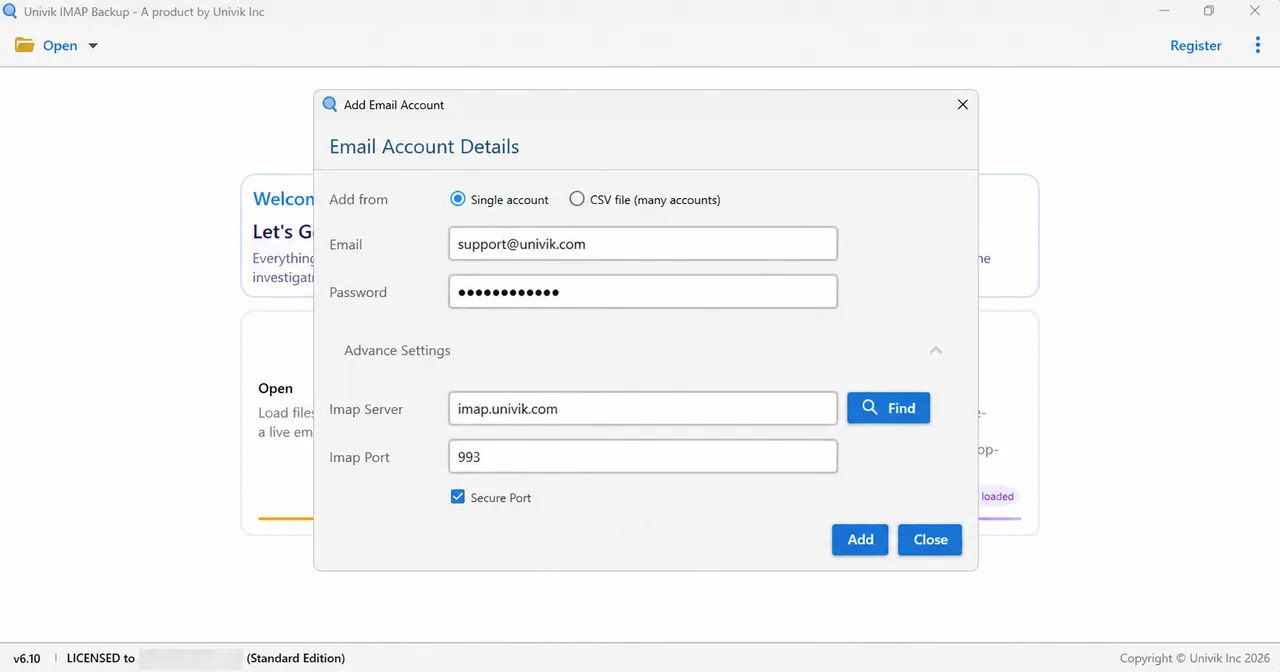
The Add account window with Advance Settings holding the server fields. - Tick the folders and choose a format. Each folder in the tree carries a tick box and its message count. Tick the folders you want to save, then open the Export menu. Pick EML, MBOX or PST under Email Files.

The Export menu in the toolbar. - Look at the attachment filter. Minimum Attachment Size to Export arrives switched on with 35 MB entered. My PST test on a non-AT&T mailbox wrote 0 messages at that default because none of its 173 mails held an attachment of that size. I switched the filter off and the export ran.
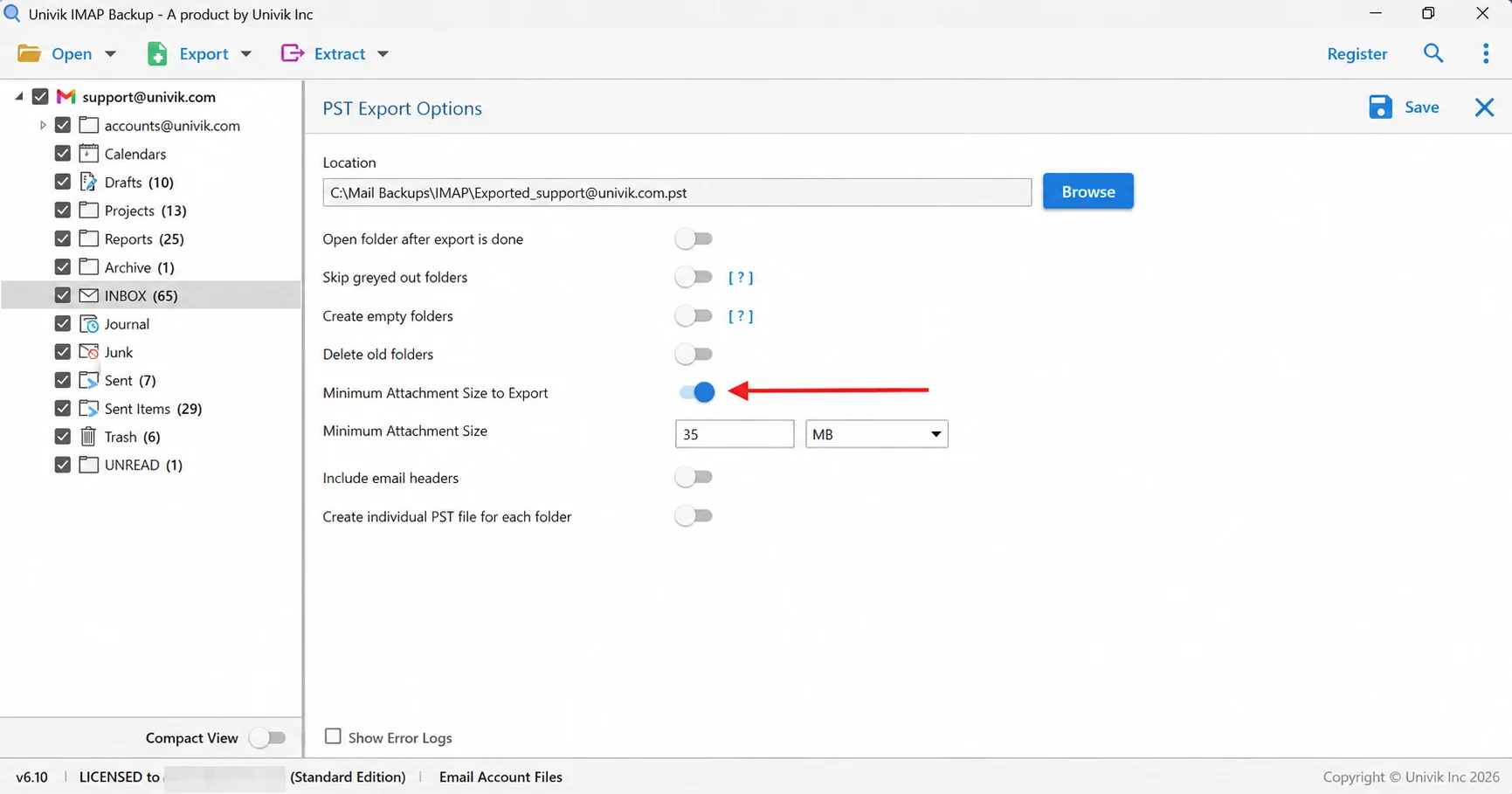
The arrow points at the 35 MB filter. Review it before every export. - Save and compare. Select Save in the top right corner. A green banner reports success. Open your export folder next and set each folder's file total beside its count in the tree.
Which Format Fits a Saved Copy of Your AT&T Mail?
Under Email Files the Export menu offers three file types. Match the choice to your next use.
| Guide | What you get | Typical next step |
|---|---|---|
| IMAP to PST guide | A single PST for the whole mailbox or one PST per folder | Browsing the mail in Outlook |
| IMAP to EML guide | Each message saved as a separate .eml file under folders named like yours | Standalone files for an archive |
| IMAP to MBOX guide | One .mbox file per ticked folder | Reading the mail in Thunderbird afterwards |
A saved .eml opens in the Online EML Viewer without a mail program. For a spreadsheet of senders and subjects, export IMAP emails to CSV. To pull only the files you were sent, extract attachments from IMAP email.
Why Does an AT&T Backup Hold Fewer Mails Than You Expect?
Five things change how many messages reach your PC. Check each one before you press Save.
- Folder ticks The tree starts with some folders ticked and some clear. Look at the ticks on every export screen.
- Size filter A filter that starts on can skip every mail without a large attachment.
- Trial cap The trial edition writes 10 items from each folder.
- Mail AT&T already removed AT&T restores deleted mail from the past 7 days only. Mail deleted before that cannot be brought back by a later backup.
- A recovered inactive mailbox AT&T says recovery restores the account without its original content. Save the mail before the 12 months pass.
My non-AT&T test mailbox listed 65 messages in INBOX and the trial wrote 10 of them. Drafts held exactly 10 and Trash held 6, so both folders came out whole. Sent Items listed 29 and gave 10.
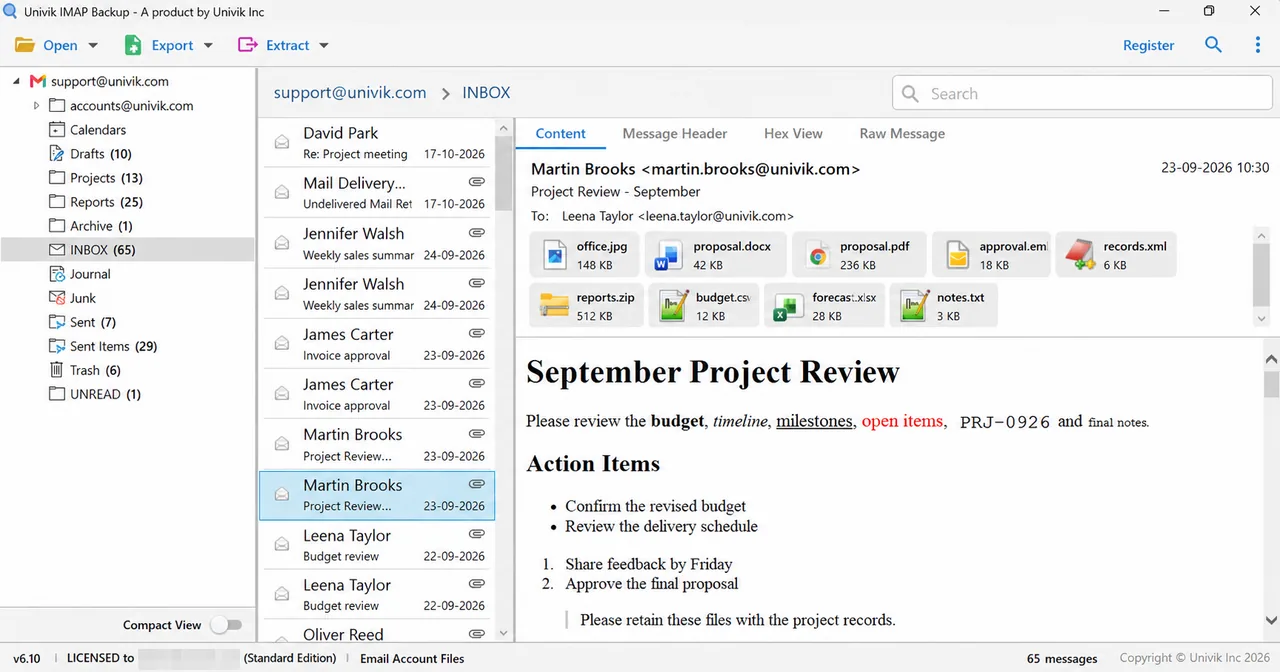
| Test folder | Count in tree | Files written by trial |
|---|---|---|
| Sent Items | 29 | 10 |
| INBOX | 65 | 10 |
| Trash | 6 | 6 |
| Drafts | 10 | 10 |
With a licence the app writes every message, so each folder's file total lines up with its count in the tree. Start with any folder that falls short.
What If Your AT&T Backup Looks Like This?
Do this: Look at the Password box first. If the box holds your AT&T account password, replace it with a secure mail key. Then check that the Email box holds the full address with its domain.
Do this: The AT&T system deletes secure mail keys when it locks or blocks an account. Create a new key in the account profile and paste it into the Password box of the app. Do the same on every other device that used the old key.
Do this: A key belongs to one address or to one subaccount. Make a separate key for the failing address and use its full name, like the sbcglobal.net or bellsouth.net one, in the Email box.
Do this: Return to the Export Options screen and read Minimum Attachment Size to Export. Left on, it skips a mailbox that has no large attachment, which is what my PST test hit. Turn it off and select Save again.
Do this: Trial runs cap each folder at 10 items. A Demo Edition message appears when the cap is reached. Licensed copies carry no cap.
Seeing something else in your AT&T backup? Send Univik support a short description.
- AT&T accepts an app only through OAuth or a 16-character secure mail key.
- The Password box of this backup takes the key and not your AT&T account password.
- Each address and subaccount needs a key of its own.
- AT&T deletes keys when it locks or blocks an account.
- AT&T empties a mailbox unused for 12 months and recovery does not return the old content.

FAQ: Backup AT&T Email
How do I backup AT&T email?
Make a secure mail key in the profile of your AT&T account first. Then add the mailbox to the app with your full address and that key in the Password box, copy the server values from the settings card and tick your folders. Next open Export and select PST, EML or MBOX, then select Save. Afterwards check each folder's file total against the tree.
Which password do I use to backup AT&T email in a desktop app?
Use a 16-character secure mail key. AT&T says an app must use OAuth or a key. The Add Email Account window has no AT&T sign-in window. Your normal account password still opens webmail at currently.com.
Does one secure mail key cover my att.net and sbcglobal.net addresses?
No. AT&T asks you to create a key for each email address and subaccount. An alias or a disposable address uses the key of the address it is linked to.
Why did my AT&T email backup stop signing in after it worked?
AT&T deletes secure mail keys when it locks or blocks an account. Create a new key in your account profile and paste it into the Password box. Keys otherwise never expire and a new account password does not cancel them.
What happens to att.net saved mail if I stop using the address?
AT&T treats a mailbox as inactive after 12 months without use and deletes its contents. Signing in within three years recovers the account but not the original content or settings. A backup made before that point is the only copy of such mail.
Can I backup several AT&T mailboxes at once?
Yes. The app can add several mailboxes from a CSV file of addresses and passwords. Each AT&T line must hold that address and its own secure mail key.
Which format should I choose for my AT&T email backup?
PST suits Outlook. EML gives one file per message and needs no mail program. MBOX fits Thunderbird and keeps each folder in a single file.
How do I know my AT&T email backup is complete?
Check each folder's file total against its count in the tree. My non-AT&T test mailbox had an INBOX of 65 and the trial wrote 10, so only a licensed copy can match every count.
Can I try the AT&T email backup before buying?
Yes. A trial run writes 10 messages per folder, which is enough to prove the key and the folder list work. Buying a licence lifts the limit.

Written on November 2, 2026 with IMAP Backup 6.10 beside AT&T's own support pages. Every count on this page comes from a mailbox of another provider, run in the free trial.
Pages we read: