Quick Answer
To backup multiple IMAP accounts, write one line per mailbox as email,password in a CSV file and load that file through an IMAP app that offers a CSV option. Leave the server box empty when the mailboxes sit on different hosts.
Only accounts that sign in are added, so count your lines against the accounts that came in. Then save the folders as PST, EML or MBOX files and compare each folder count with its files.
You look after 30 mailboxes for clients and a web host is closing next month. Typing each address and password by hand invites a typo. A CSV list of email accounts replaces that typing with one file. This guide shows that route for office addresses, domain mailboxes or a mix. For hosting mailboxes only, see back up hosting email accounts.
I read RFC 4180 and RFC 9051 on 2 November 2026. Window text, folder counts and export results here come from the app and a test mailbox that isn't tied to any provider.
How Do You Backup Multiple IMAP Accounts in One Run?
To save many mailboxes in one run, use the Open menu, then Email Accounts and Add accounts from CSV file.... That window reads the whole list of mailboxes and signs in to each one, where Add account takes one mailbox per pass.
| Route | What you fill in | When it fits |
|---|---|---|
| Single account | Email and Password, with Imap Server and Imap Port under Advance Settings | One or two mailboxes or a Microsoft address that opens its own sign-in |
| CSV file (many accounts) | A file chosen with Browse..., plus one shared Advance Settings block | A CSV file suits mailboxes that each have an address and a password |
Advance Settings is the part that trips up a list, because the window says it is used for every account in the file. A host typed into Imap Server is therefore tried for every line, so one host fits a list where all mailboxes live on that server. A mixed list needs Imap Server left empty, because the window then finds the server from each email address. When a lookup comes back empty, how to find IMAP server lists the ways to look it up by hand.
If the word account is new to you, what is an IMAP account explains it before you build a list of 30.
How Do You Backup Many Email Accounts From a CSV File?
Write one line for every mailbox as email,password and save the file as plain text with the .csv ending. The window states that format and adds that a header row is optional. A Download a sample CSV link sits beside it.
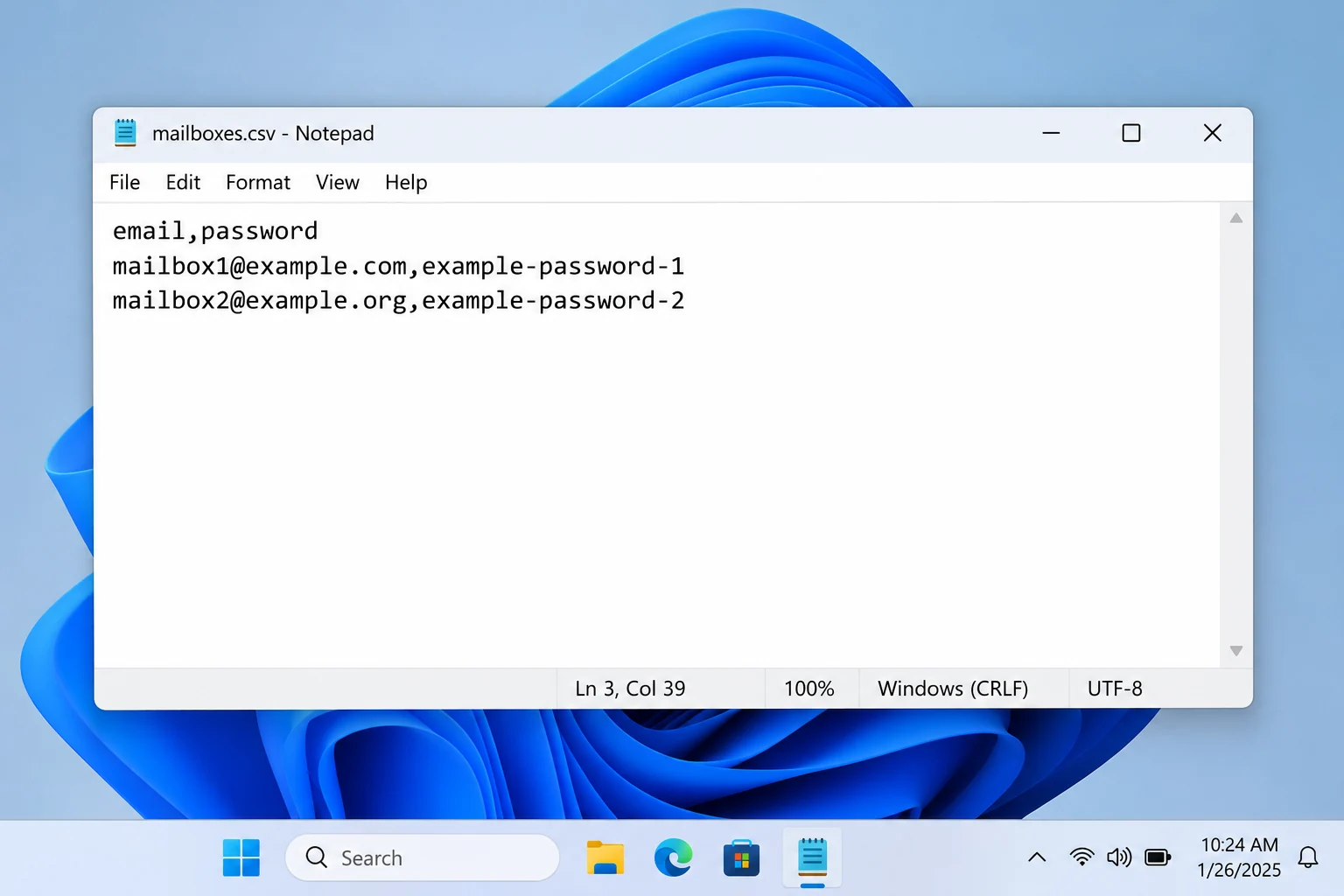
email,password
mailbox1@example.com,first-password
mailbox2@example.org,second-password
Both example lines use placeholder addresses. RFC 4180 describes the same layout: one record per line with an optional header line first.
What Does the Add Email Account Window Ask For With a CSV File?
- Add from
- CSV file (many accounts)The other choice, Single account, shows Email and Password boxes instead.
- CSV file
- The path of your listSelect Browse... and pick the file you saved.
- Imap Server
Empty or one hostEmpty finds the server from each address. A typed host applies to every line.- Imap Port
993One port for the whole file. 993 is the default.- Secure Port
- TickedThe box starts ticked. Leave it that way for port 993.
A CSV file is plain text, so anyone who opens it reads every password. Keep it in a folder only you open. The window doesn't say what the app does with the file after loading, so delete it once the backup is checked.
Commas need care too. RFC 4180 says a field that holds a comma should sit inside double quotes. It also counts spaces as part of a field. The window doesn't describe how the app reads either one, so add such a mailbox with Add account and keep stray spaces out of your list.
How Do You Backup Multiple IMAP Accounts Step by Step?
Build the list, load it through Add accounts from CSV file..., set Advance Settings once and save the ticked folders from the Export menu.
- Make the list. Save a plain text file with one email,password line per mailbox.
- Load the file. From the Open menu choose Email Accounts and then Add accounts from CSV file.... Select Browse... and choose your list.
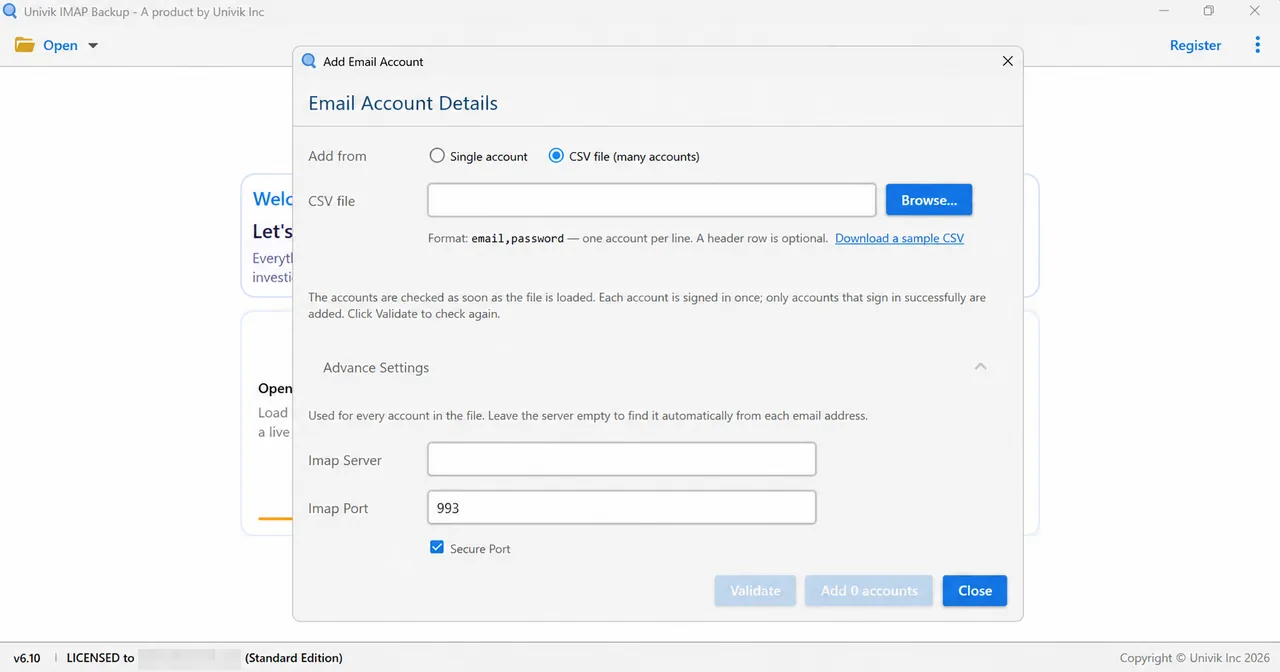
CSV file option: Browse... picks the list and Advance Settings stays open under it. - Set Advance Settings. Leave Imap Server empty for mailboxes on different hosts or type one host for a single server. Keep Imap Port at 993 with Secure Port ticked.
- Validate and add. Select Validate to check the list again after a fix. Then select the last button, which starts as Add 0 accounts, to add the accounts that signed in.
- Export and count. Select the Export menu and pick EML, MBOX or PST from the Email Files group. Tick the folders, check Minimum Attachment Size to Export and select Save. Then count the files of each folder against its number in the tree.

Email Files in the Export menu lists the three mail formats.
What Happens to a Mailbox That Does Not Sign In During the Run?
A mailbox that doesn't sign in stays out of your list. According to the window, an account gets one sign-in attempt and only the ones that succeed are added, so the rest of the file still goes in.
The refusal comes from the mail server. In IMAP a rejected login gets a NO response with the text "login failure: user name or password rejected" (RFC 9051 section 6.2.3), so a wrong password and a missing app password can look alike in the window.
Count your lines before you load the file. After the load, set that figure against the number on the last button, which reads Add 0 accounts until a file is in. When the two numbers differ, the missing lines are the accounts to fix. Select Validate after each fix to check the list again.
How Do You Check That Every Mailbox Was Saved?
Set the message count beside each folder against the files that land in your export folder. The preview window puts an account above its folders and prints a count next to every name.
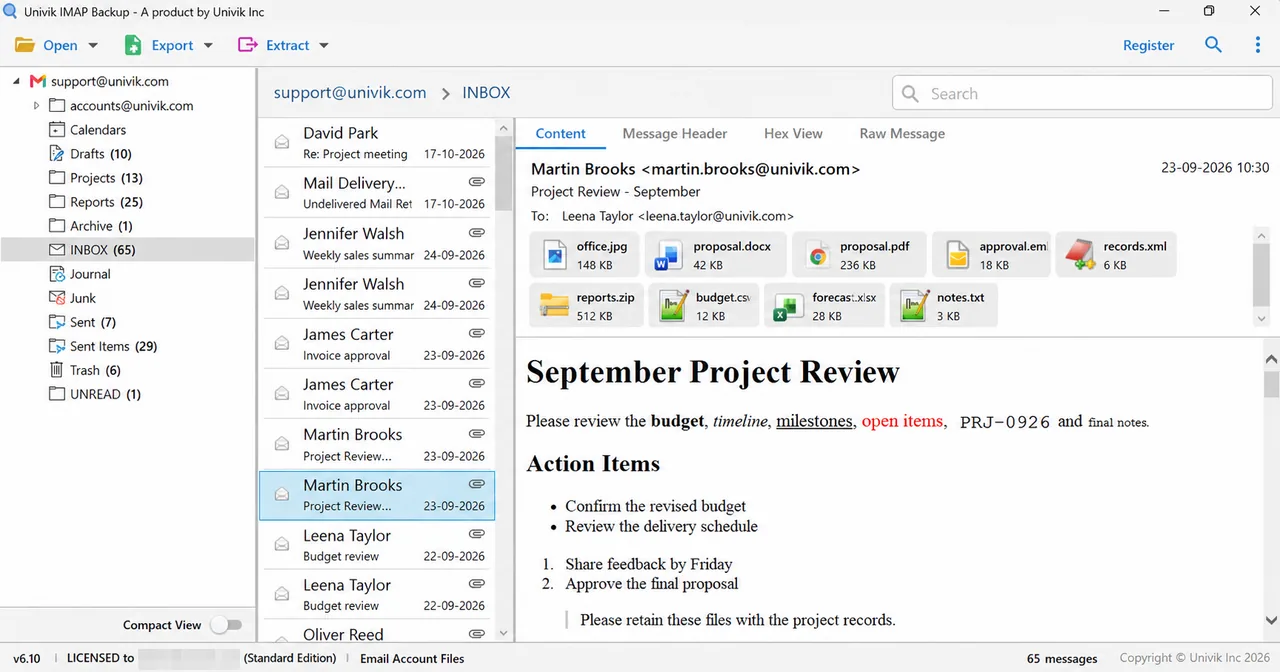
In my test mailbox, which isn't tied to any provider, Univik IMAP Backup 6.10 in its trial edition lists INBOX with 65 messages and Sent Items with 29. A trial export gave up 10 from each of those, since a folder yields at most 10 items in the trial edition. Drafts has 10 messages and Trash has 6, so both were written in full.
| Test folder | Count in the tree | Trial wrote |
|---|---|---|
| INBOX | 65 in the tree | 10 files |
| Sent Items | 29 in the tree | 10 files |
| Drafts | 10 in the tree | 10 files |
| Trash | 6 in the tree | 6 files |
How Are Export Folders Named and What Can Empty a Run?
Each account gets a folder of its own in the export. In my EML and PST runs the folder name was the address with its dots written as underscores, so alice@northwind.test became alice@northwind_test. Expect one such folder per address.
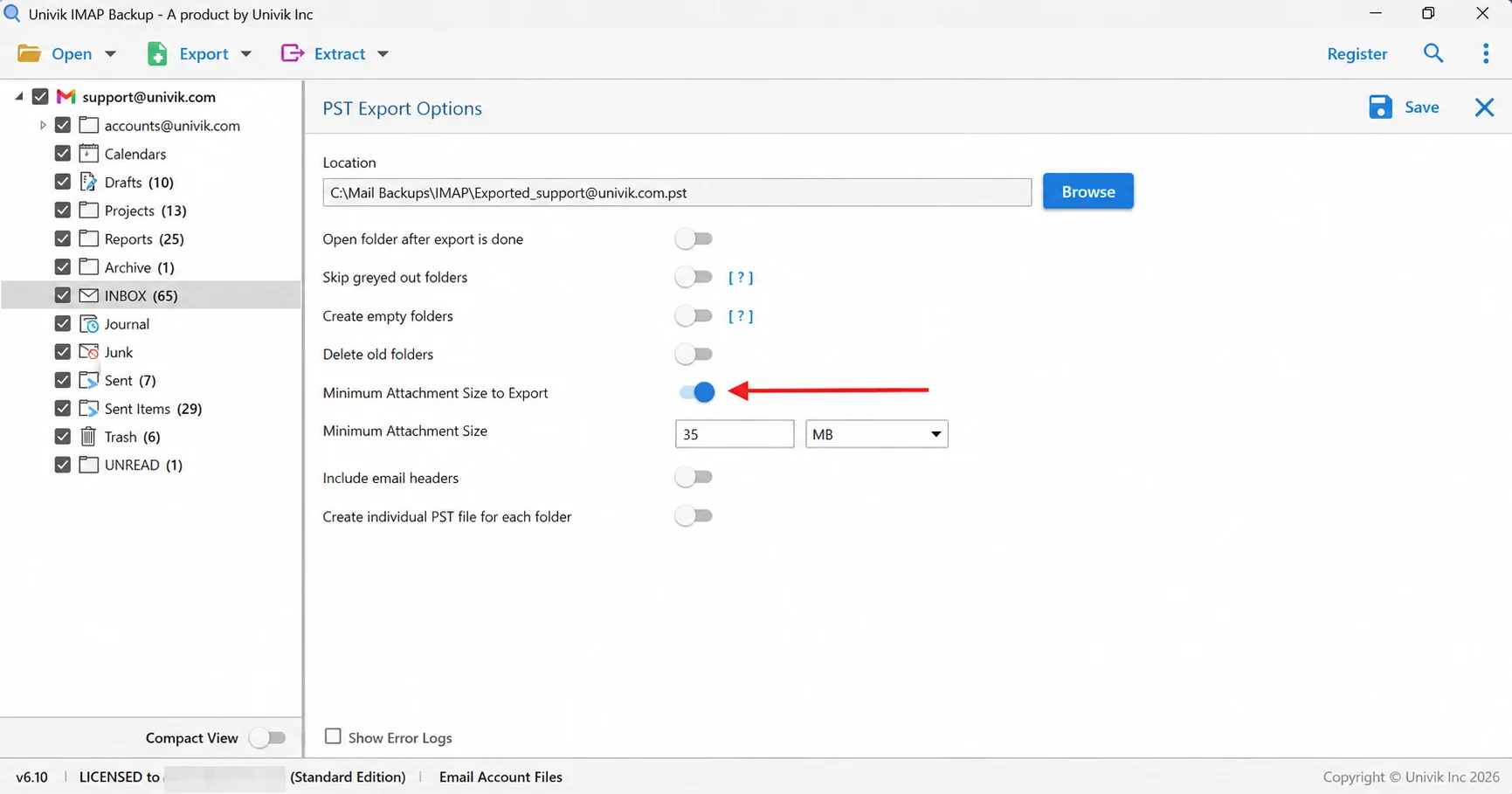
One switch can empty a whole run. The 35 MB value in Minimum Attachment Size to Export is on when the screen first opens. My first PST export with it left alone wrote nothing, so look at that switch before pressing Save. The Show Error Logs tick box at the bottom left lists the mails the run skipped.
Why Does One Mailbox Fail When You Backup Multiple IMAP Accounts at Once?
One mailbox fails because every provider sets its own sign-in rule while Advance Settings is shared by the whole file.
Try this: Imap Server holds a single host for the whole file. Clear it so the app finds each server from its address or split your list by host and load the parts one at a time.
Try this: Google says app passwords need 2-Step Verification and stop working when you change the account password. Make a new app password and put it on the Gmail line. The Gmail email settings page shows the route.
Try this: Apple asks for two-factor authentication before an app-specific password exists and revokes all of them after a password change, so put a fresh code on the iCloud line. The iCloud mail settings page walks through that code.
Which IMAP, Microsoft and Port Problems Stop a Line?
Try this: Microsoft Learn says security defaults turn POP3 and IMAP4 off in Exchange Online. A mailbox with IMAP off refuses the login whatever the password says. Ask its owner or admin to switch it on.
Try this: I entered a Hotmail address in the Add account window on 2 November 2026. A Microsoft sign-in page appeared in my browser straight away and the Imap Server boxes stayed hidden. I haven't tried Microsoft addresses in a CSV file, so add each one with Add account and keep it out of your list.
Try this: Imap Port is shared by every line as well. RFC 9051 section 2.1 names port 993 as the Implicit TLS port, which matches the default with Secure Port ticked. Check the port your provider publishes and look for a space after a comma.
Can Thunderbird or Outlook Back Up Many IMAP Accounts Instead?
Thunderbird keeps a local copy of IMAP mail once you switch on its option for storing an account's messages on your PC. Mozilla's help page on IMAP synchronization describes that option for one account. A list of 30 mailboxes therefore means 30 accounts to add to Thunderbird before every copy is switched on.
New Outlook saves a .pst file through Settings, then Files, then Export. Microsoft's support page says a wizard lets you select the mailbox or specific folders. That page describes new Outlook only, so check the menus of your own version before you plan a long list.
A CSV list moves the typing into one file. You write each address and password once, load the file in one window and export the ticked folders after that.
Why Is a Local Copy of IMAP Mail Worth Keeping Before a Mailbox Goes?
IMAP keeps the only copy of a mailbox on the server, so a delete on a phone or the end of a hosting plan reaches the mail everywhere at once. The difference gets a full walk-through in is IMAP a backup.
Windows users can load a list like this into Univik IMAP Backup, which is IMAP backup software from Univik. For a single mailbox its Add Email Account window takes Email and Password. Under Advance Settings sit Imap Server, Imap Port with 993 as the default, a Secure Port box that starts ticked and a Find button. Saved mail goes out through the Export menu in the Email Files group.
Which Export Format Fits and When Does the CSV Route Fit?
| Format | Output | Opens in |
|---|---|---|
| Export IMAP to PST | One .pst file or one for each folder with Create individual PST file for each folder switched on | Outlook on Windows |
| Export IMAP to EML | One .eml file per message, in folders that keep your folder nesting | A plain folder on your drive |
| Export IMAP to MBOX | A single .mbox per ticked folder, named after that folder | Thunderbird after an import |
My verdict: use the CSV route when you have a handful of mailboxes or more and each one signs in with an ordinary password or an app password. Add Microsoft addresses and any password that holds a comma by hand.

- A CSV mailbox list holds one email,password line per account and accepts an optional header row.
- Imap Server in Advance Settings applies to every line of the file, so leave it empty when the mailboxes sit on different hosts.
- Imap Port stays at 993 with Secure Port ticked for the whole file, which matches RFC 9051 section 2.1 for Implicit TLS.
- Add 0 accounts is the starting label of the last button, and only mailboxes that sign in raise that count.
- Univik IMAP Backup writes at most 10 items per folder in its trial edition and opens with the 35 MB attachment filter switched on.
Common Questions About CSV Mailbox Backups
How do I backup multiple IMAP accounts?
Write one line per mailbox as email,password in a CSV file. From the Open menu choose Email Accounts and then Add accounts from CSV file..., pick the file with Browse... and leave Imap Server empty when the mailboxes sit on different hosts. Accounts that sign in are added. Then tick the folders in Export and choose EML, MBOX or PST under Email Files.
What does the CSV file for many email accounts look like?
Each line holds an address, a comma and a password. A header row is optional and the window links a sample file.
Can one CSV file hold mailboxes from different providers?
Yes, when Imap Server is left empty. The window says it then finds the server from each email address. A host typed into Imap Server is used for every line, as are Imap Port and Secure Port.
Does one wrong password stop the whole list?
A wrong password keeps its own line out of the list. The window gives each account one sign-in attempt and adds only the ones that succeed. Fix the line and select Validate.
Is it safe to keep passwords in a CSV file?
A CSV file is plain text, so anyone who opens it reads every password. Delete the file after the backup is checked. Where a provider offers app passwords, you can revoke the code later.
Do Gmail mailboxes in my list need an app password?
Google says app passwords work only on accounts with 2-Step Verification turned on and that it revokes them when you change the account password. A Gmail line needs a fresh app password after each change.
Can I put Hotmail or Microsoft 365 addresses in the list?
Add them with Add account instead. On 2 November 2026 Add account answered a Hotmail address by opening Microsoft's sign-in in my browser. I haven't tried them in a CSV file.
How do I know every mailbox was saved?
Count the lines in your file and set that number against the one on the last button once the file loads. After the export, open the folder of each address and compare its files with the count beside each folder in the tree.
Does the free trial save every message of each account?
No. Each folder gives up at most 10 items in the trial edition and a licence lifts that limit. Open Minimum Attachment Size to Export first, since its switch begins in the on position at 35 MB.

I checked each claim on 2 November 2026 against the sources listed in this box. Message counts come from a test mailbox with no provider behind it, opened in IMAP Backup 6.10 with a trial licence.
Pages I read:
- RFC 4180: Common Format and MIME Type for CSV Files
- RFC 9051: Internet Message Access Protocol (IMAP) Version 4rev2
- Sign in with app passwords (Google Account Help)
- POP3 and IMAP4 in Exchange Online (Microsoft Learn)
- Mozilla Support: IMAP Synchronization
- Microsoft Support: export Outlook email with a .pst file