Quick Answer
IMAP deleted emails still showing means the server holds a \Deleted flag on them, because a client must expunge a folder to remove flagged messages for good.
Mail apps differ in how that flag looks. Outlook can show a line through the message while other apps hide it, so a second device may still list a mail that the first one hid. Expunging, compacting or purging the folder removes flagged messages from the server.
A deleted email that stays crossed out, returns after a sync or still sits in webmail looks like a fault. Usually the mailbox is doing what IMAP says, because the protocol separates marking a message from removing it.
I read RFC 3501, RFC 4315, RFC 6851 and RFC 9051 on 3 November 2026 for the commands, then help pages from Microsoft, Mozilla, Google, Apple and Fastmail for each app's delete setting. The counts in the test block come from a non-provider test mailbox that I keep for IMAP checks.
Why Are IMAP Deleted Emails Still Showing?
Deleting a message over IMAP takes two steps, and your mailbox may have finished only the first. In step one, your app sets the \Deleted flag, which RFC 9051 describes as marking a message for removal when a later EXPUNGE runs. In step two, your app sends EXPUNGE. RFC 3501 says that command permanently removes every flagged message from the selected folder, so until step two runs the server still holds the message.
Each app shows the leftover in its own way. Microsoft's IMAP help says Outlook can display marked messages in strikethrough text inside the original folder. Mozilla says Thunderbird keeps a flagged message in its folder with a line through it when you pick the mark-only delete option. Fastmail's help adds that IMAP doesn't remove a message at the moment you delete it.
Other apps hide the flagged messages, so a phone can look clean while a laptop lists the same mail. Leaving a folder doesn't finish the job either, because RFC 3501 says SELECT, EXAMINE and LOGOUT close a folder without an expunge. Flags and folders get a fuller explanation in our guide on what is IMAP.
IMAP Expunge: How Does It Differ From Marking a Message as Deleted?
IMAP expunge is the command that permanently removes flagged messages, while marking a message only sets a flag and leaves the message on the server.
| Action | What the server does | What you see afterwards |
|---|---|---|
| Marking with \Deleted | The server adds the flag and keeps the message in its folder (RFC 9051, section 2.3.2). | Your app shows a line through the message or hides it. |
| EXPUNGE | The server permanently removes every flagged message in the selected folder (RFC 3501, section 6.4.3). | Flagged messages leave the folder for every device on the mailbox. |
| CLOSE | The server permanently removes flagged messages without sending EXPUNGE responses (RFC 3501, section 6.4.2). | The folder is cleared, while SELECT, EXAMINE or LOGOUT alone leave flagged messages in place. |
| UID EXPUNGE | The server removes only flagged messages whose UID is in the set the app names (RFC 4315). | Messages that other apps flagged outside the set stay untouched. |
| MOVE | The server moves each message to a target folder with a new UID and sets no \Deleted flag (RFC 6851). | The source folder lists no crossed-out copy. |
Plain EXPUNGE carries one risk worth knowing. RFC 4315 says an app that uses UID EXPUNGE avoids removing messages that other clients marked as \Deleted since it last connected, so a full expunge from one device can remove the mail that another device flagged.
IMAP Delete From Server: Where Does a Deleted Message Go?
An IMAP delete from server ends in one of four places: a flag in the same folder, a Trash folder, an Archive or All Mail folder or permanent removal. The account type and the setting of your app pick which one.
- Gmail lets you choose what happens after an expunge. Google's Gmail API reference lists archive, move to trash and delete immediately and permanently as the outcomes, and it says permanently deleted messages can't be recovered. Gmail Help adds that mail deleted from an IMAP folder stays under All Mail. Our Gmail IMAP settings page holds the server values, and our guide on what is IMAP in Gmail explains how labels become folders.
- Microsoft 365 keeps removed items for a while, because Exchange Online moves an item you delete from Deleted Items into the Deletions subfolder of Recoverable Items and holds it there for 14 days by default. An admin can raise that period to 30 days.
- Outlook asks on your first IMAP delete whether to mark the messages for deletion or move them to a folder you name.
- iPhone Mail may offer Archive in place of Trash, depending on your account type, according to the Apple page on deleting emails.
IMAP Deleted Emails Still Showing in Your App: Which Setting Fixes It?
Each app has one delete setting, and the setting decides whether a deleted message is flagged, moved or removed.
Desktop apps
| App | Where to find the setting | What the choices do |
|---|---|---|
| Outlook (classic) | Outlook opens it under File > Account Settings > Account Settings, then the E-mail tab, your IMAP account, Change, More Settings and the Deleted Items tab. Microsoft wrote that article for Outlook 2010. | Outlook offers to move deleted items to a server folder or to mark them for deletion, which leaves a crossed-out copy. |
| Thunderbird | Thunderbird keeps it in Account Settings under your address, on the Server Settings page. | When I delete a message offers Move it to this folder, Remove it immediately and a mark-only choice. Clean up (Expunge) Inbox on Exit removes flagged messages from the server's Inbox. |
| Apple Mail on Mac | Mail clears the deleted messages from Mailbox > Erase Deleted Items and sets the timing in Mail > Settings > Accounts > Mailbox Behaviors. | Erase Deleted Items permanently erases deleted emails for the account you pick, and the Erase deleted messages pop-up sets when Mail clears the Trash mailbox. |
Mozilla says the mark-only choice leaves the messages in place until you right-click the folder and select Compact.
iPhone and Gmail on the web
| App | Where to find the setting | What the choices do |
|---|---|---|
| iPhone Mail | iPhone Mail keeps it under Settings > Apps > Mail > Mail accounts > your account > Account Settings > Advanced > Move Discarded Messages Into. | Deleted Mailbox files discarded mail in the deleted-items folder and Archive Mailbox files it in Archive. |
| Gmail on the web | Gmail keeps IMAP controls under Settings > See all settings > Forwarding and POP/IMAP. | Google's Gmail API reference names two IMAP controls: whether Gmail expunges at once and what happens to expunged mail. |
IMAP Deleted Emails Still Showing? Remove Them for Good in Five Steps
Each step costs more effort than the one before.
- Compare with webmail. Open your provider's webmail and check the same folder. A message that webmail still lists usually sits on the server, while one that only your app lists points at your app's own display. If other folders disagree too, read our guide on IMAP not syncing.
- Look for a line through the message. A crossed-out subject means the \Deleted flag is set and nothing has expunged it. In classic Outlook, select View > Change View and choose Hide messages marked for deletion or select a message and choose Home > Undelete to bring it back.
- Change the delete setting. Open the setting for your app from the table above so new deletions move to Trash or leave at once. Fastmail's help says immediate removal in Thunderbird deletes mail permanently.
- Save a copy, then expunge. Copy anything you may want back first, because an expunge can't be undone. In Thunderbird, right-click the folder and select Compact. Microsoft says Outlook's purge command removes marked messages from the IMAP server for good.
- Check Trash and provider retention. Confirm what Trash holds before you empty it. Exchange Online keeps items you delete from Deleted Items for 14 days by default. If leftovers fill your space, read our guide on IMAP mailbox full.
Copy the Mailbox to Your PC Before You Expunge Anything
Why a copy comes before the purge
Expunge, purge and Compact have no undo. RFC 3501 says EXPUNGE permanently removes messages, and Microsoft says purged IMAP messages can't be restored. A synced mailbox mirrors every removal to every device, which is why Is IMAP a backup? gets a no. A copy on your PC sits outside the mailbox.
Add the account and export
A Windows PC can hold that copy, and Univik IMAP Backup, our IMAP backup software, writes it. Start from Open > Email Accounts > Add account, then enter the mailbox address in Email and its password in Password. Advance Settings holds Imap Server, Imap Port (set to 993) and Secure Port (ticked), and Find fills the server from your address.
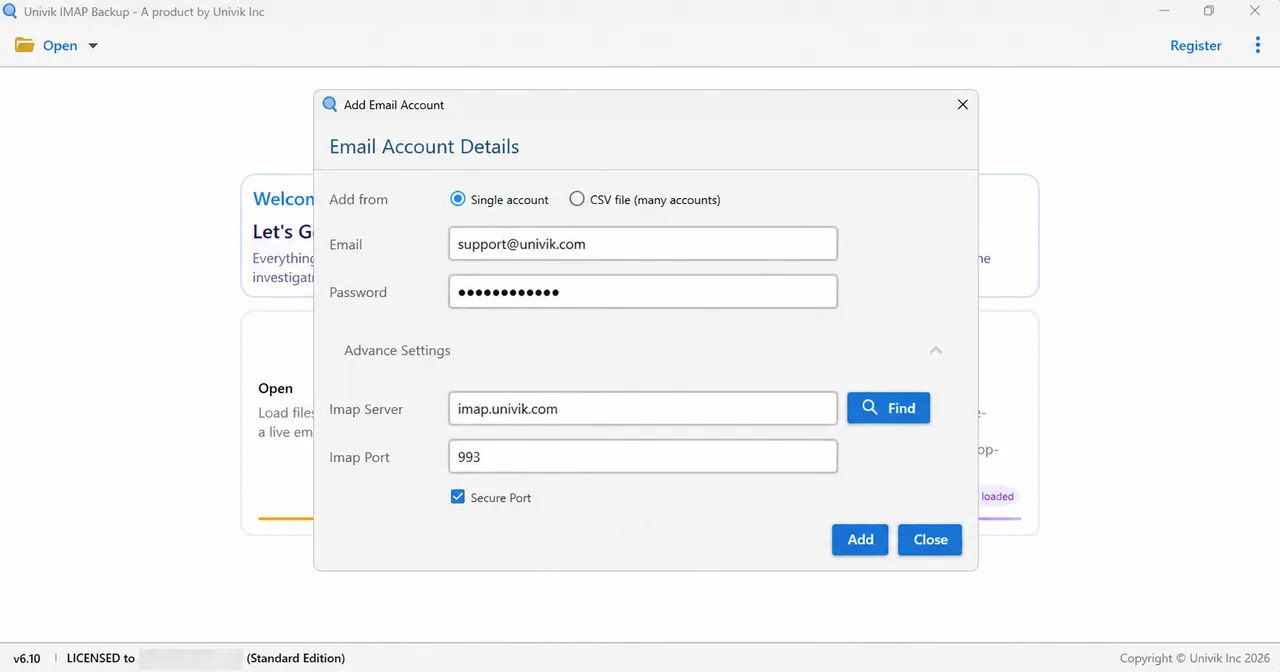
Microsoft addresses follow a separate path. In my test, Add account took a Microsoft mailbox address straight to Microsoft's own sign-in page in a browser, with no server fields on screen.
Next, select Export and pick a format in the Email Files group. PST suits Outlook (export IMAP to PST), EML gives one file per message (export IMAP to EML) and MBOX suits Thunderbird (export IMAP to MBOX). Before you save, glance at Minimum Attachment Size to Export, where the 35 MB filter is already switched on.
What a Trial Run Showed on My Test Mailbox
My non-provider test mailbox ran in Trial Edition 6.10. Its folder tree listed Trash with 6 messages beside INBOX with 65. In my PST run of 27 October 2026, Trash gave 6 of 6 written while INBOX gave 10 of 65, because the trial writes at most 10 items per folder.
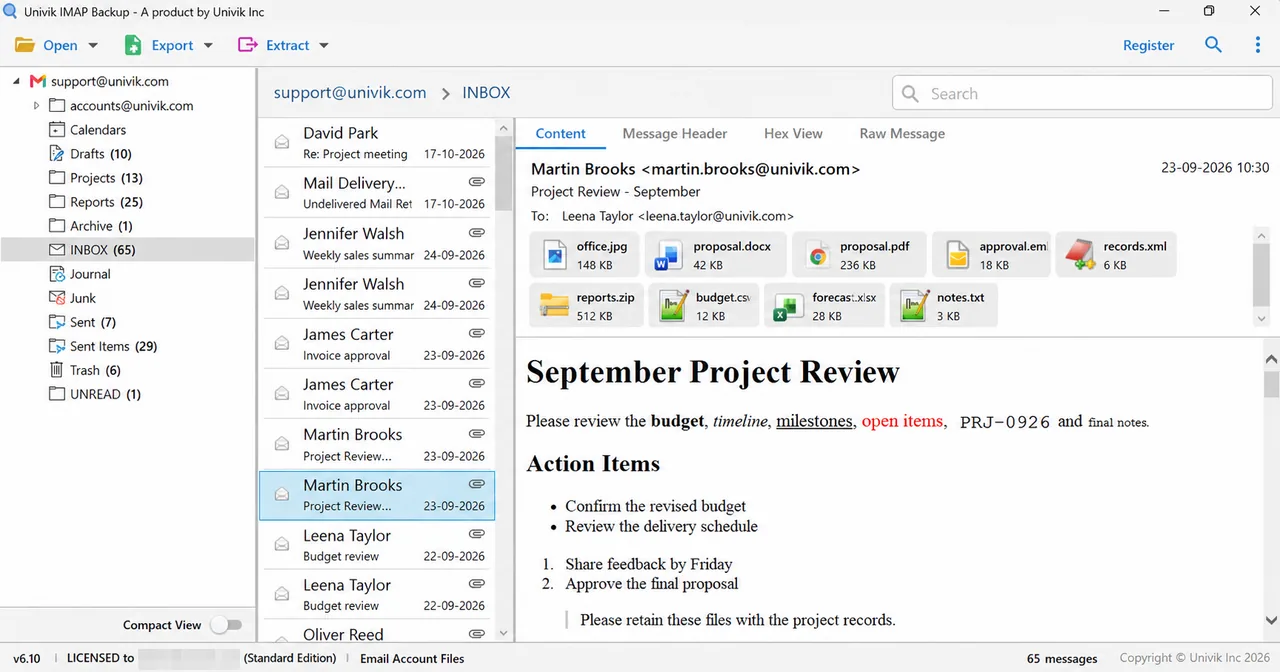
My test mailbox held no message marked as deleted, so this page makes no claim about how the app lists flagged messages. One result matters here: the six Trash messages became mail inside a PST file on my disk, where an expunge on the server can't reach them. The run supports nothing else.
Which Fix to Try First
My verdict: if a deleted message shows in one app only, change that app's delete setting first, because the server has probably done its part. If webmail still lists the message, expunge the folder, but only after you've saved a copy of anything you may want back.
- IMAP deletes in two steps: an app sets the \Deleted flag and a later EXPUNGE removes flagged messages for good (RFC 3501).
- CLOSE also removes flagged messages, but SELECT, EXAMINE and LOGOUT close the folder without an expunge.
- Outlook can show flagged IMAP messages in strikethrough text, and Thunderbird keeps them in place with a line through them when its mark-only delete option is chosen.
- Exchange Online keeps items you delete from Deleted Items for 14 days by default and for up to 30 days.
- Univik IMAP Backup wrote all 6 Trash messages of a non-provider test mailbox into a PST file in the trial run.
Questions About Deleted IMAP Emails
Why are my IMAP deleted emails still showing?
A deleted message stays on the server until an app expunges the folder, because deleting over IMAP only sets the \Deleted flag. Your app may show the message crossed out or hide it. Change the delete setting in the app, then expunge or compact the folder.
What does IMAP expunge mean?
Expunge is the IMAP command that permanently removes every message carrying the \Deleted flag from the selected folder. Expunge has no undo, although some providers keep a recovery window for the deleted mail.
If I delete a message in my app, is it gone from the server?
Deleting in an IMAP app flags the message, moves it to Trash or removes it, depending on the setting and the account. Only an expunge, a CLOSE or an immediate-removal setting erases it from the server.
Why does a deleted email show on my phone but not on my computer?
Each app handles the \Deleted flag in its own way, so one hides flagged mail while another lists it. An iPhone may also archive mail in place of trashing it, depending on its Move Discarded Messages Into setting.
How do I make Thunderbird delete IMAP mail from the server?
Open Account Settings, select your address and open Server Settings. Under When I delete a message, choose Remove it immediately to delete at once or Move it to this folder to use Trash. Compact clears the mail that is only marked.
Where do Gmail messages go when I delete them in an IMAP app?
Gmail Help says mail deleted from an IMAP folder stays under All Mail. Google's Gmail API reference lists archive, move to trash and delete immediately and permanently as the outcomes after an expunge.
Can I get back an IMAP email after it was expunged?
Expunging removes the message from the folder for good, and Microsoft says purged IMAP messages can't be restored. Exchange Online keeps items you delete from Deleted Items for 14 days by default, so ask your admin before you give up.
Should I copy my mailbox before I purge deleted emails?
Yes, because expunge and purge can't be undone. Save EML, MBOX or PST files first, check that they open, then clear the server folder.


I checked each fact here on 3 November 2026 against RFC texts and help pages from Microsoft, Mozilla, Google, Apple and Fastmail. Test mailbox counts in this guide came from a trial copy of the app that I opened myself.
Pages I read: