Quick Answer
IMAP mailbox full means your provider's server has used up the storage set for your account, so new mail bounces until you delete mail on the server or get more space.
The limit counts everything stored on the server, including the Trash folder, Spam and large attachments. Moving mail to another folder of the same account frees nothing. RFC 9208 gives IMAP a QUOTA extension that reports the usage against the limit.
A full mailbox usually shows up as a bounce message for the people who write to you. Sometimes the mail app complains first with wording like over quota, quota exceeded or mailbox full. All three point at the same cause, a storage limit on the server.
I read RFC 9208 on 3 November 2026 together with the storage help pages of Google, Microsoft, Yahoo, Apple and Mozilla, so each limit and menu path comes from those pages. Folder counts in this guide come from a mailbox I set up only for testing, so no big provider is involved.
What Does IMAP Mailbox Full Mean and Why Does It Happen?
IMAP mailbox full means the storage your provider assigned to the account on its server is used up. IMAP keeps your mail on that server, so every message, attachment and folder adds to one running total. RFC 9208 calls that limit a quota and says one quota can cover several mailboxes that share the same limit.
Two measures can run out. STORAGE counts space in units of 1024 octets and MESSAGE counts messages. Also, RFC 9208 describes STORAGE as an estimate of physical space, so the total on the server may differ from the sum of your message sizes.
Slow growth is the usual cause. The Inbox, Sent and Trash folders fill up over the years and attachments take most of the room, according to Mozilla's help article on avoiding quota limits. A shared pool is the second cause. A Google Account keeps Gmail, Drive and Photos in one 15 GB allowance and iCloud Mail draws on the same storage as device backups and photos.
What Happens to New Mail When the Quota Is Exceeded?
Senders get a bounce and the sending from your own account often stops too. The help page from Google says Gmail stops at the storage limit and messages sent to you go back to the sender. Yahoo adds that the mail sent to a full mailbox isn't stored and can't be recovered.
RFC 9208 defines an OVERQUOTA response code for the protocol side. A server should send it in a tagged NO answer when an APPEND, COPY or MOVE would push a mailbox over a limit (section 4.3.1 of the RFC). Those three commands add mail to a folder. Your mail app may therefore fail to save a draft while the reading of mail still works.
What Counts Toward an IMAP Quota?
Every message in every folder of the account counts, along with anything your provider keeps in the same pool.
| Provider | Allowance | What shares it or counts | When it is full |
|---|---|---|---|
| Gmail | 15 GB for each Google Account | Drive and Photos share it and Spam and Trash count | Gmail stops and mail sent to you goes back to the sender |
| Outlook.com | 15 GB of free email storage | Deleted Items counts until you empty it | Sending and receiving stop and senders get an error |
| Microsoft 365 for work or school | 50 GB on Exchange Online Plan 1 and 100 GB on larger plans | Archive and shared mailboxes carry limits of their own | Sending stops at 99 GB and receiving at 100 GB on a 100 GB plan |
| Yahoo Mail | 20 GB with every account | Paid plans add storage | Sending and receiving stop and mail sent meanwhile isn't stored |
| iCloud Mail | 5 GB of free iCloud storage | Backups, Photos and Drive share it | Sending and receiving with the iCloud address stop |
| Hosting or company server | Set by your host or administrator | Your hosting panel shows the figure | Servers may apply a hard or a soft limit (RFC 9208) |
Do Trash, Spam and Folder Moves Count?
The Trash and Deleted Items folders are the quick place to check, because they hold the mail you already decided to lose. Google says Spam and Trash count until you clear them for good. If the figure stays high after you deleted mail, the guide on IMAP deleted emails still showing explains why.
Folder moves free nothing. Mozilla's help article says moving mail to another folder of the same IMAP account doesn't free space, so it suggests an Archive folder under the Local Folders node instead. The guide to email providers with IMAP lists which services include IMAP at all.
How Do You Check Whether Your IMAP Mailbox Is Full?
Open the storage page of your provider first, because the server holds the real figure and your mail app only shows the folders. These places show it.
| Where | Path | What you see |
|---|---|---|
| Gmail search box | Search text has:attachment larger:10M | The mail with attachments over 10 MB |
| Outlook.com | Settings, then Account, then Storage | Space used by each folder |
| New Outlook, work or school | Settings, then Accounts, then Storage | Space per folder and a delete choice for items older than 3, 6 or 12 months |
| Outlook desktop app | File, then Tools, then Mailbox Cleanup | Mailbox size and folder size, plus a search for large or old items |
| Thunderbird | Inbox properties, then the Quota tab | Used and total storage when the server reports it |
| Any IMAP server | Commands GETQUOTAROOT INBOX then GETQUOTA | Usage and limit for STORAGE in units of 1024 octets (RFC 9208) |
Mozilla notes that the Quota tab isn't always available and that the status bar indicator appears only when storage passes 75%. However, the article is marked as no longer maintained, so your Thunderbird may differ.
The figure updates slowly. Google says storage can take 48 to 72 hours to refresh after you delete many files at once, so wait before you decide that nothing worked.
What to Do When Your IMAP Mailbox Is Full: Steps in Order
Work from the cheapest check to the biggest change. Each step is easier to undo than the step after it.
- Read your figures. Open a storage page from the table above and note the used and the total figures.
- Empty Trash, Deleted Items and Spam. In Gmail select Empty Trash now in the banner at the top. In Outlook.com select the messages and press Shift and Delete to remove them for good.
- Find the largest mail. Type has:attachment larger:10M in the Gmail search box. In Outlook run Mailbox Cleanup to find the items above a size. In Thunderbird add the Size column and sort by it.
- Save a copy of anything you will miss. Export the large or old mail to files on your PC before it leaves the server. The next section shows one way.
- Delete the large items and empty Trash again. Remove the mail from the account itself, because mail moved to another folder of the same account still counts toward the limit.
- Wait and test. Allow up to 72 hours for the Google figure to update after a big delete.
- Raise the limit if the figure stays high. Ask your host or the administrator for a larger quota or a bigger plan.
Save a Copy of Your Mail Before You Free Up Server Space
Why Should You Copy Mail Before You Delete It?
Deleting on the server is the only step that lowers the figure. Google warns that emptied items may be lost for good. A copy on your PC keeps the mail you remove, which makes copy first and delete second the safe order. Is IMAP a backup? explains why syncing to a phone isn't one. Freeing the space stays your own step in webmail or your mail app. Instead of rushing, take it after you've checked your copy.
How Do You Add the Full Mailbox for a Copy?
For this copy I used Univik IMAP Backup, IMAP backup software that runs on Windows. Select Open, point to Email Accounts and pick Add account. Fill in Email with your address and Password with your account password. Open Advance Settings to reach Imap Server and Imap Port (993 by default) with Secure Port ticked. Select Find instead to fill in the server from your address.
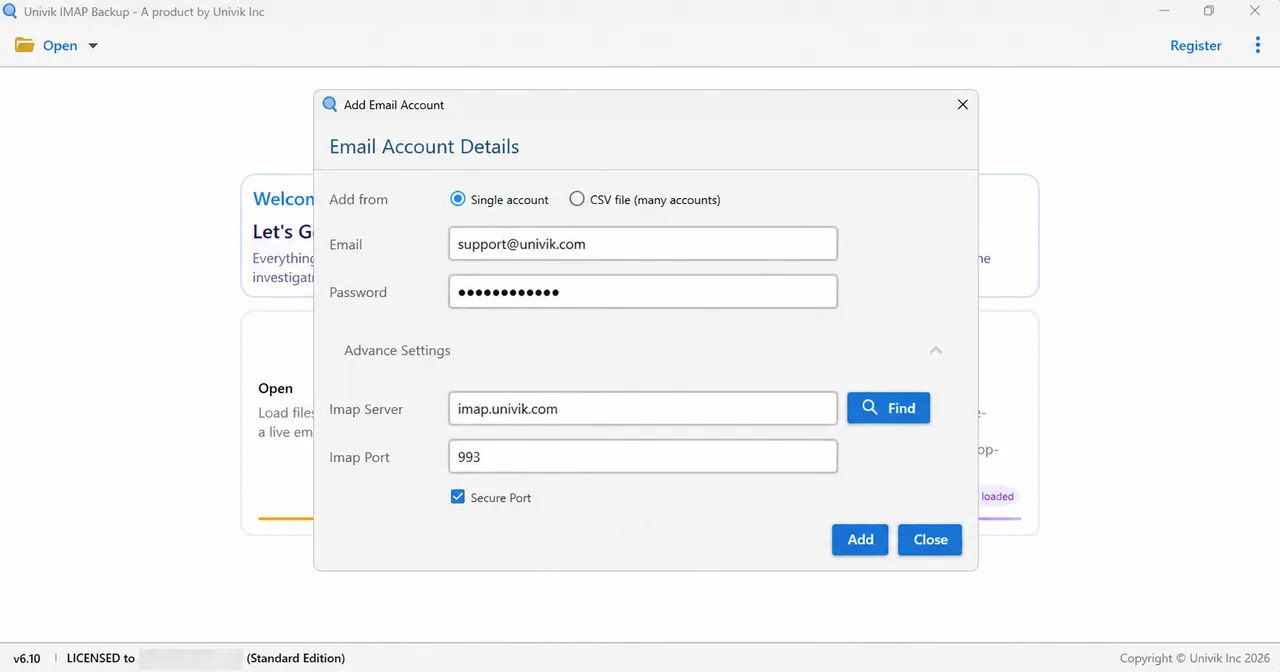
Microsoft addresses take another route. In my 2 November 2026 test the app went straight to a Microsoft sign-in page for each Hotmail, Outlook.com or Microsoft 365 address I tried. The server boxes stayed hidden. Several full mailboxes on one host fit a list, as the guide to backup multiple IMAP accounts shows. Server names for Google and Outlook.com sit on our pages for Gmail IMAP settings and Outlook.com IMAP settings.
Which File Format Should You Pick Before You Clear Space?
Open the Export menu, take Email Files and choose a format. PST suits Outlook (export IMAP to PST). EML writes every message to a file of its own (export IMAP to EML). MBOX keeps a folder in one file for Thunderbird (export IMAP to MBOX).
Next, read the Minimum Attachment Size to Export row. It begins in the on position at 35 MB, so look at it before Save. Trial editions write 10 items per folder, so a trial run is a test and not a copy to delete against. Then count the saved files against the number beside each folder in the tree.
What I Counted in a Test Run Before Deleting Anything
Univik IMAP Backup 6.10 in its trial edition produced the figures here. I ran the PST export on 27 October 2026 and the EML export on 28 October 2026 on a mailbox kept for testing that sits with no big provider. None of the runs used a mailbox over its quota, so I claim nothing about a full one.
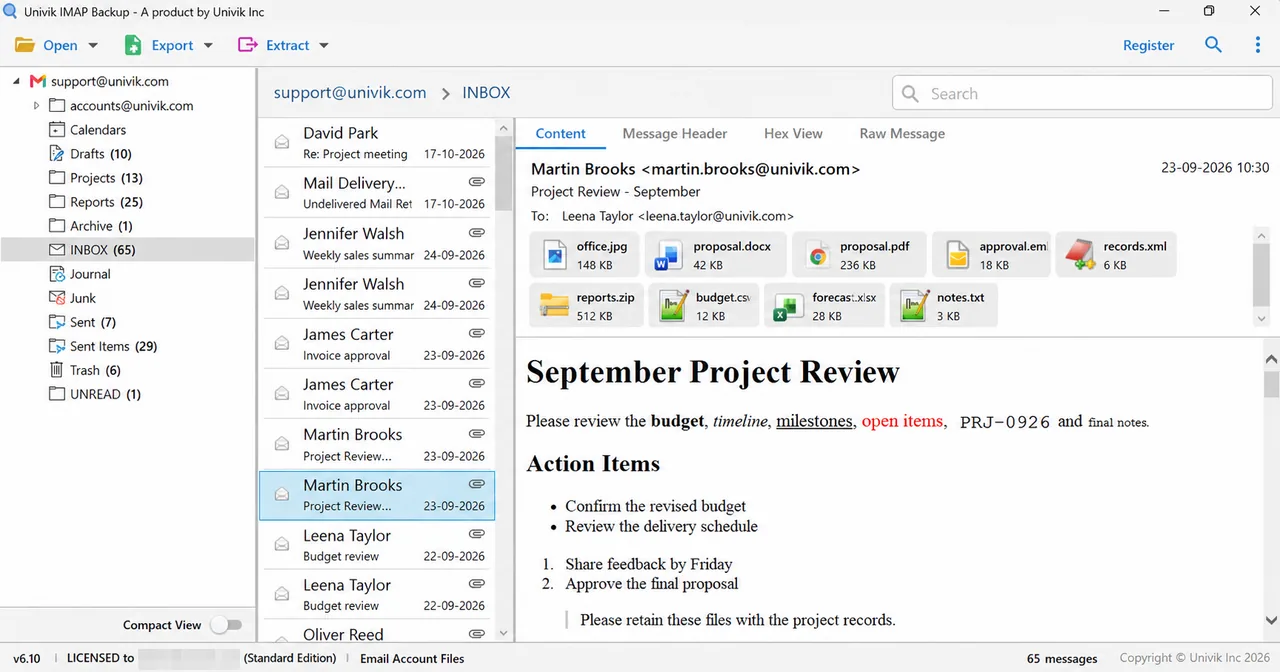
- Folder tree: 173 messages in total, with INBOX at 65, Sent Items at 29, Drafts at 10 and Trash at 6.
- Trial output: 10 messages each from INBOX and Sent Items, all 10 Drafts and all 6 Trash mails.
- First PST run: the 35 MB filter at its start value wrote 0 messages and reported 173 emails skipped.
- PST read back: after I turned the filter off, the file held 81 messages in 17 folders.
A file on your disk is a reliable record because its count stays fixed, so you can compare it with the folder tree. The changing server figure can't give you that. My first PST run wrote 0 messages because of that filter, so the file looked empty until I read it back. Deleting server mail after that run would have lost it.
Where Does This Leave You?
My verdict: if emptying Trash and Spam brings you under the limit, stop there and keep your mail where it is. Finally, if you have to delete real mail, copy it to your PC first and delete only after the counts match.
- RFC 9208 defines the IMAP QUOTA extension, which reports STORAGE in units of 1024 octets and MESSAGE as a count of messages.
- Each Google Account shares 15 GB across Gmail, Drive and Photos. Spam and Trash count toward that total until you clear them.
- Outlook.com gives 15 GB of email storage and counts Deleted Items until you empty that folder.
- The help article from Mozilla says moving mail to another folder of the same IMAP account frees no space.
- A trial edition of the app saves at most 10 items per folder. Its attachment filter starts switched on at 35 MB.
IMAP Mailbox Full Questions
What does IMAP mailbox full mean?
IMAP mailbox full means your account has used all the storage the mail server allows. New messages bounce back to senders until you delete mail or raise the limit. RFC 9208 calls the limit a quota.
Why does my mail app say IMAP quota exceeded?
The server refused a command that would add mail to a folder, for instance an APPEND, COPY or MOVE, because the account is over its limit. RFC 9208 defines the OVERQUOTA response code for that refusal.
How do I check my IMAP quota?
Open the storage page of your provider. Outlook.com lists it under Settings, then Account, then Storage. Thunderbird shows a Quota tab in the properties of the Inbox when the server reports one.
Do Trash and Spam count toward my mailbox limit?
Yes on the providers I read. Google says the Spam and Trash folders count until you clear them for good. Microsoft says the Deleted Items folder counts until you empty it or its mail clears after 30 days.
Can I still receive email when my mailbox is full?
No. Gmail, Outlook.com and iCloud Mail stop sending and receiving at their limits. Yahoo says mail sent to a full mailbox isn't stored and can't be recovered.
Does moving mail to another folder free space?
No, not inside the same account. The help article from Mozilla says moving mail to another folder of an IMAP account frees no space.
Should I save a copy of my mail before I delete it?
Yes, if the mail matters to you. Deleting is the only step that lowers the figure on the server. Save the mail to files on your PC and count them against the folder tree before you delete.
How long until freed space shows up?
Google says storage can take 48 to 72 hours to update after you delete many files at once. The other pages I read give no time.


I read every limit here on 3 November 2026 in RFC 9208 and in storage help written by Google, Microsoft, Yahoo, Apple and Mozilla. Counts in this guide come from my own trial run on a test mailbox.
Pages I read: