Quick Answer
IMAP not syncing usually means your mail app has stopped asking the server for changes. The common causes are offline mode, a folder that isn't subscribed, a changed UIDVALIDITY value and a sign-in the server now refuses.
Check webmail first to see where the mail really is. Then turn off offline mode, force a check and update the folder list. Rebuild the local copy last.
Your phone shows a message that Outlook on your PC doesn't. Elsewhere a folder made in webmail never appears in Thunderbird. Both come from a short list of causes. This guide lists them in the order I'd check them, cheapest test first. If you aren't sure which protocol your account uses, IMAP vs POP3 shows the difference.
My research for this guide took place on 3 November 2026. I read RFC 9051, RFC 2177 and RFC 4549 plus the help text that Microsoft, Google, Apple and Mozilla publish. Each step and figure here traces to one of those pages.
Why Is IMAP Not Syncing on Your Device?
IMAP stops syncing when your app quits asking the server for changes or when the app and the server no longer agree on which messages exist. What is IMAP covers the basics. The mailbox lives on a server and your app keeps a working copy, so any gap between the two shows up as a sync fault.
Two RFC 9051 terms explain most gaps. A UID is the number the server gives each message. UIDVALIDITY is a value that says whether those numbers can still be trusted. Section 2.3.1.1 calls persistent identifiers a requirement for a client to resynchronize its state. Your app then learns of changes by polling or by holding an IDLE command open.
Which Cause Matches Your Symptom?
| Cause | What you see | First check |
|---|---|---|
| Offline mode | Working Offline and Disconnected in the Outlook status bar | Send/Receive tab, then Work Offline |
| Automatic checks switched off | Outlook updates only when you press F9 | Send/Receive Groups, then Define Send/Receive Groups |
| Folder not subscribed | A folder from webmail is missing in the app | Update Folder List, then IMAP Folders |
| UIDVALIDITY changed | One folder reloads from the server | Compare the message count with webmail |
| Sign-in refused | A password prompt after a password change | Sign in on the provider's website, then update the app |
| Gmail folder cap | One Gmail IMAP folder capped at a set number of messages | Folder size limits under IMAP access in Gmail settings |
Two look-alike faults have their own guides. A deleted message that keeps showing is covered in IMAP deleted emails still showing. A sent message missing from your Sent folder is covered in IMAP sent items not saving.
Why Are IMAP Folders Not Syncing?
An IMAP folder stays out of your app when the app hasn't subscribed to it. Subscription is a list the server keeps of the folders a client chose to show. RFC 3501 section 6.3.6 says SUBSCRIBE adds a mailbox name to that set. RFC 9051 reports the set through LIST with its SUBSCRIBED option.
Microsoft says a folder created on the mail server, in another app or in a browser may not appear in the IMAP Folders box until you update the folder list. Step 4 of the fix has the clicks, which Microsoft documents for Outlook 2021, 2024 and Microsoft 365. Microsoft also lists a known issue. When the top IMAP folder's name starts with a digit, the subscribe steps fail.
RFC 3501 says a server must not unilaterally remove an existing name from the subscription list. A folder that vanished is therefore more likely a change in your app or a rename than a removal by the server.
What Does a UIDVALIDITY Change Do to Your Local Mail?
A UIDVALIDITY change tells your app that the numbers it saved for a folder no longer match the server, so the app reloads that folder. RFC 9051 section 2.3.1.1 says the server must give a greater validity value when identifiers from an earlier session fail to persist.
RFC 4549 describes what an offline client does next. This Informational RFC from June 2006 says in section 4.1 that the client must empty the local cache of that mailbox and drop pending actions that name its UIDs. It must not cancel scheduled uploads. A folder can therefore look empty or reload with no warning, so compare its message count with webmail.
How Do IDLE and Polling Decide When New Mail Shows Up?
New mail shows up as fast as your app hears about it: at once with an open IDLE command and at the next check with polling. RFC 2177 from June 1997 notes that the base protocol requires a client to poll for changes. IDLE lets a client tell the server that it is ready for real-time updates.
RFC 9051 section 6.1.2 calls NOOP a periodic poll for new messages and says IDLE should replace it when real-time updates are desirable. A server may log off a client it counts as inactive, so RFC 2177 has clients restart the command about every half hour.
Each app sets its own pace. Mozilla Support says Thunderbird checks when you open it and then every 10 minutes while it runs. Outlook follows its Send/Receive group.
Why Is Outlook IMAP Not Syncing?
Outlook IMAP is not syncing most often because the Work Offline switch is on, automatic Send/Receive is cleared or the account type is wrong.
On the Send/Receive tab, Work Offline changes every email account at once. Microsoft says you can't send or receive email until you reconnect. Outlook shows Working Offline in the status bar meanwhile. Next, open Send/Receive Groups and then Define Send/Receive Groups. If the first Schedule an automatic send/receive every n minutes box is cleared, mail moves only when you press F9.
Outlook's Sync button on the View tab doesn't help here, since Microsoft says third-party accounts, including generic POP and IMAP, can't use it. Microsoft also says Hotmail.com and Live.com addresses should use the Outlook.com account type, not Exchange or Microsoft 365.
Outlook.com needs its IMAP switch on. Microsoft says IMAP access stays off there until you turn on Let devices and apps use IMAP. Its table lists OAuth2 or Modern Auth as the sign-in. Our Outlook.com email settings page shows the values.
A full Outlook data file can also stop new mail. Microsoft Learn lists a default limit of 50 GB (51,200 MB) for .pst and .ost files in Outlook 2016, 2013 and 2010. Microsoft also says Outlook does not let a file grow past its maximum. An account whose local data file has reached that size may stop showing new mail until you free space.
How to Fix IMAP Not Syncing, Step by Step
Each step costs less than the next. Only the last clears what your app holds.
- Check webmail. Sign in to the website of your provider and look for the missing message or folder.
- Turn off offline mode. In Outlook, open the Send/Receive tab and select Work Offline if it is highlighted. In the Mail app on a Mac, click the warning icon beside the inbox for details.
- Force a check. In Outlook, press F9 or use the Send/Receive tab. In Thunderbird, select the Get Messages button in the toolbar.
- Update the folder list. In Outlook, right-click the top folder of your IMAP account and choose Update Folder List from the menu. Then right-click it again, select IMAP Folders and select Query. Pick the folder and select Subscribe.
- Renew the sign-in. Update your password in the app after any change at the provider. If the provider asks for an app password, create it on the provider's site and paste it where Outlook asks for a password. IMAP app password vs OAuth explains the choice.
- Rebuild the local copy last. In the Mail app on a Mac, select the mailbox and then choose Rebuild from the Mailbox menu. Apple says this removes local copies of IMAP messages and downloads them again from the mail server.
Before You Rebuild
A saved copy matters before step 6, because a rebuild clears what your app holds. The last section shows one way to make it.
My verdict: if webmail shows the mail and your app doesn't, work through steps 2 to 5 and rebuild only when those fail. If webmail lacks the mail too, stop changing the app and look at the provider side.
What I Measured When I Compared a Folder Count
I haven't tested a sync fault, so nothing here is a repair claim. This block records a count check, the quickest way to see whether a folder in your app matches what a copy on your PC holds. The mailbox has no provider behind it and was opened in Univik IMAP Backup 6.10, the Trial Edition.
| Item | Result |
|---|---|
| Folder tree | 173 messages in total: INBOX 65, Sent Items 29, Drafts 10 and Trash 6 among them |
| PST run on 27 October 2026 | 81 messages read back from the file, spread over 17 folders |
| Folders in that file | INBOX and Sent Items gave exactly 10 each, while every message of Drafts (10) and Trash (6) came across |
| MBOX run on 31 October 2026 | All 7 mails of the Sent folder sat in one Sent.mbox file |
| Microsoft address on 2 November 2026 | Add account sent me to Microsoft's sign-in page after I typed the address. The folder tree loaded after that |
The gap of 92 between 173 in the tree and 81 in the file comes from the trial cap of 10 items per folder.
Sync Can Reload a Folder, So How Do You Keep a Copy That Stays Put?
Sync keeps your app level with the server. That becomes a weakness on the day the server side changes. RFC 4549 has a client empty its cache after a UIDVALIDITY change. Apple's Rebuild clears local IMAP copies on purpose. An app's cache is therefore no archive, while a file copy lives outside your mail app and a folder reload doesn't alter it. Is IMAP a backup explains the same gap from the server side.
From Add Account to a Saved File
My route to a file copy on Windows is Univik IMAP Backup, a program that Univik sells as IMAP backup software. The Open menu holds an Email Accounts entry. Add account sits inside it and asks for Email and Password. A collapsed Advance Settings section hides the server name, the port number, a Secure Port check box beside Find. Port 993 with a ticked box are the starting values.
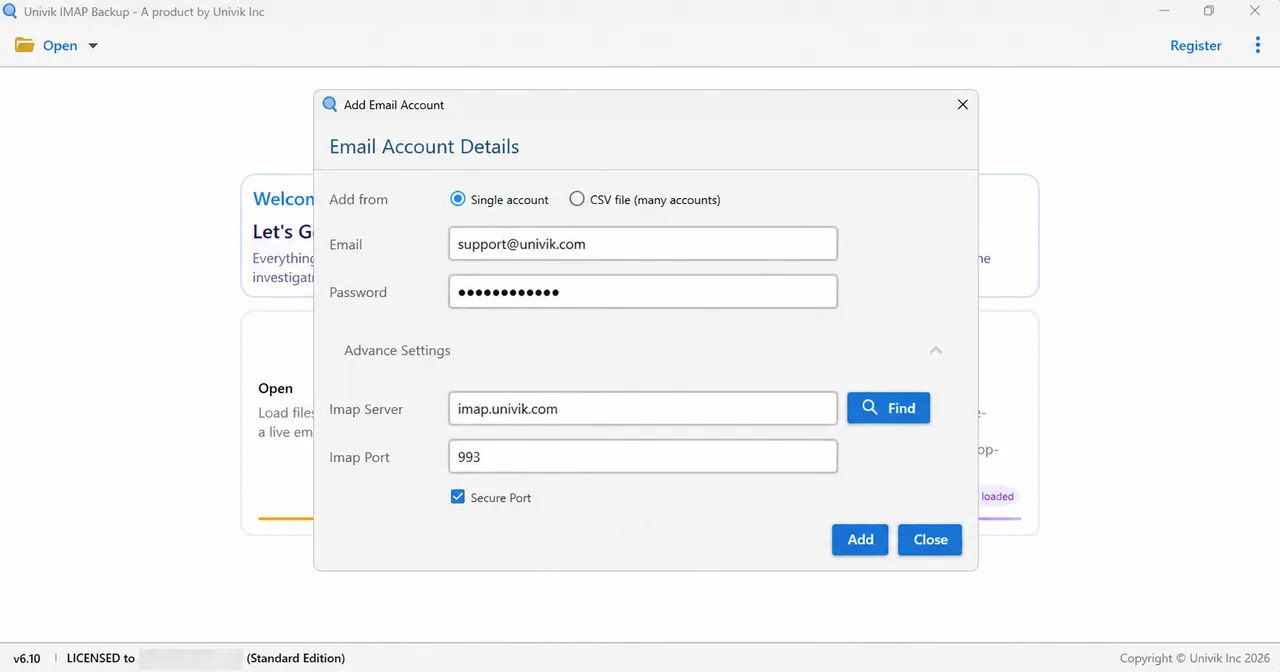
Hotmail, Outlook.com and Microsoft 365 addresses take another route. My test on 2 November 2026 used such an address in Add account. A Microsoft page asked me to sign in, no password went into the app and the server boxes stayed hidden.
Choosing a Format and Checking the Size Switch
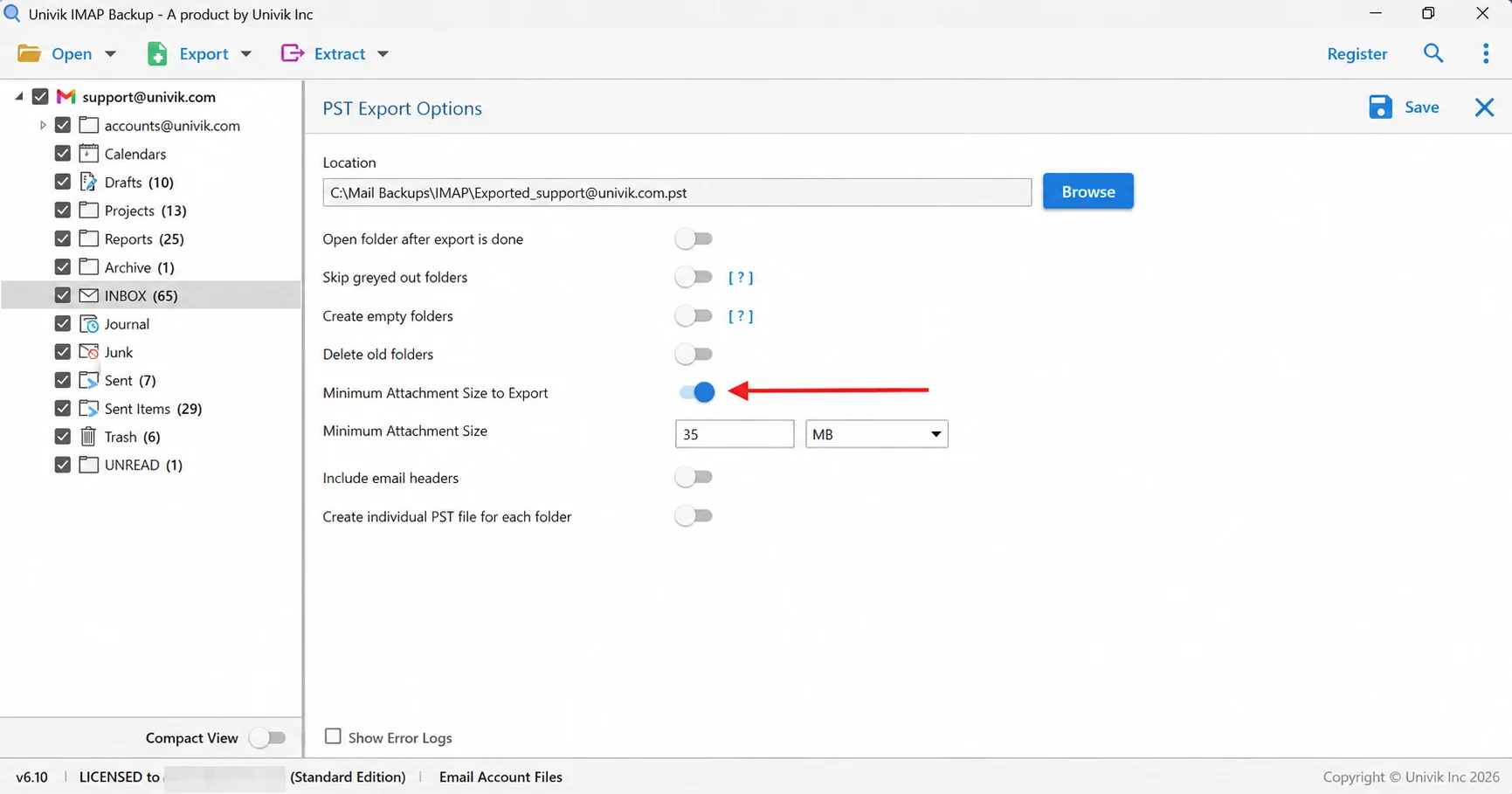
Under Export, the Email Files group offers EML, MBOX or PST files. Under Save, one switch deserves a glance first. Minimum Attachment Size to Export begins at 35 MB. With it left alone my first PST run came out empty. A trial copy holds at most 10 items per folder, so short results are normal there.
- Work Offline in classic Outlook changes every email account at once and stops sending and receiving until you select it again.
- Thunderbird checks for new messages at startup and then every 10 minutes while it runs, according to Mozilla Support.
- RFC 4549 says a client must empty the local cache of a mailbox when its UIDVALIDITY value differs from the saved one.
- Gmail settings include a folder size limit under IMAP access that caps how many messages one IMAP folder holds.
- Choosing Mailbox then Rebuild in the Mail app on a Mac removes local copies of an IMAP mailbox and downloads them again from the server.
Common Questions About IMAP Sync
Why is IMAP not syncing?
IMAP stops syncing when your app quits asking the server for changes or no longer agrees with it on which messages exist. Usual causes are offline mode, an unsubscribed folder, a changed UIDVALIDITY value and a refused sign-in. Check webmail first.
Why is one folder missing from my IMAP account?
Your app probably hasn't subscribed to it. In Outlook, right-click the top folder of the account, choose Update Folder List and then use IMAP Folders and Query to subscribe. Microsoft says these steps fail when the top folder's name starts with a digit.
How often does an IMAP account sync?
Sync speed depends on the app. Thunderbird checks at startup and then every 10 minutes while it runs. Outlook follows its Send/Receive group. An app holding an IDLE command open hears about new mail at once.
How do I force an IMAP account to sync?
In Outlook, press F9 or use the Send/Receive tab. In Thunderbird, select Get Messages in the toolbar. Microsoft says the Sync button on the View tab can't be used with generic POP and IMAP accounts.
What happens when UIDVALIDITY changes?
The server tells your app that the identifiers it saved for a folder are no longer valid. RFC 4549 says the client must then empty the local cache of that mailbox, so the folder reloads from the server.
Why does Outlook IMAP stop syncing after a password change?
Outlook still holds the old password, so update it in the app. If your provider asks for an app password, create one on the provider's site and paste it where Outlook asks for your password. Microsoft lists OAuth2 or Modern Auth for Outlook.com.
Will Rebuild in Apple Mail delete my mail?
Apple says Rebuild removes local copies of IMAP messages and downloads them again from the mail server. The mailbox looks empty until the download ends. Look in webmail first to confirm the server holds the mail.
Can a saved copy on my PC fix a sync problem?
No, a saved copy doesn't repair sync. It keeps your mail while you fix the fault, since a folder reload or a rebuild in your app doesn't change a file. An export to EML, MBOX or PST gives you that file.


Every claim here was checked on 3 November 2026 against the pages listed in this box. The counts for folders come from a mailbox set up only for testing.
Pages I read:
- IMAP4rev2 specification, RFC 9051
- Synchronization Operations for Disconnected IMAP4 Clients, RFC 4549
- Configure the size limit for Outlook data files (Microsoft Learn)
- Choose which IMAP account folders appear in Outlook
- Rebuild mailboxes in Mail on Mac
- Also read: RFC 2177, Microsoft Support on send/receive groups, working offline and Outlook.com settings, Mozilla Support on Thunderbird and Gmail Help on other email clients