Quick Answer
IMAP sent items not saving usually means neither your mail app nor your mail server filed a copy after SMTP sent the message.
SMTP only delivers mail. A copy reaches the Sent folder when your app uploads it with the IMAP APPEND command or when your provider saves it. Check the webmail copy first, then confirm that your app is set to save a copy in the right folder.
Your outgoing mail leaves through one server and the Sent folder sits on another system, so a missing copy can come from either side.
I read RFC 3501, RFC 6154 and RFC 6409 on 3 November 2026, along with the help pages from Google, Microsoft and Apple. Every setting name and menu path in this guide comes from those pages. My own test mailbox supplies the folder counts. That mailbox belongs to no particular provider.
Why Are IMAP Sent Items Not Saving in Your Sent Folder?
SMTP delivers your message and never files a copy of it. RFC 6409 describes a submission server as one that accepts mail from your app and then delivers it or relays it onward. The RFC says nothing about a Sent copy. Your IMAP Sent folder belongs to the mailbox on your server, so something else has to put the copy there. Our IMAP vs SMTP guide covers that split.
Two parties can do that job. Your mail app can upload the copy with APPEND, which RFC 3501 describes as appending a message to the end of a chosen mailbox. Your provider's server can also save the sent message by itself. When neither party acts, the mail reaches its recipient and the Sent folder stays empty.
| Situation | Who files the copy | What you see |
|---|---|---|
| Mail app uploads the copy with APPEND | Mail app | One copy in the Sent folder |
| Mail app uploads a copy and the server saves another | Mail app and provider | Two copies in the Sent folder |
| Mail app has saving switched off and the server doesn't save a copy | Nobody | No copy in the Sent folder |
RFC 6154 adds a \Sent attribute that a server can attach to the mailbox holding copies of the messages that have been sent. Mail apps can use it to find the right folder.
IMAP Sent Mail Not in Sent Folder: Is It in Another Folder?
Sent mail can sit in a folder you haven't opened. My test mailbox lists a folder named Sent with 7 messages and another named Sent Items with 29, so an app has two folders to pick from. Open both of the folders and compare the dates. Apple Mail can also store the sent messages in a mailbox on your Mac instead of on the server. A deleted copy can linger as a flagged message, which IMAP deleted emails still showing explains.
How Do You Fix IMAP Sent Items Not Saving, Step by Step?
Start with the quickest check, because it shows what your server holds. Move on only when a step doesn't change the result. Then send a short test message after each step and refresh the Sent folder in webmail.
- Look in webmail. Open the webmail page of your provider, sign in and look in its Sent folder. A copy there means your server saved the mail and your app isn't showing it, so read our guide to IMAP not syncing. No copy there means nobody filed one, so go to step 2.
- Check Outlook. For an IMAP account, go to File > Account Settings > Account Settings, select the account and choose Change. Leave Don't save copies of sent items unticked unless you get two copies. For an Exchange account, go to File > Options > Mail and make sure Save copies of messages in the Sent Items folder is selected under Save messages.
- Check Thunderbird and Apple Mail. In Thunderbird, choose Tools > Account Settings, select the address of your account, open the Copies & Folders tab and keep Place a copy in ticked. In Apple Mail, choose Mail > Settings, click Accounts, open Mailbox Behaviors and set Sent Mailbox to the Sent mailbox on your server.
Steps 4 and 5: Two Copies and Shared Mailboxes
- Let only one side save the copy. Two copies mean that both the server and your app save one. Google's help for Gmail tells you to switch off saving sent messages in the settings of your client. Microsoft tells Outlook users to tick Don't save copies of sent items for that IMAP account.
- Ask your administrator about shared mailboxes. If mail sent from a shared mailbox lands in your own Sent Items, ask the Exchange Online administrator of your organization to run Set-Mailbox with MessageCopyForSentAsEnabled set to $True for the mail sent as the mailbox. Microsoft names MessageCopyForSendOnBehalfEnabled for the mail sent on behalf.
How Do Gmail and Microsoft Handle Sent Copies Themselves?
Gmail files a sent copy on its own when your app sends through the SMTP server of Gmail. The Google help page for IMAP clients tells you to switch off saving sent messages on the server side of your client, so you don't end up with two copies. Server names and sign-in choices for Gmail sit on our Gmail email settings page.
Outlook adds a twist for IMAP accounts. The known-issue page from Microsoft says that a server may create a Sent Items entry and Outlook then uploads the same message again. The result is a duplicate with one copy marked unread. The page covers Outlook for Microsoft 365, Outlook 2024, 2021 and 2019. It lists Gmail, AOL and Yahoo among the providers. Also, Microsoft says that you can't change where the sent items are stored for an IMAP account. You can only switch off the saving.
Why Do Shared Mailbox Messages Land in Your Own Sent Items?
Microsoft Learn explains that you sign in to your own mailbox and then open the shared mailbox. Outlook therefore sends from your account and stores the message in your Sent Items. The page applies to Exchange Online and covers the mail sent as the mailbox and the mail sent on behalf of it.
Which Symptom of IMAP Sent Items Not Saving Matches Yours?
Each symptom in this table points to one likely cause and one first fix.
| Symptom | Likely cause | First fix |
|---|---|---|
| The Sent folder is empty in your app and in webmail | Your app has saving switched off and the server doesn't save a copy | Switch on the sent-copy setting of your app from step 2 or 3, then send a test message |
| The Sent folder holds two copies and one shows as unread | The server saves a copy and Outlook uploads another | Tick Don't save copies of sent items for that IMAP account in the settings of Outlook |
| The Sent Items folder doesn't list your BCC recipients | Microsoft says some providers leave the BCC recipients out of Sent Items | Check the message in webmail, because Microsoft says the workaround may not always help |
| The shared mailbox mail sits in your own Sent Items folder | Outlook sends from your account and stores the copy there | Ask the administrator of your Exchange Online tenant to set MessageCopyForSentAsEnabled |
| Webmail shows the copy and your app doesn't | Your app may point at another folder or hasn't refreshed Sent | Check the Sent folder named in the settings of your app, then refresh the folder |
What Did My Test Mailbox Show About Sent Folders?
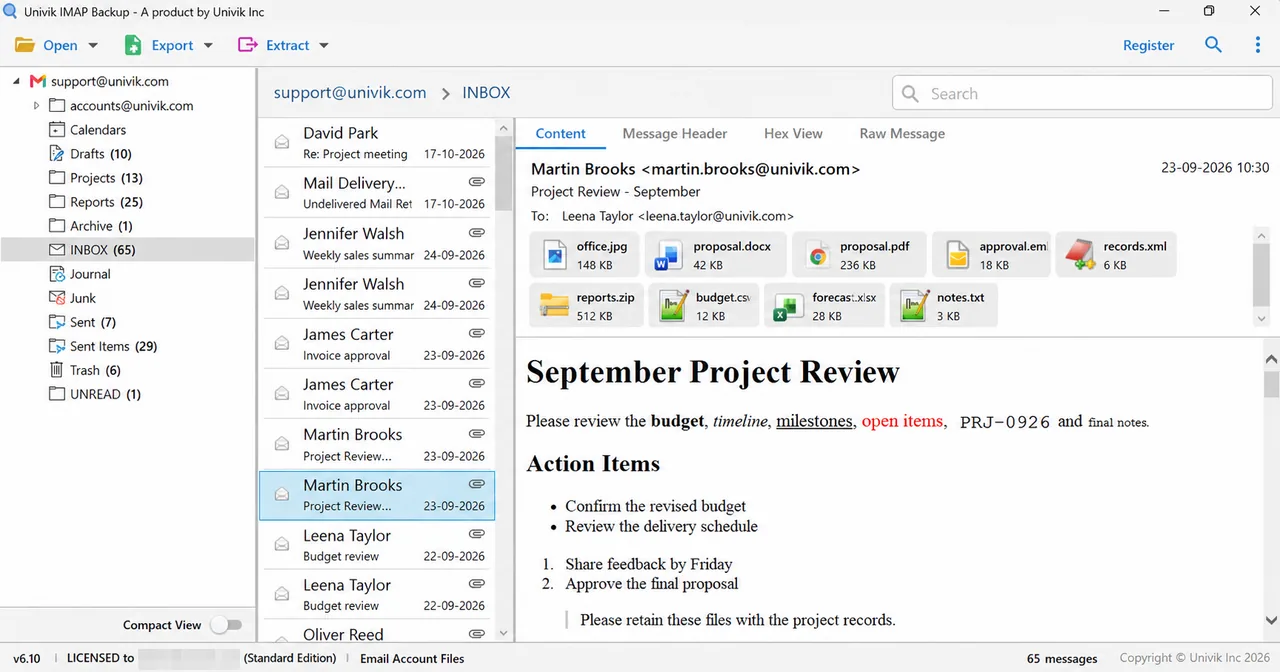
On 27 October 2026 I opened a test mailbox in a trial copy of the app, version 6.10. The folder tree listed Sent Items with 29 messages and Sent with 7. A PST export wrote 10 of the 29 messages in Sent Items because a trial copy stops at 10 items per folder. It wrote all 7 messages from Sent.
Later, on 31 October 2026, an MBOX export of Sent produced one file named Sent.mbox with all 7 messages inside. A standard mbox reader opened Sent.mbox and listed 7 messages whose dates and subjects were correct. I didn't run any sent-copy setting in Outlook, Thunderbird or Apple Mail, so the menu paths above rest on the help pages that I read.
How Do You Keep a Copy of Sent Mail That Lives Only on Your Server?
Sent mail is the record of what you quoted, promised or agreed. On an IMAP account that record sits in one Sent folder on the server of your provider. A synced folder isn't a backup. Is IMAP a backup? shows why.
Still, a fixed setting protects only the mail you send from now on. It does nothing for the messages that were never filed, so save what the Sent folder holds today. The folder belongs to your account and not to one app, as our guide on what is an IMAP account explains.
Steps in the Add Email Account Window
Univik makes IMAP backup software for Windows. To add your mailbox in Univik IMAP Backup, go to Open > Email Accounts > Add account. Two boxes come first, Email for your full address and Password for the matching password. Expanding Advance Settings shows Imap Server, Imap Port (set to 993), Secure Port (ticked) and a Find button that looks up the server from your address.
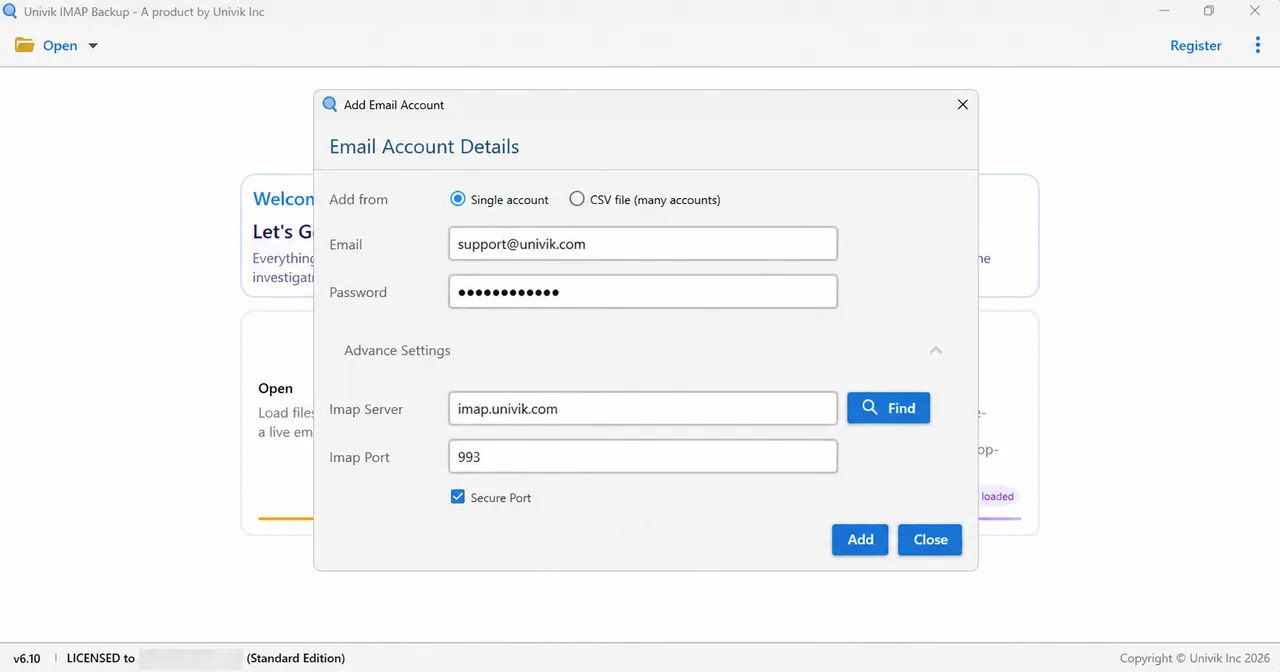
A Hotmail, Outlook.com or Microsoft 365 address takes another route. I tested this on 2 November 2026 by typing such an address into Add account. A browser window with Microsoft's own sign-in page appeared immediately and the server fields stayed hidden.
Export Formats, the 35 MB Filter and the Trial Cap
Next, tick your Sent folder in the tree. Then select Export. The Email Files group lists EML, MBOX and PST. Pick export IMAP to EML when you want a file for every message, export IMAP to MBOX for a single file per folder or export IMAP to PST when Outlook is your next stop. Glance at the switch for Minimum Attachment Size to Export ahead of Save, because 35 MB is its starting value. Trial copies write 10 items from each folder.
Which Fix Should Come First?
My verdict: if the Sent folder is empty in webmail too, fix the setting in your app first and then save what is left. If webmail shows the copy, fix the Sent folder view in your app before you touch any sent-copy option.
- RFC 6409 describes a submission server that delivers or relays a message and says nothing about filing a copy in the Sent folder.
- RFC 3501 defines APPEND, the IMAP command that lets an app add a message to the end of a chosen mailbox.
- Microsoft lists Don't save copies of sent items under File > Account Settings > Account Settings > Change as the fix for the double saving in Outlook.
- Microsoft Learn names Set-Mailbox with MessageCopyForSentAsEnabled set to $True as the fix on Exchange Online for the shared mailbox mail in the wrong Sent Items folder.
- Apple Mail offers a Sent Mailbox setting under Mail > Settings > Accounts > Mailbox Behaviors that points to a mailbox on the server or on your Mac.
Questions and Answers
Why are IMAP sent items not saving?
Neither your mail app nor your server is filing a copy. SMTP delivers the message and RFC 6409 says nothing about a Sent copy, so your app has to upload one with APPEND or your provider has to save it.
Does SMTP save a copy of the messages I send?
No. SMTP hands your message to the next server for delivery. The copy in your Sent folder comes from your mail app or from the server of your provider.
Who saves the copy of sent mail, my app or my provider?
Gmail copies the sent messages itself when your client sends through its SMTP server, according to Google's help. Other providers may rely on your app to upload the copy.
Why does every sent message appear twice in Outlook?
A server may create its own Sent Items entry while Outlook uploads the same message again. Microsoft documents the problem as a known issue and suggests ticking Don't save copies of sent items.
Where do I stop Outlook from saving sent items for an IMAP account?
Go to File > Account Settings > Account Settings, select the IMAP account and choose Change. Tick Don't save copies of sent items, then select Next and Done. Microsoft says that you can't change the storage folder for an IMAP account.
How do I choose the Sent mailbox in Apple Mail?
Choose Mail > Settings, click Accounts and open Mailbox Behaviors. Apple's Sent Mailbox option lets you pick a mailbox on the server or on your Mac. Apple lists it for IMAP accounts only.
Why do shared mailbox messages show up in my own Sent Items?
Outlook signs in to your own mailbox and then opens the shared one, so it sends from your account and stores the message in your Sent Items. An Exchange Online administrator can change that with Set-Mailbox.
Can I save my Sent folder as files before I change settings?
Yes. Save the Sent folder as EML, MBOX or PST files first, because the file copies on your PC don't depend on the server settings you are about to change.


The setting names and the menu paths here were verified on 3 November 2026 against the pages cited at the end of this guide. My counts of messages per folder come from one test mailbox with no ties to a provider.
Pages I read:
- Choose your IMAP email client settings for Gmail
- Change where sent email messages are saved
- IMAP Sent Messages in Outlook for Windows are duplicated and unread in Sent Items folder
- Messages sent from a shared mailbox aren't saved to the Sent Items folder
- Also read: RFC 3501, RFC 6154, RFC 6409 and Apple's Mail guide on Mailbox Behaviors