Quick Answer
What is IMAP in Gmail? IMAP is the connection that lets another mail app read your Gmail mailbox while the mail stays on Google's servers.
Gmail shows each label as a folder to that app, so the same message can appear in several folders. With the app settings Google recommends, a message you delete from a folder stays in All Mail.
IMAP is the reason Gmail looks the same on your phone, in Outlook and in a browser. On 3 November 2026 I read the Gmail Help pages of Google, its developer notes on IMAP, the Mozilla page on Thunderbird and Gmail, RFC 9051 and RFC 6154. I haven't tested a Gmail mailbox myself, so the test numbers near the end come from a mailbox that isn't tied to any provider.
What Is IMAP in Gmail and What Does It Do for Your Mail?
IMAP in Gmail is the connection that lets an outside mail app read and manage your Gmail mailbox. Google's help says the messages and labels sync with that app, while the mail itself stays on Google's servers. RFC 9051 defines the protocol, called Internet Message Access Protocol in full, as version 4rev2.
Flags make the sync work. RFC 9051 keeps flags like \Seen and \Deleted on the server, so a message you read in Outlook can show as read in your browser too.
Personal Gmail needs no on and off switch for the protocol any more. Google's help says IMAP access is always on, and that the option to turn IMAP on or off went away in January 2025. Our guide on how to enable IMAP in Gmail covers the Settings path, the admin control for work accounts and the sign-in rules. Mozilla adds that Gmail uses a special implementation of IMAP, which is the reason the labels turn into folders.
The server name for this connection is imap.gmail.com on port 993, and Google's developer guide says incoming connections to it require SSL. POP3 is the older protocol that downloads mail to one device, while IMAP keeps the mail on Google's servers for every device you use. Our guide on IMAP vs POP3 compares the two row by row.
How Do Gmail IMAP Labels and Folders Line Up in Your Mail App?
Gmail treats each label as a folder for IMAP. A label you create in Gmail therefore appears in your mail app as a folder with the same name. Google's IMAP notes add that the system labels Gmail creates are reserved and carry a [Gmail] prefix.
RFC 6154 defines the special-use attributes that tell an app what a folder is for. In the examples Google gives, All Mail carries \All, Spam carries \Junk and Trash carries \Trash.
| Gmail item | What your mail app lists | Where it comes from |
|---|---|---|
| Your own label | A folder with the same name as the label | Google's IMAP notes |
| All Mail | A folder named [Gmail]/All Mail, tagged with the \All attribute | Google's IMAP notes |
| Spam | A folder named [Gmail]/Spam, tagged with the \Junk attribute | Google's IMAP notes |
| Trash | A folder named [Gmail]/Trash, tagged with the \Trash attribute | Google's IMAP notes |
| Other system labels | Folders under the [Gmail] prefix, among them Starred, Important, Sent Items and Drafts | Google's IMAP notes |
What Is IMAP in Gmail Doing When the Same Message Shows Up Twice?
A Gmail message shows up twice when it carries two labels, because IMAP lists it in both folders. Mozilla's Support page says Gmail still stores only one message and applies both folder names to it as labels, while Thunderbird ends up holding several copies of the message.
Also, All Mail adds one more copy. Mozilla describes it as holding every message in your account, with the Sent and Archived ones included. For that reason Mozilla suggests unsubscribing from All Mail in Thunderbird, and it warns that you lose offline access to the messages that sit in no other folder.
RFC 9051 hands out a UID inside one mailbox, so an app can see the same Gmail message under a separate UID in each folder. Google's X-GM-MSGID extension gives the message a single ID that works across the folders.
What Is IMAP in Gmail Doing When You Delete or Archive a Message?
With the app settings Google recommends, a message you delete from an IMAP folder stays in All Mail. Google's IMAP help says you can find the deleted messages there, and it warns that an app set to keep deleted mail in Trash makes Gmail delete that mail permanently after 30 days.
| Action in your app | What Gmail does | Where it comes from |
|---|---|---|
| Archive | Gmail removes the Inbox label and keeps the message in All Mail | Mozilla Support, Gmail Help |
| Delete from a folder | Gmail keeps the message in All Mail when the app follows Google's recommended settings | Gmail Help |
| Move to Trash | Gmail removes every label, so the message no longer appears in any other folder | Mozilla Support |
Also, the Trash in Gmail runs on a 30-day clock. Google's page on deleting messages says you can recover a message from the Trash up to 30 days after deletion. After that, Gmail deletes the message permanently.
Which Delete Setting Does Gmail Follow?
RFC 9051 calls \Deleted the flag that puts a message in line for removal by a later EXPUNGE, and a mail app sets it first. Two settings in the API reference from Google decide the rest.
With autoExpunge true, Gmail expunges the message at once. Otherwise it waits for the app. With expungeBehavior, Gmail archives the message, moves it to Trash or deletes it forever once it leaves the last visible IMAP folder. Google says the forever-deleted mail can't be recovered. For the mail that lingers in an app, read our guide on IMAP deleted emails still showing.
Which Gmail Labels Sync to an IMAP App and Which Stay Out?
A label syncs to your app when the Show in IMAP box of that label is ticked. The Support page from Microsoft for Outlook Mobile places that box in Gmail under Settings, See all settings and Labels.
- Show in IMAP: You tick the box to show a label and clear it to hide the label, says Microsoft's page.
- Folder size limit: The Forwarding and POP/IMAP tab holds a menu that caps the number of messages in an IMAP folder. The API reference from Google lists 1,000, 2,000, 5,000 and 10,000, and 0 means no limit. The help from Google suggests 10,000 or fewer when an app crashes or downloads slowly.
However, a folder that goes missing in the app often has another cause, because each app keeps its own folder subscriptions. Our guide on IMAP not syncing covers the cases.
What Did a Test Mailbox Show About Folders and Copies?
The trial edition of Univik IMAP Backup 6.10 ran against a test mailbox that isn't tied to a provider. The mailbox isn't Gmail, so the numbers say nothing about labels. Instead, they show what a copy on a PC does with the folders. In the folder tree, the main account held 157 messages and a sub-account held 16, which makes 173.
| Run date | What was run | What I read back |
|---|---|---|
| 27 October 2026 | PST export with the attachment size filter off | A single PST held 81 messages across 17 folders. Trash came out whole at 6 of 6 and Drafts at 10 of 10, while INBOX gave 10 of 65 and Sent Items 10 of 29. |
| 27 October 2026 | PST export with one file for each folder | 17 files came out. Projects.pst held the Projects mail only, and its Apollo sub-folder sat in a separate file. |
| 28 October 2026 | EML export of three ticked folders | 14 .eml files came out, with the folder nesting kept. |
The three runs show that each ticked folder becomes its own file or folder on disk. I didn't try a mail with two labels, so how a labelled Gmail message lands in two folders is reasoning from the Mozilla page and not a result of mine.
Save Your Gmail Labels as Folders on Your PC
Why Does a Mailbox Built on Labels Need a Copy Outside Gmail?
A label isn't the place where mail is stored. Gmail holds one live mailbox, and every IMAP app shows it through the labels, so a delete in any app may send a message toward the Trash and its 30-day clock. Files on your PC sit outside the mailbox. A separate guide answers is IMAP a backup and explains why a synced app isn't a second copy.
How Do You Add a Gmail Address to the App?
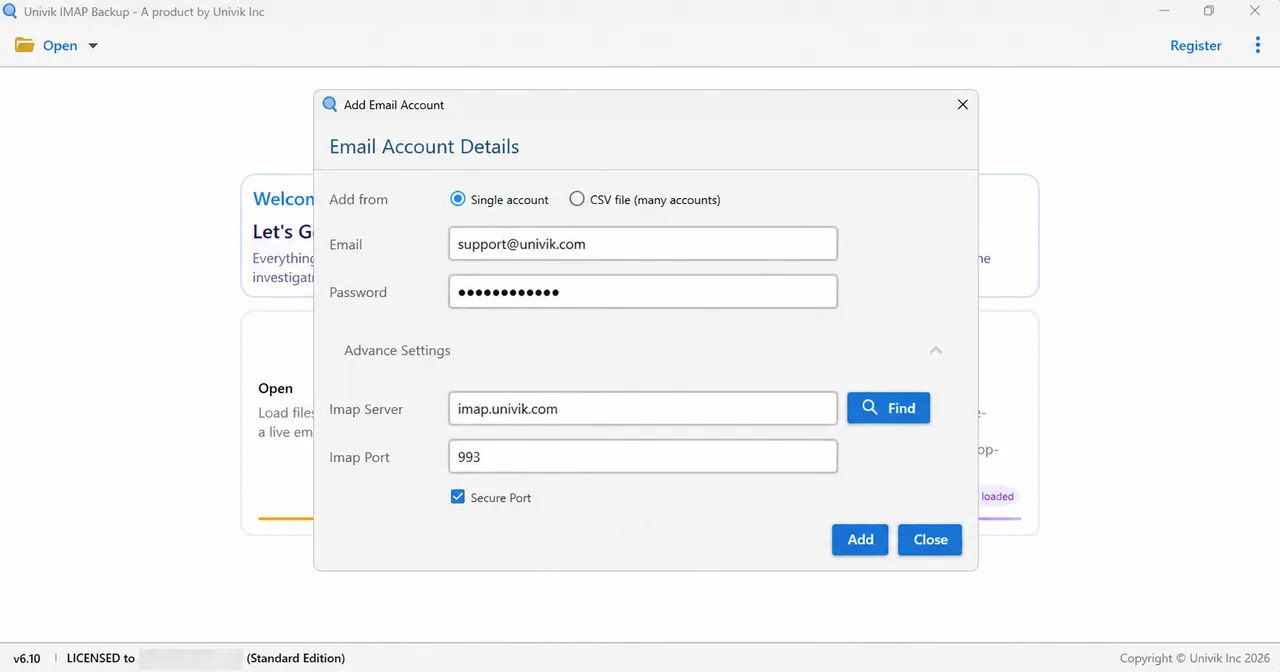
Univik IMAP Backup runs on Windows, and the page for our IMAP backup software lists the export formats. Choose Open, then Email Accounts, then Add account. Type your full Gmail address in the Email box. In the Password box, Google's help calls an app password the fallback for apps that don't offer Sign in with Google, and it needs 2-Step Verification switched on first.
Next, the Advance Settings block holds Imap Server, Imap Port (993 by default) and Secure Port (ticked by default). Select Find to fill in the server name from your address, or read the values from Google on our Gmail IMAP settings page. A Hotmail or Microsoft 365 address skips those fields, because the sign-in page from Microsoft opened in my browser at once on 2 November 2026.
Which Export Format Keeps Your Gmail Folders?
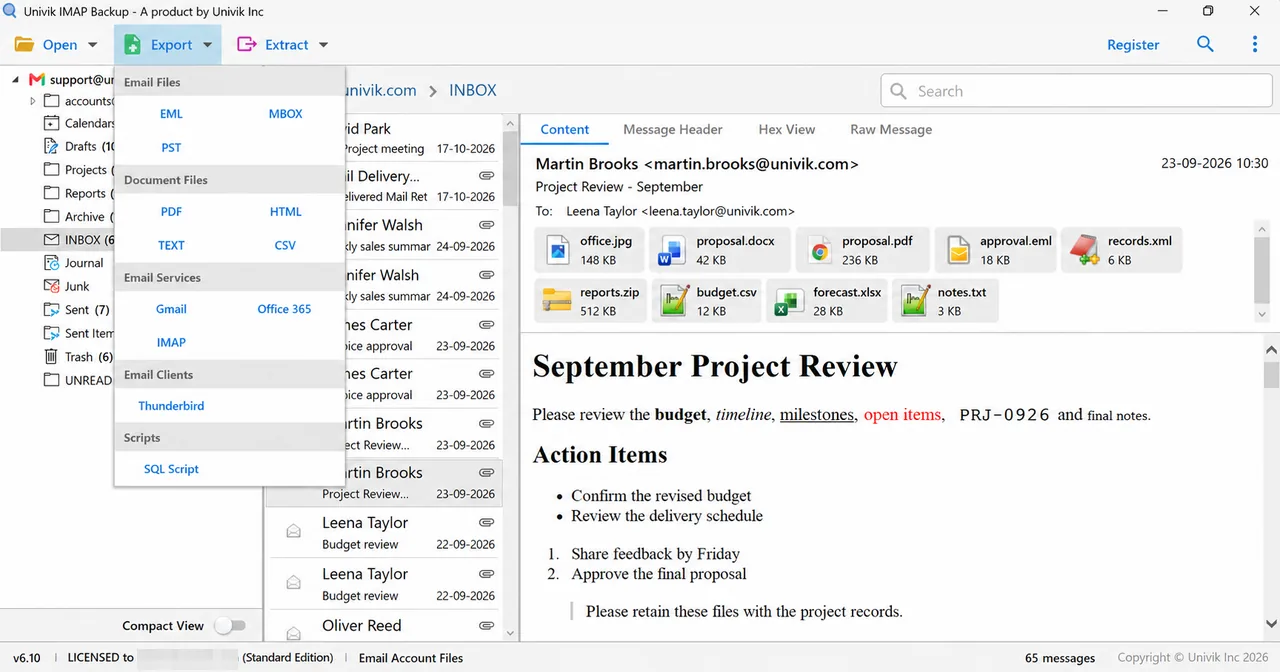
The Export menu lists three formats under Email Files. Our guide to export IMAP to PST covers one file that Outlook opens, and the nesting of my test folders came back intact in a PST. Our guide to export IMAP to EML covers a file for each message. Our guide to export IMAP to MBOX covers a file for each ticked folder.
Because All Mail lists every message, ticking it together with the label folders can write some mail twice. Before you select Save, look at Minimum Attachment Size to Export. The switch of that option starts on at 35 MB. A trial writes 10 items for each folder.
What Should You Remember About IMAP in Gmail?
My verdict: Use IMAP for Gmail when you read mail in more than one app, and hold a file copy of every message you couldn't replace. That copy is the reliable one, because a delete in one app can reach Trash and the Trash empties after 30 days.
- Gmail shows each label to an IMAP app as a folder, and the system labels sit under a [Gmail] prefix.
- A message with two labels appears in two folders, and the All Mail folder lists every message once more.
- A message you delete from an IMAP folder stays in All Mail when the app follows Google's recommended settings.
- The Trash in Gmail keeps a message for up to 30 days and then deletes it permanently.
- Personal Gmail keeps IMAP always on after Google removed the on and off option in January 2025, and a Workspace admin controls IMAP for work accounts.
Gmail IMAP Questions and Answers
What is IMAP in Gmail?
IMAP in Gmail is the connection that lets another mail app read and manage your Gmail mailbox while the mail stays on Google's servers. Gmail shows each label to that app as a folder.
What does IMAP mean in Gmail?
IMAP is short for Internet Message Access Protocol. In Gmail the name means that an app reads your mailbox where it sits and leaves the mail off your device, so a read mark or a folder move in the app is stored in your Gmail account.
Are Gmail labels the same as IMAP folders?
No. Google's help says labels are different from folders, because one message can carry several labels. For IMAP, Gmail treats each label as a folder, so your mail app lists a message in every folder that matches its labels.
Why does the same Gmail email show in two folders in my mail app?
The email usually carries two labels, so IMAP lists it in both folders. Mozilla's page says Gmail still stores one message while Thunderbird holds the copies. All Mail lists every message once more and adds another copy.
Does deleting an email in my mail app delete it from Gmail?
Not at once, when the app follows Google's recommended settings. Google says the message you delete from an IMAP folder stays in All Mail. A message moved to the Trash loses its labels, and Gmail deletes it permanently after 30 days.
What is All Mail in Gmail IMAP?
All Mail is the folder that Google tags with the \All attribute in its IMAP notes. Mozilla says it holds all the messages in your account, Sent and Archived ones included. An archived message leaves the inbox and stays in All Mail.
Can I hide some Gmail labels from my mail app?
Yes. The Support page from Microsoft says each Gmail label has a Show in IMAP checkbox under Settings, See all settings and Labels. Clearing the box hides the label in Outlook Mobile.
How do I save my Gmail folders as files on my PC?
Our Windows app takes your Gmail address under Email Accounts in the Open menu. Export then writes EML, MBOX or PST files for the folders you ticked. A trial writes 10 items for each folder. I haven't run a Gmail address through it yet, so test one folder first.


I checked every Gmail statement in this guide against the pages listed here on 3 November 2026. The test numbers come from a trial-edition run on a mailbox that has no provider.
Pages I read:
- Add Gmail to another email client (Gmail Help)
- Choose your IMAP email client settings for Gmail (Gmail Help)
- Server names and ports for Gmail clients (Google for Developers)
- Gmail IMAP extensions (Google for Developers)
- Thunderbird and Gmail (Mozilla Support)
I also read RFC 9051, RFC 6154, the Gmail API reference, Gmail Help on archiving, deleting and labels, Google Account Help, Google Workspace Help and Microsoft Support on IMAP folders in Google settings.