Quick Answer
To enable IMAP in Gmail you do nothing on a personal account, because Google keeps IMAP access on for every such account.
Google removed the Enable IMAP and Disable IMAP choices from January 2025. On a work or school account your administrator sets IMAP in the Admin console. A mail app that still fails usually needs a different sign-in, so choose Sign in with Google first.
Older guides still tell you to open the Gmail settings and select Enable IMAP. Google's current help says that the choice is gone, so those steps send you looking for a menu that no longer exists.
I read Google's Gmail help, the Google Workspace Admin Help, the Google Account Help, RFC 9051, Mozilla Support and Microsoft Support on 3 November 2026. Every menu path, setting name and rule here comes from those pages, while my own app tests in the last sections never used a Gmail mailbox.
Do You Still Need to Enable IMAP in Gmail?
A personal Google Account has no IMAP switch left to flip, because the Gmail help from Google describes IMAP access as always turned on. The same page says that starting January 2025 the choice to select Enable IMAP or Disable IMAP won't be available. Still, the connections that your mail apps already have aren't affected by this change.
IMAP (Internet Message Access Protocol) keeps your mail on the server while a mail app reads and sorts it. RFC 9051 defines the current version, called IMAP4rev2. The RFC says a server listens on port 143 or on port 993, the Implicit TLS port. Our guides to what is IMAP and IMAP port numbers cover the protocol and the two ports.
A work or school account follows other rules than the personal one. The table shows who controls IMAP in each case.
| Account type | Who controls IMAP | What Google's help says |
|---|---|---|
| Personal Google Account | IMAP access is always turned on and the on and off choice is gone | |
| Google Workspace user | The organization's administrator | An account managed by an organization may not have access to the Forwarding and POP/IMAP tab |
| Google Workspace administrator | The Admin console | The End User Access page holds the setting for each organizational unit |
How to Enable IMAP in Gmail: Seven Checks in Order
Work down these seven checks until your mail app connects.
- Update your mail app. Google lists the latest version of your email client as the first troubleshooting step.
- Choose the Sign in with Google option. Remove the Gmail account from your mail app, then add it again with the Sign in with Google option.
- Open Gmail settings on a computer. Select the gear icon, choose See all settings and open the Forwarding and POP/IMAP tab. Google says Enable IMAP is no longer available.
- Check the IMAP folder size limit. Under Folder size limits in IMAP access, Google suggests 10,000 emails or fewer per folder.
- Ask your administrator on a work or school account. On a work or school account that tab may be missing. An administrator can allow IMAP for you in the Admin console.
- Count the mail apps on your account. Google lists 15 email clients as the most that one Gmail account supports together. Going past that count can bring a connection error.
- Check for password issues. Re-enter your account details if you changed your Google password. With 2-Step Verification on, an app password can work.
If all seven checks pass and your mail app still fails, the fault sits in the connection. Read imap.gmail.com not responding for the network, the port, TLS and the account state.
How to Enable IMAP in Gmail for Google Workspace Users
A Google Workspace administrator controls IMAP for the whole organization in the Admin console. The Admin Help page from Google, Turn POP & IMAP on or off for users gives the path Menu > Apps > Google Workspace > Gmail > End User Access. The setting applies to an organizational unit, so an administrator picks the unit before changing anything.
Choose which mail apps may connect
On that page the administrator checks Enable IMAP access for all users and picks one of two choices. A user with a missing Forwarding and POP/IMAP tab can ask the administrator to allow IMAP in Gmail for the unit.
| Choice | Which mail apps can connect | What Google's help adds |
|---|---|---|
| Allow any mail client | Every mail app, including those without OAuth support | Clients without OAuth support can use IMAP only when the administrator allows all clients |
| Restrict which mail clients users can use (OAuth mail clients only) | Only the clients the administrator specifies | Third-party clients that use domain-wide delegation through a service account don't work |
Who can change it and how long it takes
Changing the setting takes the Gmail Settings administrator privilege. Google says the changes can take up to 24 hours, although they typically happen more quickly. However, users can't switch IMAP on or off in the Gmail settings of their own account. The server values for a Workspace domain sit on our Google Workspace email settings page.
What Replaced Less Secure Apps for IMAP Sign-In?
Sign in with Google replaced password sharing, while app passwords remain as an optional route. According to Google's Gmail help, third-party apps and devices that need your Google username and password have lost Gmail support.
For Workspace accounts, the Admin Help from Google says they no longer support less secure apps and that apps must use OAuth instead. Three Google pages give three different start dates inside 2025, so I give only the year.
OAuth is the sign-in that took over, with RFC 7628 defining the OAUTHBEARER mechanism for it. Also, the developer page from Google says the Gmail IMAP server supports OAuth 2.0 through the XOAUTH2 mechanism. A mail app handles all of this for you when it opens the Google sign-in window.
App passwords still exist. The Account Help from Google says they need 2-Step Verification, doesn't recommend them and says most people don't need one. The same page lists three cases where you won't find the option: 2-Step Verification set up only for security keys and a work or school account. For both methods side by side, open IMAP app password vs OAuth.
How Can You Tell That Your Mail App Reached Gmail?
A folder list that loads and mail that downloads is a reliable proof, because the help pages I read describe no IMAP status line to check in Gmail. Next, add the account in your mail app and watch what happens after you approve the Google sign-in.
Thunderbird opens the Google sign-in in your browser. Mozilla Support says you open the Thunderbird menu, select Add Account and then Email. You enter your name and the Gmail address and approve the services Thunderbird asks for.
New Outlook for Windows follows the same pattern, since Microsoft Support tells you to select Add account and enter your Gmail address before you approve access in the Google account permissions window. Which Gmail labels show up as folders is the topic of what is IMAP in Gmail.
My verdict: on a personal account, skip the hunt through the settings and go straight to Sign in with Google in your mail app. Still, on an account that belongs to an organization, ask your administrator to allow IMAP for your unit before you try an app password.
Google Changed Gmail Sign-In Rules, So Save Your Mail to Your PC
Why a PC copy fits a rule change
IMAP keeps one live copy of your mail on the Google servers, a point Is IMAP a backup? explains. Google has changed two rules: the IMAP switch went away from January 2025 and third-party apps can no longer ask for your Google password. Still, files stored on your PC don't depend on either rule once the copy exists.
Univik IMAP Backup is Windows IMAP backup software which copies every folder you tick into files stored on your PC.
Add your Gmail address in the app
Pick Add account from Email Accounts inside the Open menu. Enter your address under Email and a password under Password. Then expand Advance Settings, where the server fields sit. The developer page from Google lists imap.gmail.com on port 993 with SSL, so type the name in Imap Server. Imap Port opens at 993 with Secure Port ticked. Find looks up the server from your address.
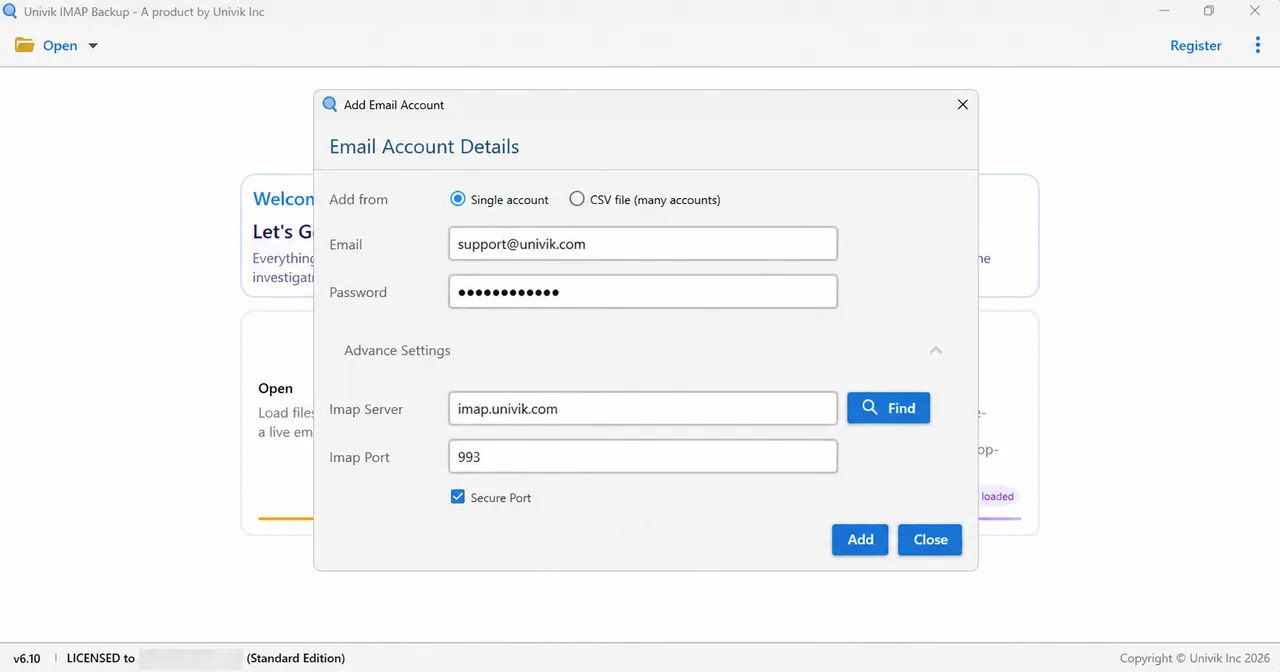
Gmail needs a sign-in that the Password box can carry, so an app password is the route Google documents for apps with only that box. However, I haven't run a Gmail mailbox through this window yet, so test one folder before you rely on it. Our Gmail email settings page lists the server values for reference.
Choose EML, MBOX or PST
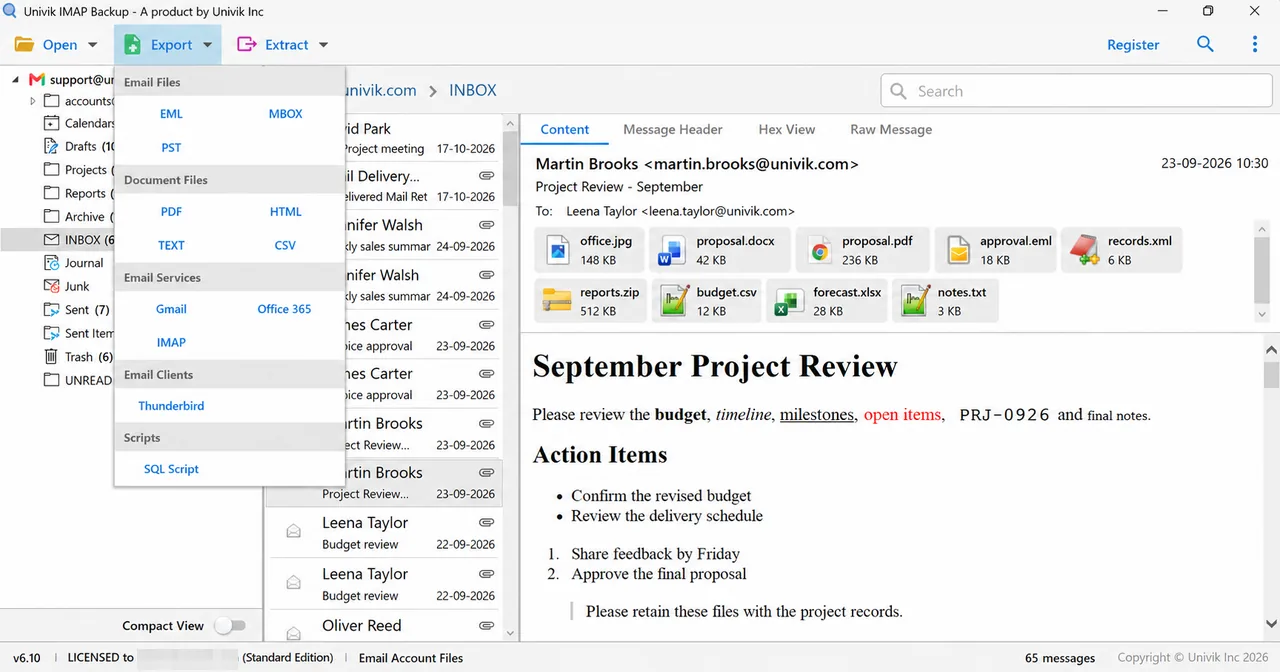
Select Export and look under Email Files, which lists the three formats. The format guides cover export IMAP to PST first, then export IMAP to MBOX or export IMAP to EML.
Minimum Attachment Size to Export begins switched on with 35 MB filled in, so review it ahead of Save. The trial copies only 10 items from each folder, so expect a short result.
My Test Runs on a Non-Gmail Mailbox
The runs in this section used Univik IMAP Backup 6.10 in its Trial Edition against a mailbox from no named provider. It wasn't a Gmail mailbox, so none of these figures is a Gmail result.
- PST run on 27 October 2026: the file read back with 81 messages in 17 folders. The nested path Projects, Apollo, 2025 stayed nested.
- EML run on 28 October 2026: the three ticked folders gave 14 .eml files. The time on disk of each file matched the date of its mail.
- MBOX run on 31 October 2026: one folder gave a single Sent.mbox file that a standard mbox reader opened with all 7 mails.
- 35 MB filter: my first PST export with the default setting wrote none of the 173 messages. The export ran once I switched the filter off.
A copy on your PC does one thing a server setting can't do. It stays exactly as saved when the provider changes the rules. I claim nothing beyond the runs listed here.
- In Google's words IMAP access is always on for personal Google Accounts. The Enable IMAP choice left Gmail in January 2025.
- Google Workspace administrators set IMAP in the Admin console under End User Access. The changes can take up to 24 hours.
- Third-party apps that need your Google password have lost Gmail support, so a mail app should offer Sign in with Google.
- Google lists 15 email clients as the most that one Gmail account supports together. Many clients fetching at once can bring a Too many simultaneous connections error.
- Your three file choices, EML, MBOX and PST, are grouped under Email Files in the Export menu. Its 35 MB attachment filter starts switched on.
Gmail IMAP Access Questions
How do I enable IMAP in Gmail?
You don't need to on a personal account, because Google keeps IMAP access on at all times. Add the account in your mail app and choose Sign in with Google. On a work or school account the administrator controls IMAP in the Admin console.
Why can't I find the Enable IMAP option in Gmail settings?
Google removed it. Its Gmail help says that starting January 2025 the choice to enable or disable IMAP won't be available. Older guides still describe the switch.
How do I turn on IMAP in Gmail for a work or school account?
Ask the administrator of your account. In the Admin console the path is Menu, Apps, Google Workspace, Gmail, End User Access, where the setting applies to an organizational unit. Google says the changes can take up to 24 hours.
Does Gmail still support less secure apps?
No. According to Google's Gmail help, third-party apps and devices that need your Google username and password have lost Gmail support. The Admin Help from Google says Workspace accounts no longer support less secure apps and that apps must use OAuth.
Do I need an app password to connect a mail app to Gmail?
Usually not. Google doesn't recommend app passwords and says most people don't need one, so choose Sign in with Google instead. An app password needs 2-Step Verification. Google lists security-key-only setups and work or school accounts as cases where the option is missing.
How many mail apps can use one Gmail account at once?
Google lists 15 email clients as the most that one Gmail account supports at a time. When many clients fetch together you may see a Too many simultaneous connections error.
How do I limit IMAP folder size in Gmail?
Open the Forwarding and POP/IMAP tab in the Gmail settings. Pick a number in the folder limit list under IMAP access and select Save Changes. Google suggests 10,000 emails or fewer.
Is IMAP a backup of my Gmail mail?
No. IMAP shows the mail that sits on the Google servers to your mail app, so a deletion on one side appears on the other. A copy saved on your PC as EML, MBOX or PST files is separate from the sync.


Each Google rule here was compared with the pages in this box on 3 November 2026. My test figures come from a mailbox that isn't a Gmail account.
Pages I read:
- Turn POP & IMAP on or off for users
- Add Gmail to another email client
- Sign in with app passwords
- RFC 9051 from the RFC Editor, IMAP4rev2
- Also read: Google for Developers on IMAP, Google Admin Help on less secure apps, Google Account Help on less secure apps, Mozilla Support on Thunderbird and Gmail, Microsoft Support on Gmail in Outlook, RFC 7628 and RFC 8314