Quick Answer
imap.gmail.com not responding means your mail app got no usable answer from Gmail. The cause is usually a sign-in method Google no longer accepts, a blocked connection or an account rule.
Sign in to Gmail on the web first, then update the mail app and add the account again with Sign in with Google.
Your mail app says imap gmail com is not responding, yet Gmail opens in a browser, so the error feels impossible to fix. Gmail IMAP not working usually traces back to a sign-in or connection detail on your side. A table pairs each error text with its cause. A numbered list then gives the fixes in the order to try them, cheapest check first.
I read Google's Gmail and Workspace help pages, RFC 9051 and RFC 5530 on 3 November 2026, along with support pages from Apple, Microsoft and Mozilla. Each rule here comes from those pages.
What Does imap.gmail.com Not Responding Mean?
The message imap.gmail.com not responding is the label a mail app puts on any failed attempt to reach Gmail, so it names the server and says nothing about the cause. IMAP (Internet Message Access Protocol) is how a mail app reads mail that stays on the server. imap.gmail.com is the host name Google publishes for the Gmail server, on port 993 with SSL. The wording belongs to the app, because the IMAP standard has no such phrase.
RFC 9051 describes what the server really says: it greets a new connection with OK or, when it rejects the connection, with BYE, while a failed login returns a tagged NO. The server can add the response code AUTHENTICATIONFAILED, which RFC 5530 defines as a login failure that a retry with the same details won't fix. The code UNAVAILABLE marks a temporary failure on the server side.
Four problems hide behind that one message: a blocked port, an encryption mismatch, a refused sign-in and an account limit. Label and folder behaviour is a separate topic, covered in what is IMAP in Gmail.
Which Error Text Points to Which Cause?
Each vendor names a few error texts in its help pages. The table shows the text the app prints, the documented cause and the first fix to try.
| What your app shows | Usual cause | First fix |
|---|---|---|
| Username and password not accepted or Invalid credentials | Google says Gmail no longer supports third-party apps that need your Google username and password | Remove the account and add it again with Sign in with Google |
| Time-out with no message | A VPN, firewall or security program may block port 993 | Pause the VPN and run the port test |
| Sign-in refused for hours while webmail works | Google caps Workspace IMAP at 2,500 MB of download and 500 MB of upload a day and suspends the account, typically for 1 hour | Wait for the suspension to end and sync fewer folders |
| Error on a work address only | A Workspace admin can switch IMAP off or limit it to approved OAuth clients | Ask your admin and read enable IMAP in Gmail |
Does imap.gmail.com Not Responding Mean Gmail Is Down?
Gmail is rarely down, so a quick one-minute check settles the question. Google's Workspace Status Dashboard lists Gmail by name, so an incident there is easy to spot and means waiting for Google. Apple's Mail help says that signing in to webmail confirms the account works but not that the mail app is set up correctly.
A port test separates the network from the sign-in when webmail works and the app doesn't. The test is fast because it opens one connection. Next, open PowerShell and type Test-NetConnection -ComputerName imap.gmail.com -Port 993. Microsoft Learn describes the cmdlet as one that displays diagnostic information for a connection. A result of TcpTestSucceeded : True means port 993 opened, so look at the sign-in next. A False result tells you that a VPN, a firewall or the network is blocking the path.
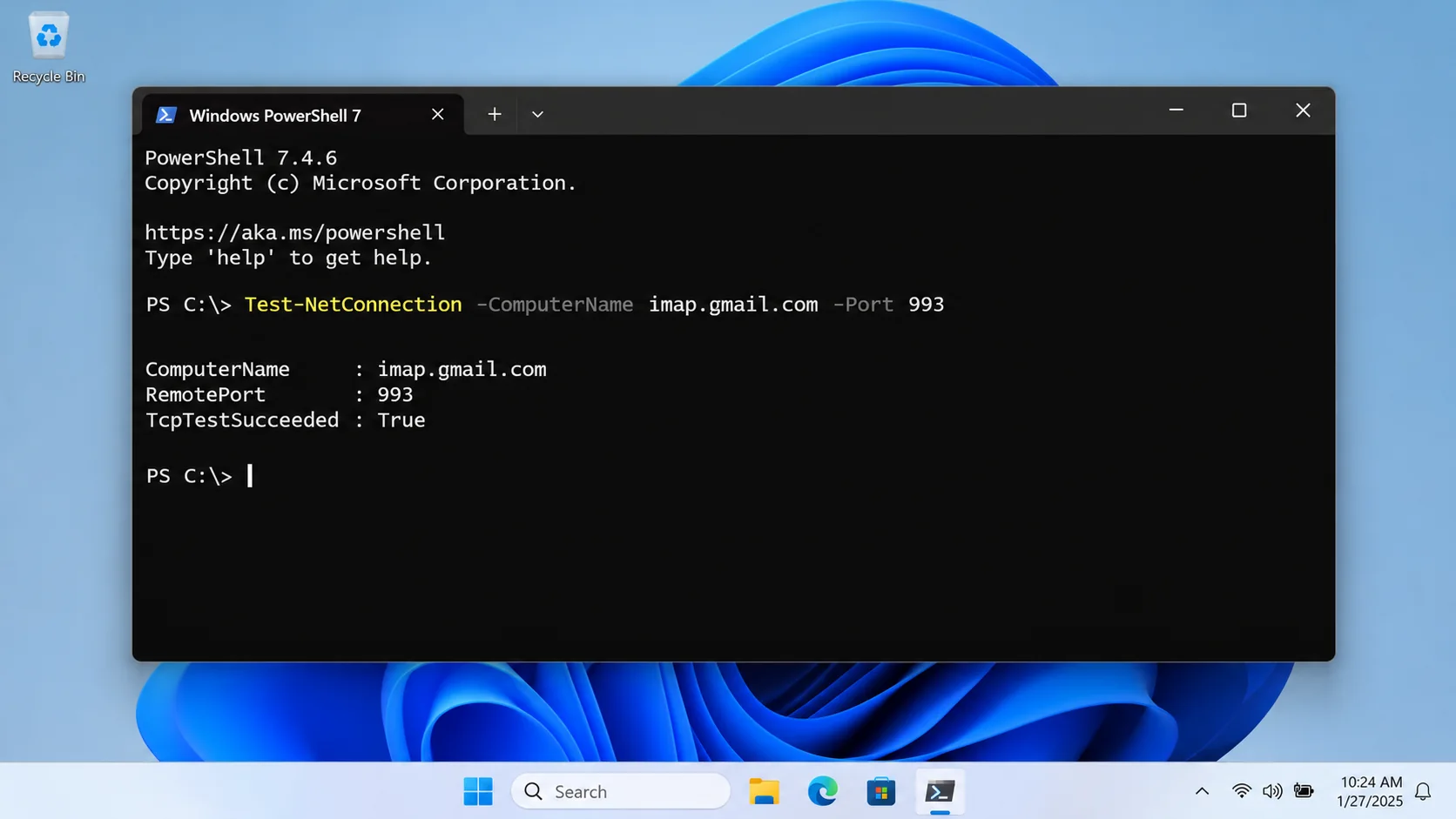
TcpTestSucceeded. True means the port opened; it does not confirm that Gmail accepted the sign-in.Our guide to IMAP port numbers covers the encryption side of the same test.
Are the Port and Encryption Settings Wrong?
Google lists the host imap.gmail.com on port 993 with SSL and says that incoming IMAP connections require SSL, which in a mail app means choosing the SSL/TLS option and pairing it with port 993. RFC 8314 gives the reason, because a TLS handshake begins at once on that port. A mismatch between the port and the encryption makes the handshake fail. Many apps then print a no-response message.
The user name is your full Gmail address. Also, sending goes through smtp.gmail.com, a separate server that takes port 465 with SSL or port 587 with TLS, so a failed send doesn't prove that the IMAP side is broken. Our Gmail email settings page holds the full value list.
RFC 8314 requires TLS 1.2 or later on mail access servers. Google warns that older versions like Outlook 2016 may not meet the current security standards of Gmail, so you can treat an app update as a settings fix.
What Does Network Error POSIX 54 Mean for imap.gmail.com?
POSIX error 54 is the code ECONNRESET, which Apple's system headers describe as "Connection reset by peer". Mail on an iPhone can show it as Network error: POSIX 54 beside the imap.gmail.com message. It means the connection to imap.gmail.com was opened and then ended by the other side or by something on the route, so the server name and port are usually fine.
Try Wi-Fi and mobile data in turn, switch off a VPN and restart the app. A reset that follows you across every network points to the sign-in, so redo it with Sign in with Google as the steps below show.
Does Gmail Need an App Password or Sign in with Google?
Gmail needs Sign in with Google whenever the app offers it. An app password is only the fallback. Google's help says Gmail no longer supports third-party apps or devices that require you to share your Google username and password. The help tells you to look for the option named Sign in with Google.
Google calls app passwords unnecessary in most cases and creates them only for accounts with 2-Step Verification. However, the option can be missing when 2-Step Verification uses only security keys or when the account is a work or school account. Our page on IMAP app password vs OAuth compares the two methods.
Workspace accounts follow a firmer rule. Google's admin help says that since May 1, 2025 Workspace accounts don't support less secure apps, so apps and devices must use OAuth. A user with 2-Step Verification on a client without OAuth needs an app password.
How to Fix imap.gmail.com Not Responding Step by Step
Nine fixes follow in the order to try them, with free checks first and account rules last. Stop at the first one that brings your mail back.
Free checks first
- Sign in to Gmail on the web. Open Gmail in the browser and finish any security notice that Google shows you. If the web login fails too, the account needs attention before any app can connect. The Workspace Status Dashboard shows whether Gmail has an incident.
- Rule out your network. Turn off any VPN and pause security software that watches network connections, then retry. Apple's Mail help names both as sources of interference.
- Update your mail app. The first sign-in step in Google's help is to upgrade the client, because older builds may not meet the security standards of Gmail. In classic Outlook you choose File, Office Account, Update Options and then Update Now.
Redo the sign-in
- Remove Gmail from the app. Delete the Gmail account entry in the mail app. Removing it is safe for the mail itself, because IMAP keeps the original copy on Google's server. The second step in Google's help is to remove your Gmail information from the client and sign in again.
- Add Gmail with Sign in with Google. Pick Google as the provider. Then approve the request in the browser window. Apple Mail on Mac lists Google under Add Account.
- Use an app password only as a fallback. If the app has no Google option and 2-Step Verification is on, create an app password at myaccount.google.com/apppasswords and type it where the app asks for a password.
When limits or admin rules apply
- Close extra mail apps. Gmail accepts up to 15 email clients at a time per account. Close or sign out of the clients you no longer use.
- Shrink the sync load. In Gmail open Settings, See all settings, Forwarding and POP/IMAP, then IMAP access. Under Folder size limits choose Limit IMAP folders to contain no more than this many messages, pick 10,000 or fewer and select Save Changes.
- Ask your Workspace admin. On a work or school address the admin controls IMAP access and can limit it to approved OAuth clients. Changes can take up to 24 hours to apply.
Classic Outlook and my verdict
Classic Outlook has one more fix. Microsoft fixed a Gmail sync issue with error 0x800CCC0E or 0x800CCC0F through a service change on 20 March 2026. For errors that persist, its workaround is to close Outlook, open Credential Manager and remove the saved Google entries under Windows Credentials, so that Outlook asks for a new sign-in.
My verdict: if your mail app is current, redo the sign-in with Sign in with Google before you touch the port or server fields, because it is the second step in Google's own troubleshooting list and the one that changes how the app logs in. Reach for an app password only when your app has no Google option and 2-Step Verification is already on.
What I Measured on a Test Mailbox
On 28 October 2026 I exported three ticked folders to EML in Univik IMAP Backup 6.10 (Trial Edition) from a test mailbox that belongs to no provider. Reading the result from disk gave 14 .eml files: 10 from Drafts, 1 from EML_Test_new and 3 from Sent Items. The trial writes 10 items per folder, so Drafts stopped at 10. Those files open on my PC while no server answers at all. The mailbox wasn't Gmail, so I make no claim about how the app signs in to Gmail.
Keep a Local Copy for the Day Gmail Stops Answering
Why a copy on your PC helps
Google's server holds the only copy of your IMAP mail, so a mail app that can't reach imap.gmail.com has nothing to show. Our guide Is IMAP a backup? explains that gap. Files on your PC open without any server, so save the copy while the connection works, which means once the fixes above bring your mail back.
Add your Gmail address
Univik IMAP Backup is our IMAP backup software for Windows. From the Open menu choose Email Accounts, then Add account. Type your full address in the Email box and the password type your account accepts for mail apps in the Password box.
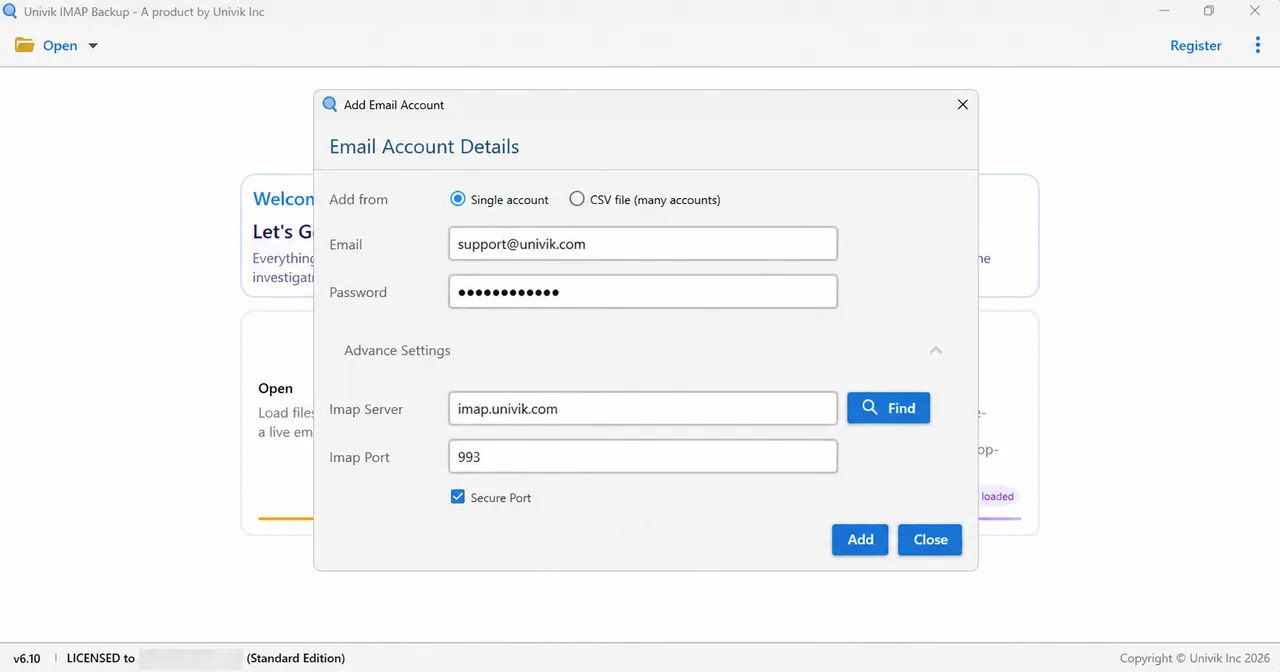
Inside Advance Settings you will find Imap Server, then Imap Port with 993 filled in and the Secure Port box already ticked. Select Find to fill the server from your address or type imap.gmail.com, the host Google publishes.
Save it as EML, MBOX or PST
Pick Export, then Email Files, to choose between EML, MBOX and PST. Finally, the Minimum Attachment Size to Export switch needs a look, because it starts on at 35 MB. That default left my first PST test run empty until I switched it off. The trial stops at 10 items per folder.
- A no-response message about Gmail is the wording of a mail app, because the IMAP standard has no such message.
- Google publishes the host imap.gmail.com on port 993 with SSL and says incoming IMAP connections require SSL.
- Gmail no longer supports apps that need your Google username and password, so Sign in with Google is the first fix.
- Google allows up to 15 email clients at a time per account. Google also caps Workspace IMAP at 2,500 MB of download and 500 MB of upload a day.
- Google Workspace accounts have not supported less secure apps since May 1, 2025, so apps must use OAuth.
Questions and Answers
What does imap.gmail.com not responding mean?
The error means your mail app got no usable answer from Gmail. The wording comes from the app. It covers a blocked port, a mismatched encryption setting, a refused sign-in and an account limit.
Why does my app say imap gmail com is not responding when my password is right?
Google says Gmail no longer supports third-party apps that need your Google username and password, so a right password can still be refused. Add the account again with Sign in with Google.
Is Gmail down when my app can't reach imap.gmail.com?
Gmail is seldom down. Check the Workspace Status Dashboard from Google for a Gmail incident, then sign in to Gmail on the web. If both look normal, the cause sits in the app, the network or the account.
Can a VPN or firewall cause this error?
A VPN or firewall can cause it. Apple's Mail help names a VPN and other software that interacts with network connections as a source of trouble. Pause the VPN, then run the port test and look for TcpTestSucceeded : True.
Why does Apple Mail say the server imap.gmail.com is not responding?
Apple's Mail help doesn't quote that wording but gives the checks for an account that can't connect. It says to click the warning symbol beside the inbox for status and to check your provider's status page. As a last resort it says to remove the account and add it again.
What happens when Gmail IMAP reaches its daily limit?
Google lists IMAP limits for Workspace accounts of 2,500 MB of download and 500 MB of upload a day. Reaching a limit suspends the account, typically for 1 hour and for up to 24 hours, with an error on the sign-in page for the owner.
Can a Google Workspace admin cause the error?
A Workspace admin can cause it. The admin can turn IMAP off or limit it to approved OAuth clients, with changes taking up to 24 hours. Since May 1, 2025 Workspace accounts don't support less secure apps.
Can I keep a copy of my Gmail mail once the connection works?
A desktop app that signs in over IMAP can write the folders you tick to your PC as EML, MBOX or PST files. Make the copy while the connection to the server works.


I went through each source in this list on 3 November 2026 before I wrote a rule from it.
Pages I read:
- Gmail Help from Google, page on adding Gmail to another email client
- Gmail bandwidth limits, Google Workspace Help
- Gmail IMAP and SMTP guide, Google for Developers
- IMAP4rev2 specification, RFC 9051
- Error numbers in Apple's XNU system header, errno.h
- Also read: Google Workspace Help on POP and IMAP controls, Google Account Help on app passwords, RFC 5530, RFC 8314, Apple Support, Microsoft Support, Microsoft Learn and Mozilla Support