Quick Answer
IMAP too many simultaneous connections means your mail server already holds as many open sessions on your account as it allows, so it turns the next sign-in away.
Close the mail apps and devices you don't use, then sign in again. Idle sessions can take 30 minutes or more to expire, so a short wait may be part of the fix.
Mail apps show this error when several devices have signed in to one mailbox. This page explains what the server counts, lists the limits that providers publish and walks through the fixes from the cheapest check to the last resort.
I read the help pages of Google, Microsoft, Yahoo, Apple, Zoho and Mozilla, Dovecot's documentation, RFC 9051, RFC 2683 and RFC 2177 on 3 November 2026. Where a provider prints no number, I say so instead of guessing one.
What Does IMAP Too Many Simultaneous Connections Mean?
The message means the server has refused a sign-in because your account already holds the number of open sessions that the server allows. Every mail app, phone or webmail add-on that reads your mailbox opens at least one IMAP (Internet Message Access Protocol) session. The server counts those sessions for each account. Dovecot and Exchange Server can also count them for each IP address.
RFC 9051 is the current IMAP standard. Its state diagram lists a rejected connection as one of the ways a session can begin, shown as a BYE greeting. A server that closes a session on its own should send an untagged BYE with a reason first, so the wording you see depends on the app.
RFC 2683, a guide for IMAP4 implementers from September 1999, tells clients not to assume they can open the same mailbox more than once at the same time. A connection limit is therefore a normal choice of the server and not a fault in your account. A wrong port gives a timeout instead of this message. IMAP port numbers shows how to tell the two apart.
Why Do You Hit IMAP Too Many Simultaneous Connections With Only a Few Devices?
Each app or device counts as a client. A client can hold more than one connection. Your laptop, your phone and a second PC make three clients before any of them opens a second session. Gmail Help warns that many clients collecting mail at the same moment may bring on the error. Microsoft gives the same warning for Outlook.com when one account is set up as IMAP in more than one client.
One program can use several sessions on its own. Mozilla's page on Thunderbird account options says most servers support multiple connections and names a setting, Maximum number of server connections to cache, to lower if the connections get dropped. Another setting, Allow immediate server notifications when new messages arrive, uses the IMAP IDLE command to show mail the moment it arrives.
IDLE keeps a session open on purpose. RFC 2177 advises a client to re-issue IDLE at least every 29 minutes, otherwise the server may log it off. A session left behind by a crashed app may stay counted until the inactivity timer of the server closes it. If sessions open fine but folders stop updating, read IMAP not syncing instead.
What Is the IMAP Connection Limit for Gmail, Outlook.com and Other Providers?
Providers publish very different amounts of detail, so the query imap max connections has no single answer. The table lists what I found on the help page of each provider on 3 November 2026 and marks where no number exists.
| Service | What the page states | Page I read |
|---|---|---|
| Gmail | A cap of 15 email clients for each account, with the error named Too many simultaneous connections | Gmail Help |
| Google Workspace | No connection count, only the daily IMAP download of 2,500 MB and the daily IMAP upload of 500 MB | Google Workspace Help |
| Outlook.com | A connection error may follow when one account is set up as IMAP in several clients, with no number given | Microsoft Support |
| Yahoo Mail, iCloud Mail and Zoho Mail | No connection limit appears on their IMAP settings pages | Yahoo Help, Apple Support and Zoho Mail Help |
| Dovecot | The default of mail_max_userip_connections is 10 IMAP connections for a user from each IP address | Dovecot documentation |
| Exchange Server on premises | The default of MaxConnectionsPerUser is 16 and the administrator of the server changes it with Set-ImapSettings | Microsoft Learn |
How to Read These Numbers
The figure for Gmail counts clients, so the number of sessions that Google enforces may differ from 15. Still, older forum posts quote 10 connections for Gmail, but I found no such number on the Gmail Help or Workspace pages. If the server refuses every sign-in instead of only the extra ones, imap.gmail.com not responding covers that case.
A host can run Dovecot for your domain mailbox with its own value, so ask the support team before you rely on 10. Before you leave that host, back up hosting email accounts. Our email settings pages list the server for each provider.
How Do You Fix IMAP Too Many Simultaneous Connections?
Work through the steps in order, because each one costs less effort than the next.
Steps 1 to 3: Find the Sessions You Don't Need
- Quit the app that shows the error. Close the program fully, including its icon in the Windows system tray, so its sessions end. This quick check costs nothing.
- Close or sign out of your other clients. Gmail Help advises closing clients or signing out of some when several share one account. Check your phone, your tablet, a second PC and any old program that still collects mail. A backup or sync program counts while it runs. A mail app on an old phone can also hold a session in the background even when you never open it.
- Check Gmail's account activity. In Gmail, select Details at the bottom right to open Activity on this account. Google says the page lists the last 10 IP addresses and the access type, which can be a mail server like IMAP. An IMAP entry you don't know points to a forgotten client.
Steps 4 to 6: Lower the Count or Raise the Limit
- Lower the connection count of your app. In Thunderbird, open Account Settings, choose Server Settings for the account and select Advanced. Lower Maximum number of server connections to cache, because Mozilla advises a lower number when connections get dropped.
- Wait, then sign in with one client first. RFC 9051 sets the autologout timer of the server at no less than 30 minutes, so a stale session may stay counted for that long. Sign in with one client first, then add the others one at a time.
- Raise the limit if you run the server. On Dovecot, raise
mail_max_userip_connections. On Exchange Server, runSet-ImapSettings(a cmdlet for on-premises Exchange) with-MaxConnectionsPerUserand restart the IMAP4 services, as the Exchange 2013 guide of Microsoft says. On shared hosting, ask your host to review the value.
Then test the sign-in after each change, so you know which step worked.
How Long Should You Wait Before You Sign In Again?
Wait at least 30 minutes if an app crashed or your phone lost its signal, because RFC 9051 says the autologout timer of a signed-in session must last no less than 30 minutes. Still, closing a client you can reach is faster than waiting for the timer. Google also runs a second sign-in limit with a different wait:
- Connection limit: a new sign-in is refused while the old sessions stay counted. Closing the clients or waiting for the timer clears the block.
- Bandwidth limit: Google Workspace Help says a suspension for passing the daily limit typically lasts 1 hour and can last up to 24 hours. Several IMAP clients on one account download every message several times, so fewer clients ease both limits.
Read Old Mail From Files When Server Sessions Run Out
Why Files Avoid a Session Limit
A saved file opens from your disk, so reading it needs no sign-in and no free place under the limit of your provider. With IMAP the only copy of your mail sits on the server, so a locked-out mailbox gives you no way to read old mail until a session frees up. Any program that signs in to your mailbox takes a place under that limit while it runs, so close your other clients first.
Also, if several mailboxes are affected, the guide to backup multiple IMAP accounts covers a list in one run.
Add Your Mailbox in the Add Email Account Window
Windows users can add a mailbox to Univik IMAP Backup, our IMAP backup software, from the Open menu. In the Open menu, Add account sits inside Email Accounts.
Enter your address in the Email box and your password in the Password box, then open Advance Settings. A Find button there looks up the server from your address, next to the Imap Server and Imap Port boxes and the Secure Port tick box. The Imap Port box opens at 993 and the Secure Port box opens ticked. For Gmail, see Gmail email settings to learn which password Google expects.
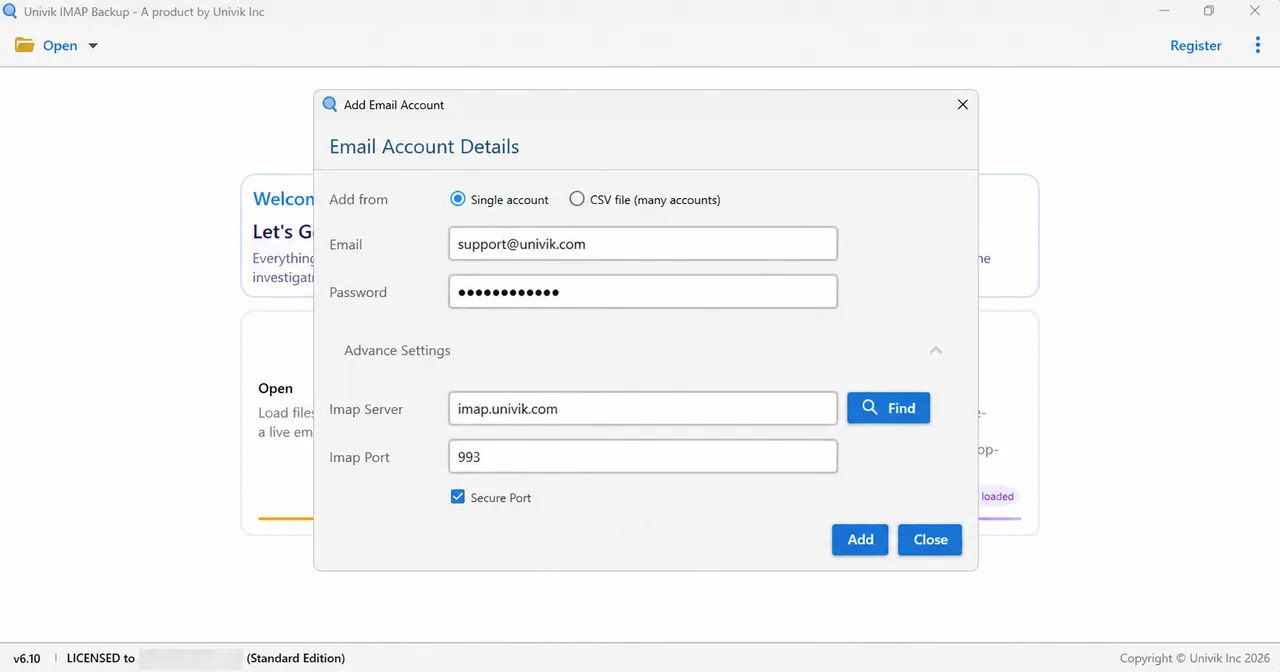
A Microsoft address follows another route. A Hotmail address that I entered in Add account on 2 November 2026 sent my browser straight to Microsoft's sign-in page. The Outlook.com email settings page covers that route.
Save the Folders as Files
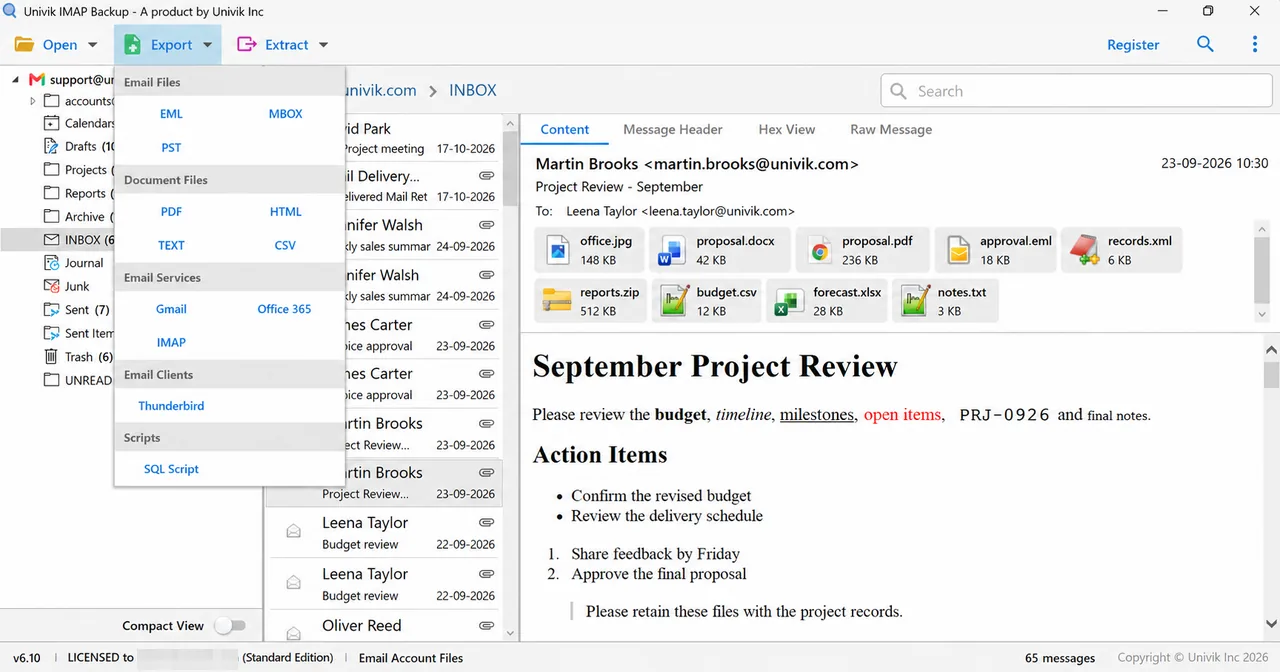
Next, select Export and pick EML, MBOX or PST under the Email Files group. Press Save only after you have looked at Minimum Attachment Size to Export, which starts on at 35 MB. The trial stops at 10 items per folder, which explains a short result.
What I Tested on a Test Mailbox Before Writing This
I ran Univik IMAP Backup 6.10 in its Trial Edition on Windows on a test mailbox that is none of the providers in the table. The folder tree held 173 messages and my PST run took place on 27 October 2026.
My first PST export, with Minimum Attachment Size to Export at its default of 35 MB, wrote 0 messages because none of the 173 mails carried an attachment that large. With the filter off, the trial wrote 10 items for every folder that held more than 10. I read 81 messages and 160 attachments back from the PST file on disk, spread over 17 folders.
However, a PST file is the part a server can't give you, because a file on disk opens with no sign-in and a full list of connections can't refuse it. Nothing else on this page comes from my own test. Every limit above comes from a help page or from a standard that I read on 3 November 2026.
Which Fix Should You Try First?
My verdict: close old clients and lower your own app's connection count first, because both cost nothing and match the advice of Gmail Help and Mozilla. Ask your provider or host to raise the limit only when the error stays after every other client is closed and the 30 minutes have passed.
- Servers count the open IMAP sessions for each account. Dovecot and Exchange Server can also count them for each IP address.
- Gmail Help documents a cap of 15 email clients for each account.
- Dovecot defaults to 10 IMAP connections for a user from each IP address. Exchange Server defaults to 16 for each user.
- Thunderbird's Maximum number of server connections to cache setting controls how many connections it keeps.
- RFC 9051 sets the server autologout timer at no less than 30 minutes, so a stale session can stay counted that long.
Questions and Answers
What does IMAP too many simultaneous connections mean?
Your mail server has refused a sign-in because your account already holds the most open IMAP sessions that the server allows. Each app, phone or add-on counts. Close the clients you don't use, then try again.
How many IMAP connections does Gmail allow?
Gmail Help sets a cap of 15 email clients for each account. It names the Too many simultaneous connections error but prints no count of the sessions for each client.
Does Outlook.com have an IMAP connection limit?
Microsoft's help page for Outlook.com says a connection error may follow when one account is set up as IMAP in several email clients. It prints no number.
What is the default IMAP max connections setting in Dovecot?
The mail_max_userip_connections setting defaults to 10, the most IMAP connections one user may hold from each IP address.
Why do I get this error with only one mail app?
One app can hold several connections and may keep them open with IDLE. A crashed app or a phone that lost its signal can leave a session counted until the timer of the server closes it.
Do all providers publish an IMAP connection limit?
No. Gmail Help gives 15 email clients per account. Dovecot and Exchange Server give defaults of 10 and 16. The Outlook.com, Yahoo, iCloud and Zoho pages that I read print no number.
Is a connection limit the same as a bandwidth limit?
No. A connection limit counts the open sessions, while a bandwidth limit counts the data per day, like the 2,500 MB of IMAP download in Google Workspace. A suspension for a bandwidth limit typically lasts 1 hour and can last up to 24 hours.
Can I save my mail as files if my provider keeps refusing sign-ins?
Once one sign-in works, Univik's Windows program can save folders as EML, MBOX or PST files. Close your other clients first, because a backup program takes a place under the same limit while it runs.


Each figure in the table comes from a provider page that I opened during my research on 3 November 2026.
Pages I read:
- Google's article on adding Gmail to another email client
- Configuration Options for Accounts, Mozilla Support
- Limits, Dovecot documentation
- IMAP4rev2 specification, RFC 9051
- Also read: RFC 2683, RFC 2177 and the help pages named in the table