Quick Answer
To backup Verizon email, sign in to the company that holds your mailbox now, because Verizon retired its own email service. For an AOL-hosted verizon.net address type imap.aol.com on port 993 with SSL, your full verizon.net address and an AOL app password.
After sign-in, choose the folders to keep and send them to disk as PST, EML or MBOX files. A mailbox that sits on Yahoo needs the values and the app password of Yahoo.
Verizon stopped running email and the mailboxes that survived moved to AOL or Yahoo. Verizon's support page says that mail not moved before 15 December 2017 was deleted from its systems and that it no longer offers the option to extract data. A copy of your verizon.net saved mail on your own PC is therefore the one copy that no company decision can touch.
My Windows test used an IMAP backup app with a spare mailbox that is not a Verizon account, so each number in this guide describes the spare mailbox and not a Verizon one. The account rules come from Verizon's own support page and from Yahoo's help center, both read on 2 November 2026.
Which Server Does a Verizon.net Mailbox Use After the Move to AOL?
Verizon's support page names mail.aol.com as the place to open a migrated mailbox and asks you to sign in with your full verizon.net address. AOL keeps a help page for Verizon.net accounts and the card lists every box of the Add Email Account window for a mailbox on AOL. The Verizon.net IMAP settings page on Univik also lists the POP3 and SMTP hosts.
name@verizon.netYour whole address, with @verizon.net at the end.- Password
- An AOL app passwordAOL issues this code. It is not a Verizon password.
- Imap Server
imap.aol.comType it exactly. It names AOL, not Verizon.- Imap Port
993This box already holds 993.- Secure Port
- Ticked (SSL)It starts ticked. Leave it that way.
Find proposes a server name based on the address you typed. Compare whatever it fills in with the card before you select Save. Saving mail to files sends nothing, so the SMTP server stays unused. Older web guides print a Verizon name for incoming mail. Skip them, because Verizon no longer runs the mailbox.
What Do You Do When Your Verizon.net Mailbox Sits on Yahoo Instead?
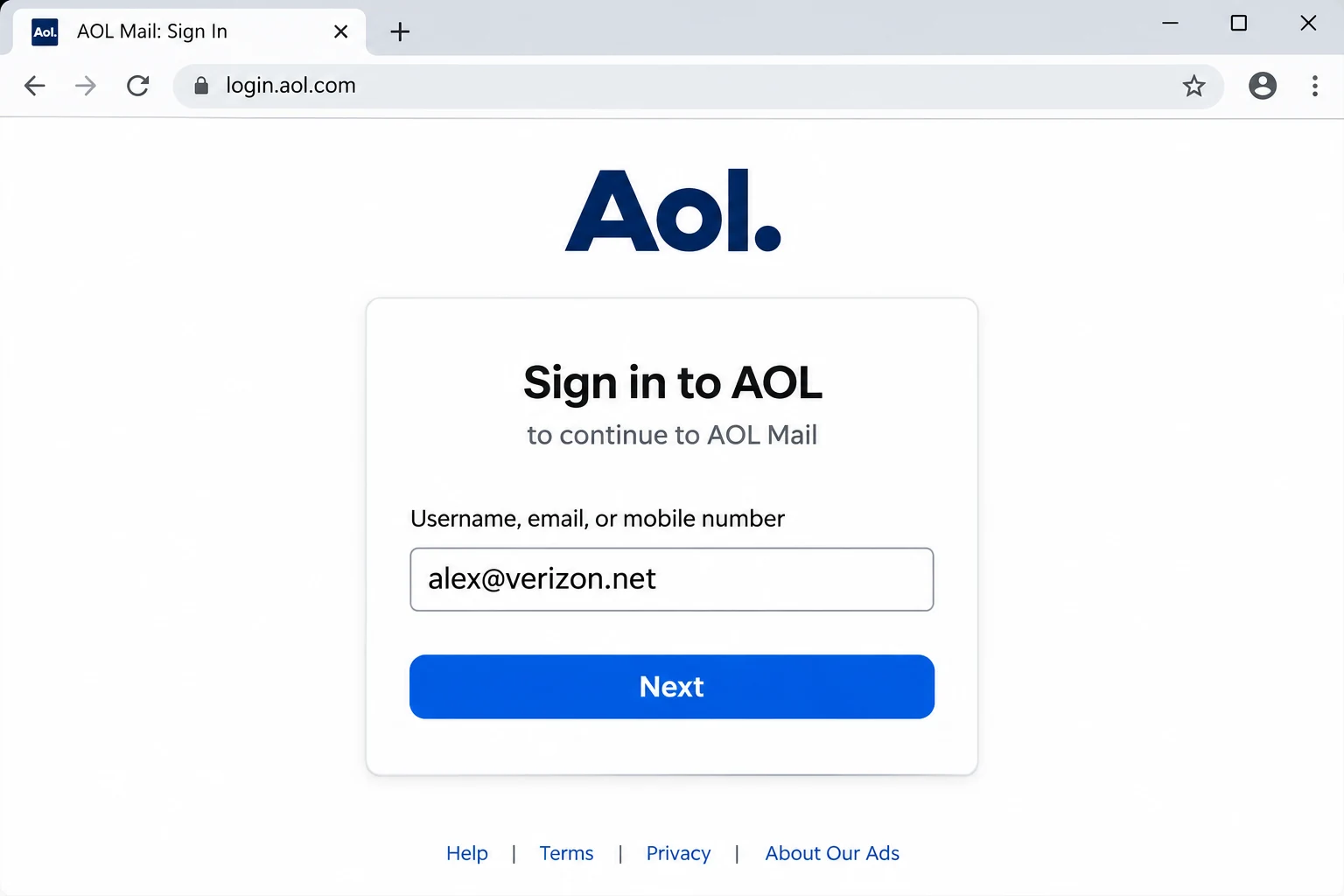
Verizon's support page lists two sign-in sites for a migrated address: mail.aol.com and verizon.yahoo.com. Open the mail.aol.com site first and sign in with your full verizon.net address. If AOL refuses the address, try the verizon.yahoo.com site. The site that accepts your sign-in is the host to back up.
For a Yahoo-hosted mailbox keep the card layout but replace the Imap Server and Imap Port values with the ones on Yahoo's IMAP page for Yahoo Mail. The Password box then takes a Yahoo app password. Yahoo says its app passwords stay valid after you change your main password and that each code is shown only once.
Which Password Does a Verizon.net Mailbox on AOL Accept?
AOL says on its help center that a third-party email app may need a special app password to reach an AOL account. Your usual sign-in password can therefore be refused in the Password box. AOL creates the code after you sign in to your AOL account with the full verizon.net address. Verizon cannot create or reset it, because its support page sends questions about forgotten passwords and lockouts to the email provider.
| Where your mailbox lives | Email box | Password box |
|---|---|---|
| AOL | Full verizon.net address | App password made in your AOL account |
| Yahoo | Full verizon.net address | App password made in your Yahoo account |
A wrong code gets the same rejection as a wrong password, so check the Password box first when a login fails.
What Did Verizon Delete in 2017 and What Is Left to Backup?
Verizon's email retirement page states that verizon.net email, calendar and address book content which was not migrated to AOL or moved to another provider before 15 December 2017 has been deleted from its systems. Mail that did move is held by AOL or Yahoo under the rules of those companies and no longer by Verizon.
The page says nothing about idle accounts. If you rarely open the address, sign in and save its mail soon. The app saves mail folders. I did not test contacts or calendars, so keep those separately.
Does Signing In Over IMAP Leave You With a Copy of Your Verizon.net Saved Mail?
No. A mail app on IMAP shows the folders that AOL's server holds. A move or delete in the app reaches the server too. That gap is the subject of Is IMAP a backup? Only files on your PC stay put when the server changes.
Old PCs add a second case. A mail program that once fetched Verizon mail over POP3 may hold messages that the server dropped after the download. Save those local files as well. Because mail.aol.com is the webmail that AOL members use, Univik's guide on how to download AOL emails also covers saving a single message from it.
Who Needs a Backup of a Verizon.net Mailbox?
- A long-time address holder You use a verizon.net address and have never copied the mail in it.
- A switcher You changed internet provider and kept the address, so you want files that need no login.
- A family records keeper You look after a relative's address and want plain files of the mail in it.
- A mover You plan to leave the address. Save a copy first. For the reverse job, pick email migration software when mail should land live in a new mailbox.
How Do You Backup Verizon Email Step by Step?
The flow has five moves: connect the mailbox, tick the folders, pick a format, review one filter and run the export.
My test used Univik IMAP Backup, which counts as IMAP backup software for Windows PCs. It logs in to a live mailbox and lists every folder in the tree before anything is written.
- Sign in from the Open menu. Click Open at the top left, pick Email Accounts and finish with Add account. Email takes your verizon.net address. Password takes the app password. Then reveal Advance Settings and enter imap.aol.com into Imap Server. Imap Port already says 993 and Secure Port is already ticked, so nothing else changes.
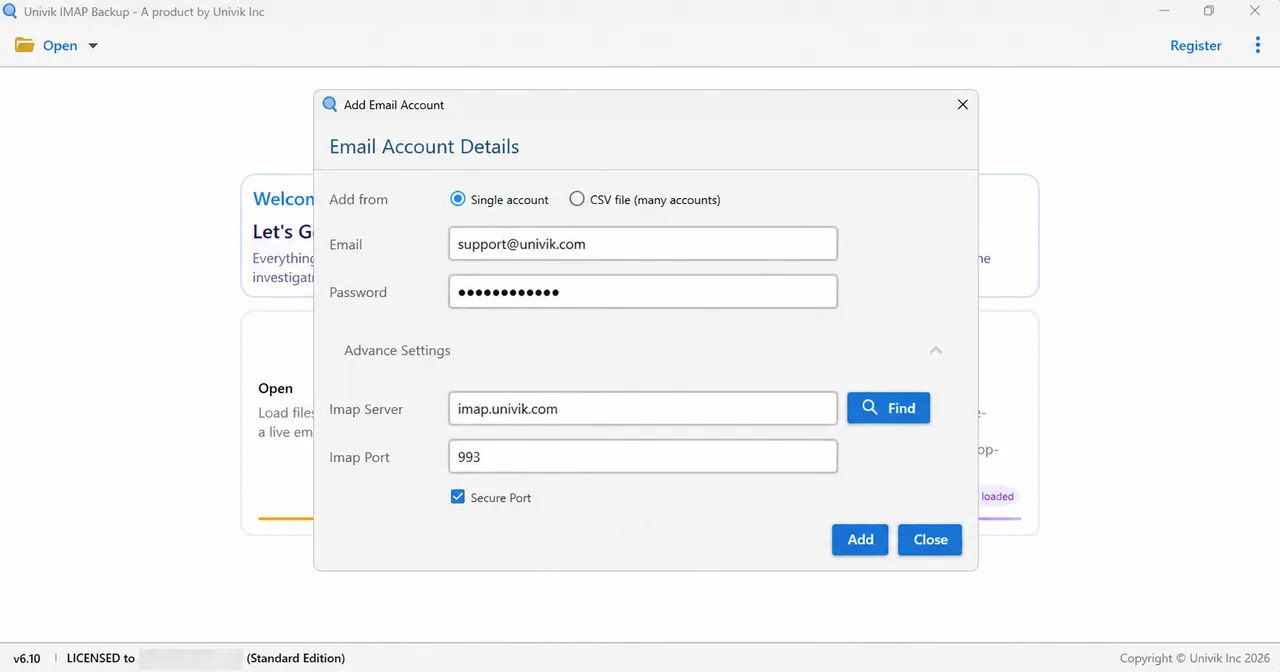
Advance Settings in this window holds the three server boxes that you fill from the card. - Choose folders. The tree on the left lists every folder with a count beside it. Tick every folder that holds mail you need. The list mirrors what AOL's server returns.
- Pick the output. Open the Export menu. Email Files groups PST, EML and MBOX while PDF, HTML, TEXT and CSV live under Document Files.

Email Files groups the three formats this guide covers. - Review one filter. Before saving, check Minimum Attachment Size to Export. It starts switched on with 35 in its box and MB as the unit. My PST run in the spare mailbox wrote zero messages until I turned it off. Decide on the filter before you save.
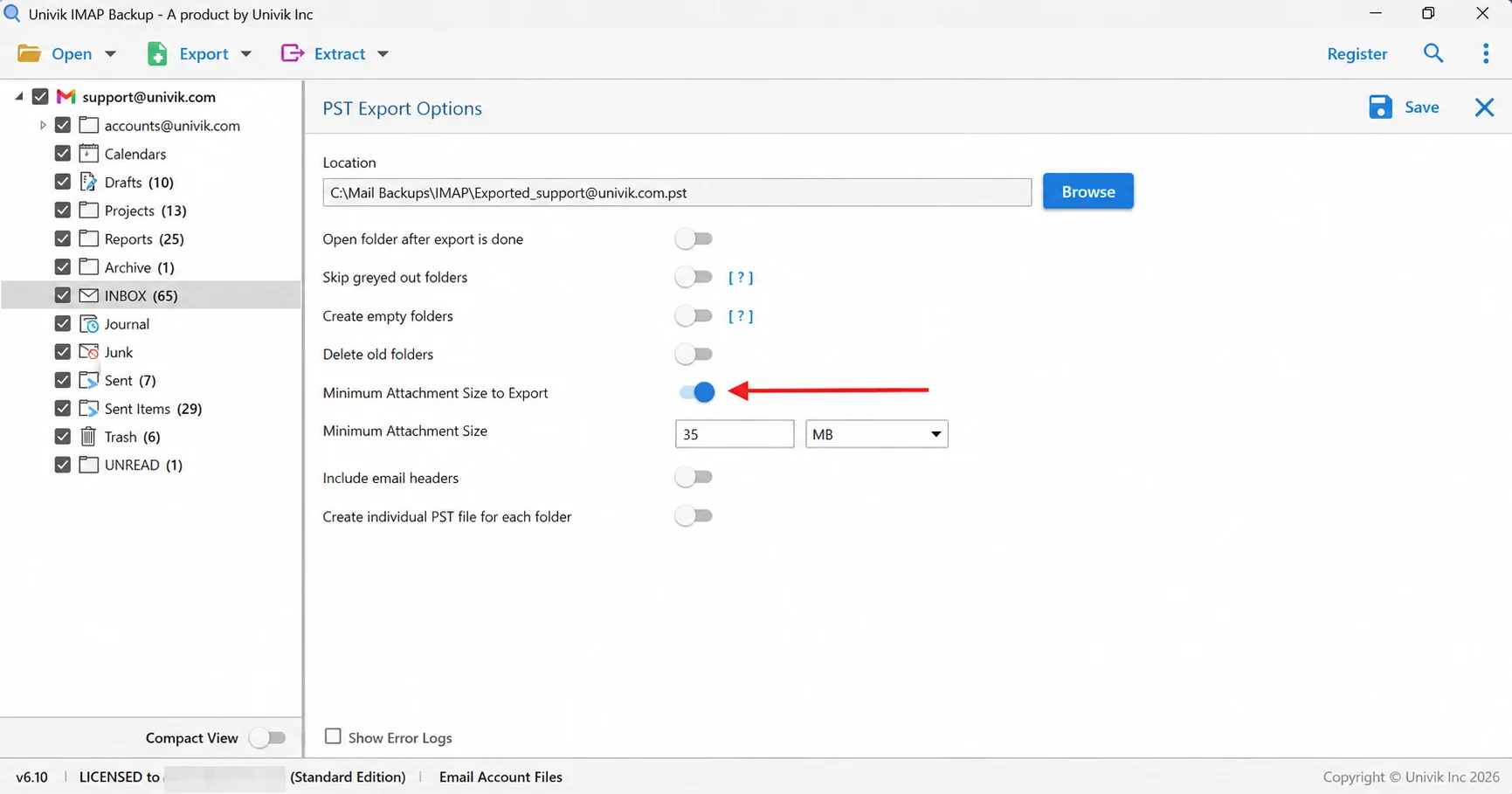
The arrow marks the filter that is already switched on when this screen opens. Switch it off or lower it before a full export. - Run it and tally. The Save button sits at the top right. Select it and watch for a green banner confirming the run. Afterwards count the files per folder in your export location and set each count beside its folder in the tree.
Which File Format Suits Your Verizon.net Saved Mail?
Three email formats sit in the menu. Choose by what will open the files afterwards.
| Format guide | Result on disk | Good fit |
|---|---|---|
| IMAP to PST guide | An Outlook-ready file, either a single one or one per folder | You open mail in Outlook |
| IMAP to EML guide | An .eml file for every single message, laid out in folders like your tree | You want files readable without mail software |
| IMAP to MBOX guide | One mbox file holds all messages of a folder | You plan a Thunderbird import later |
Each guide in the table walks through the export screen option by option.
Why Does Your Verizon.net Backup Hold Fewer Mails Than Webmail Shows?
- The attachment filter The filter starts on at 35 MB.
- The trial cap A trial copy stops after ten mails per folder. Buying a licence ends that limit.
- The wrong host A login to the AOL host shows nothing of a mailbox on Yahoo. The reverse holds too.
- Mail kept only on an old PC Messages that an old POP3 program pulled and the server dropped never appear in the tree.
Counting needs no extra tool, since folders in the tree state their totals. Of 65 messages in the spare mailbox's INBOX only ten came out under the trial limit and Sent Items gave ten of its 29. Drafts at ten and Trash at six were small enough to copy fully.
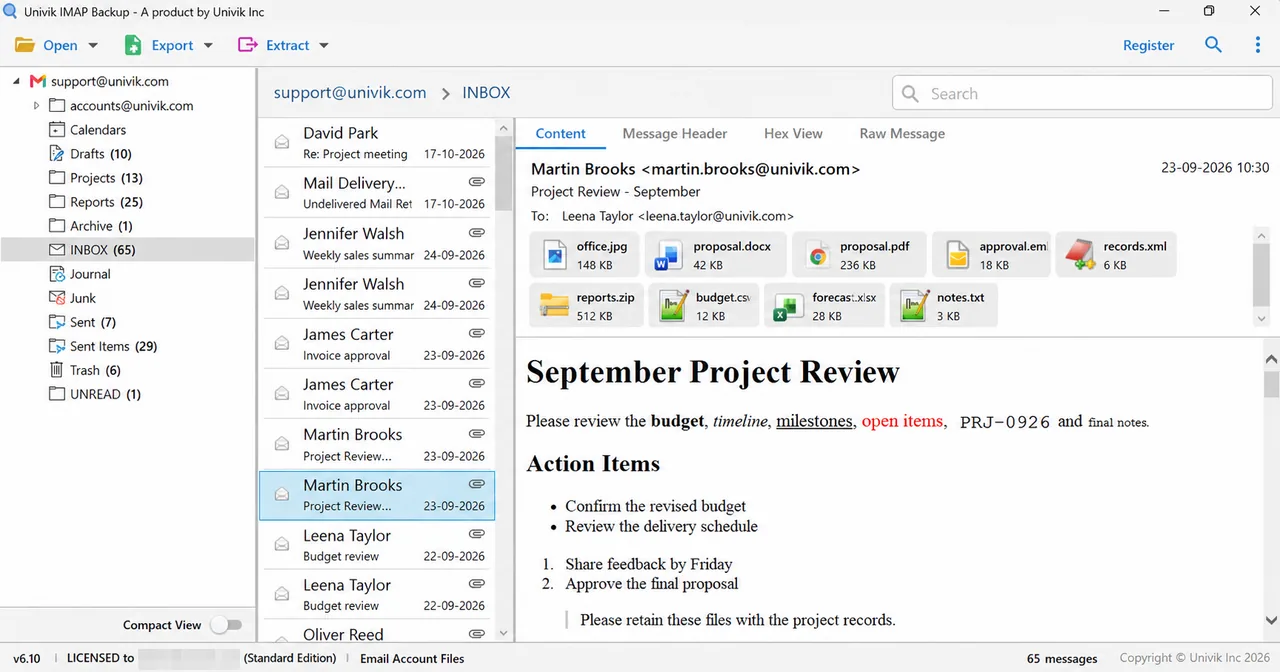
With a licence, expect the file total of each folder to match its tree total. If one does not, start the investigation with that folder.
What If Your Verizon Email Backup Looks Like This?
Try this: Replace the sign-in password with an app password from the company that hosts your mailbox. AOL and Yahoo each issue their own code.
Try this: Open Advance Settings and read the Imap Server box. A name ending in verizon.net comes from an old guide. Replace it with the host on the card. Use the Yahoo host when Yahoo holds your mailbox.
Try this: Try mail.aol.com and verizon.yahoo.com once more with the full address. If both refuse it, the mailbox may never have moved. Verizon states that unmoved content was deleted after 15 December 2017.
Try this: Use a browser that you have signed in to Yahoo with on several days in a row and not a private window. Yahoo's customer care cannot override the check.
Try this: On the export screen find Minimum Attachment Size to Export. If it is on and your mails carry no big attachments then nothing is written. Turn it off or lower the number and select Save again.
Try this: The trial edition writes ten items from each folder and then shows a Demo Edition dialog. A licence is the only way past the cap.
Found a case this guide misses? Write to Univik support.
- Verizon retired its email service, so the surviving verizon.net mailbox is held by AOL or Yahoo.
- For an AOL-hosted mailbox the backup signs in to imap.aol.com on port 993 with SSL.
- The Password box takes an app password from AOL or Yahoo and never the Verizon password.
- Mail not moved before 15 December 2017 was deleted from the systems of Verizon.
- Email Files offers PST, EML and MBOX and the trial stops at ten mails per folder.

FAQ: Backup Verizon Email
How do I backup Verizon email?
Find out whether your verizon.net mailbox sits on AOL or Yahoo by signing in at mail.aol.com or verizon.yahoo.com. Add the mailbox in the app with the full address and an app password from that company. For AOL type imap.aol.com in Imap Server and leave the two boxes under it as they are. Then mark the folders to keep, pick PST, EML or MBOX from Export and select Save.
Why does a Verizon email backup sign in to AOL and not to Verizon?
Verizon retired its own email service and moved surviving mailboxes to AOL or Yahoo. An app has to connect to the new host.
Why is my Verizon password rejected during a backup?
A backup app signs in as a third-party app. AOL and Yahoo both point such apps to the app password that you create in your AOL or Yahoo account. Verizon cannot create it for you.
What if my verizon.net mailbox is on Yahoo?
Sign in at verizon.yahoo.com to confirm the host. Keep the same Add Email Account window and type the values from Yahoo's IMAP page. Use a Yahoo app password in the Password box.
Is my verizon.net saved mail still on Verizon's servers?
Verizon says mail that was not moved to AOL or another provider before 15 December 2017 was deleted from the systems of Verizon. Mail that moved sits with AOL or Yahoo.
Can I backup several Verizon mailboxes at once?
Yes, through the CSV option in the Add account window. Every mailbox in that file needs its own address and its own app password.
Why does my Verizon backup hold fewer mails than webmail?
Usually the attachment filter that starts on at 35 MB or the trial cap of 10 items per folder.
PST, EML or MBOX for a Verizon email backup?
Pick PST when Outlook will open the copy. Pick EML for loose single-message files. Pick MBOX to import into Thunderbird later.
How can I confirm that the Verizon email backup is complete?
Tally the files in your export location for each folder and set that number against the tree. The trial caps output at 10 per folder, so counts match only for small folders or with a licence.
Is there a free trial for a Verizon email backup?
Yes. Ten mails per folder come out in the trial, so you can verify sign-in and the folder tree before paying.

Facts were read from Verizon's support page and Yahoo's help center on November 2, 2026. Screens and counts come from the 6.10 trial edition and a mailbox that is not a Verizon account.
Sources read:
- Verizon Support: Verizon Email Retirement FAQs
- Yahoo Help: IMAP server settings for Yahoo Mail
- Yahoo Help: Generate and manage 3rd-party app passwords