Mailboxes come back from a clean copy of the database, not from the encrypted file. Isolate the server first, then restore.
Look for an offline backup, a storage or VM snapshot or a lagged database copy on a server the attacker never reached. Restore it on a clean machine, check the header with eseutil /mh and export the mailboxes. Encrypted pages cannot be read without the attacker key.
Ransomware on an Exchange server hits the most sensitive data a company keeps. Exchange has been a favourite entry point too: in March 2021 the DearCry strain spread through the ProxyLogon flaws and listed .edb among the file types it encrypted (BleepingComputer). This guide covers Exchange server ransomware recovery in the order that keeps the most mail.
What should you do first when ransomware hits Exchange?
Cut the Exchange server off the network and leave it running. CISA tells victims to isolate affected systems at once and to power down only when disconnecting is not possible, because shutting down destroys evidence held in memory (CISA #StopRansomware Guide).

- Unplug the network cable or disable the switch port. Do not wipe or reinstall anything yet.
- Take a disk image and a memory capture of the server for the investigators.
- Do not restore mail onto the same server. Until investigators clear it, treat the server as still under attacker control.
- Report the attack to your national cyber agency or police cyber unit.
- Keep the encrypted .edb files. A free decryptor is sometimes released months later.
How can you tell the EDB file is encrypted?
An encrypted EDB file no longer carries the ESE signature at byte 4, so eseutil /mh cannot read its header. Look for these three signs:
| Sign | What you see |
|---|---|
| New extension | DB01.edb renamed to something like DB01.edb.CRYPT or a random string |
| Ransom note | A text or HTML file with payment instructions in the database folder |
| Header fails | eseutil /mh returns an error instead of the State line |
To check the first bytes yourself, read them in Windows PowerShell 5.1 on a copy of the file. In PowerShell 7, use -AsByteStream instead of -Encoding Byte.
Get-Content "F:\Restore\DB01.edb" -Encoding Byte -TotalCount 8
# A readable ESE database shows 239 205 171 137 in positions 5 to 8
A healthy database carries the value 0x89ABCDEF from byte 4 onward. Other values there mean the header page was overwritten.
Where can a clean copy of the mailboxes come from?
A clean copy is any copy of the Exchange database that the ransomware could not reach. Check these sources from newest to oldest:
| Source | How fresh the mail is | Watch out for |
|---|---|---|
| Lagged DAG copy on an untouched server | Up to 14 days behind | It is lost if the same attacker reached that server |
| Storage or VM snapshot | Time of the last snapshot | Attackers with storage admin rights delete snapshots first |
| Offline or immutable backup | Time of the last backup | Test the restore before you rely on it |
| Windows Server Backup volume copy | Time of the last full backup | All databases on the volume restore together |
| Old .edb left from a migration | Older, months behind | Fills gaps only, not recent mail |
Windows Server Backup restores every database in a backup together and cannot restore straight into a Recovery Database, so restore to an alternate folder instead (Microsoft Learn).
How do you recover from a lagged database copy?
Suspend the lagged copy before its logs replay, then bring it to a point before the attack. Microsoft built lagged copies to recover from logical corruption, and the replay lag can be set up to 14 days.
Suspend-MailboxDatabaseCopy DB01\EX3 -SuspendComment "Ransomware recovery" -Confirm:$false
eseutil /r E00 /a /l "F:\DBRecovery" /s "F:\DBRecovery" /d "F:\DBRecovery"
Before the eseutil step, move every log created after the attack started to another folder and delete the checkpoint file, so replay stops at the clean point. Microsoft gives the full procedure in Activate a lagged mailbox database copy.
How do you get mail out of the restored copy?
Read the restored copy on a clean machine instead of rebuilding Exchange first. Rebuilding Exchange on a new network takes days, and people need their old mail sooner.
- Prepare a clean PC. Use a freshly installed Windows machine that was never joined to the attacked network.
- Restore a copy. Restore the .edb and its logs from an offline backup, snapshot or lagged copy to a new folder on that PC.
- Verify the file. On a clean Exchange server of the same version, run eseutil /mh on the restored copy. Eseutil ships with Exchange, not with Windows.
- Replay logs if needed. If the header shows Dirty Shutdown, replay the restored logs with eseutil /r.
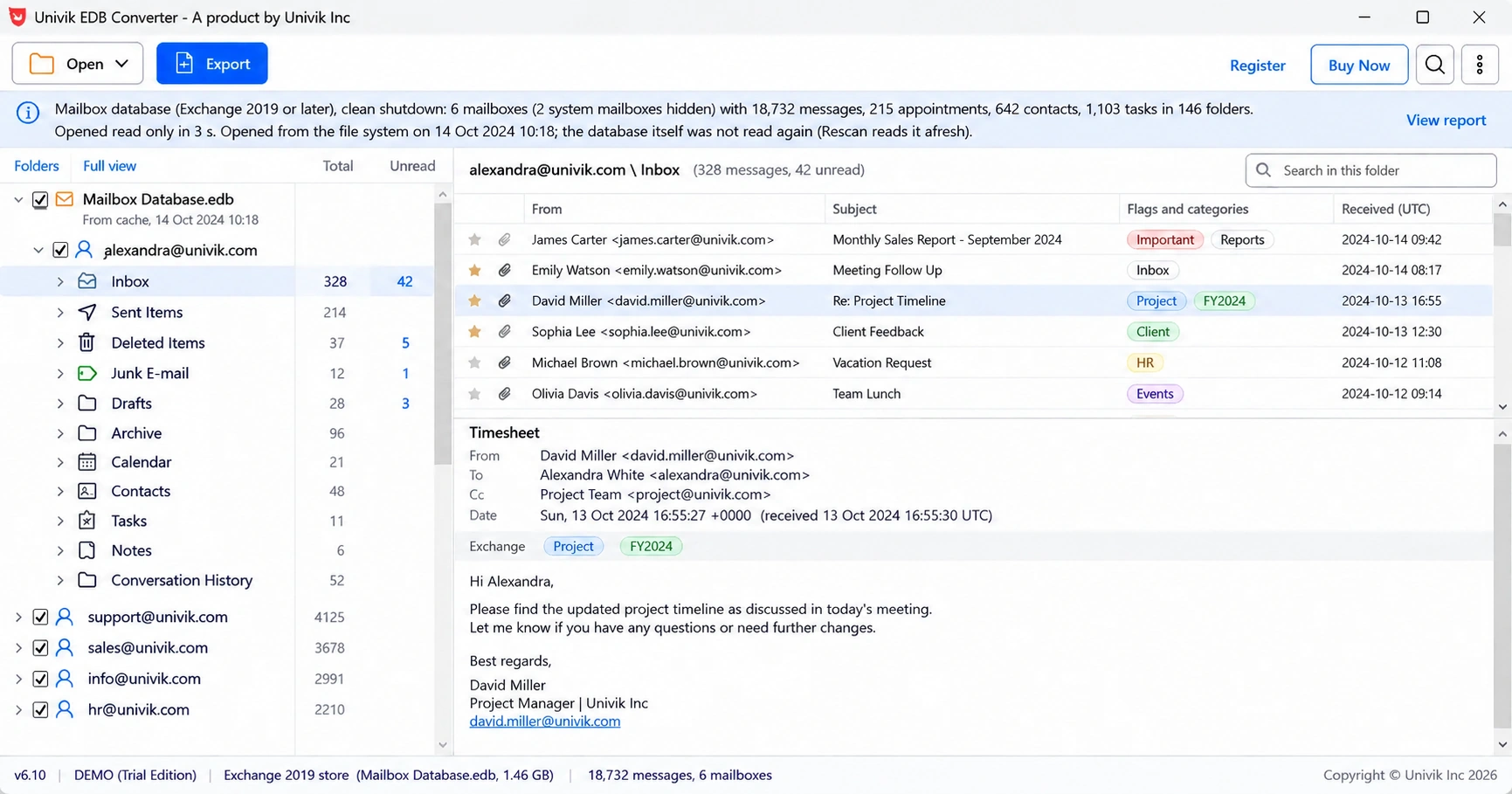
- Export the mailboxes. Open the restored copy in an offline reader and save each mailbox as PST for the new mail system.
For the last step, Univik EDB Converter opens the restored .edb on a plain Windows PC with no Exchange installed and never writes to the copy.
For the next stop, see how to convert EDB to PST or moving the mail to Office 365. If the header shows Dirty Shutdown, our dirty shutdown guide covers log replay.
Can a partly encrypted EDB file be saved?
A partly encrypted EDB file can be saved only in the parts the ransomware skipped. Many strains encrypt a file in chunks to work faster: SentinelLabs reported in 2022 that BlackCat, Black Basta, PLAY and others skip blocks of each file instead of encrypting all of it (BleepingComputer).
- Pages that were skipped still hold readable mail, but the database structure around them is broken.
- Pages that were encrypted stay unreadable for every tool until someone has the key.
- If the first pages were hit, normal readers cannot open the file at all.
Salvage from a partly encrypted file is specialist data recovery work with no promise of results. Check No More Ransom for a free decryptor first, and keep the encrypted files untouched.
How do you stop the next attack on Exchange?
Three habits cut the damage of the next attack on Exchange: patching, one offline backup and timed restore tests.
- Install every Exchange security update. ProxyLogon was patched on 2 March 2021, and DearCry hit servers that had not installed that update.
- Plan for Exchange 2016 and 2019 leaving support, covered in our end of support guide.
- Keep one backup offline or immutable, out of reach of domain admin accounts.
- Run a lagged copy on a server in a separate admin boundary.
- Test a full restore twice a year, timed.
“The backup you never tested is a hope, not a plan. Restore one database to a spare PC every six months and time it.”
- Isolate the Exchange server and keep it powered on for the investigators.
- An encrypted EDB fails eseutil /mh and loses the 0x89ABCDEF signature at byte 4.
- Mail comes back from a backup, snapshot or lagged copy the attacker did not reach.
- Restore to a clean machine and export mailboxes before rebuilding Exchange.
- Encrypted pages stay unreadable without the key, so keep the files and check for a decryptor.
Open the restored .edb without rebuilding Exchange and check every mailbox. The trial saves 10 messages per folder.
Free Download See all featuresQuestions about Exchange ransomware recovery

Leena Taylor Paul wrote this guide with the Univik team, which has shipped Windows mail tools since 2013. This guide covers getting Exchange mailboxes back from clean database copies after a ransomware attack. Last checked October 2026. Stuck? Contact our support team.