Jet error -1018 means a database page failed its checksum, and failing storage is almost always the cause.
Fix or replace the storage first, then restore from backup or let a database copy patch the page. If neither exists, a hard repair deletes the bad pages, so save the mail around them from a copy of the file before that.
A backup job fails with -1018, an event log fills with checksum warnings or a database refuses to mount. The error is short and the meaning is precise: the bytes Exchange read back are not the bytes it wrote. What you do next decides whether you lose one page of mail or many.
What does Jet error -1018 mean?
Every page in an Exchange database carries a checksum. When the database engine reads a page and the checksum no longer fits its contents, it raises -1018, named JET_errReadVerifyFailure. The page has changed on disk without Exchange changing it.

You will see it in three places:
- backups, because a full backup reads every page and stops at the first bad one
- the Application log, as ESE event 474 naming the page that failed
- a database that refuses to mount, with -1018 in the event log
What causes a -1018 checksum error?
Exchange does not damage its own pages in normal work. Something between the engine and the platter did. Look at storage first:
- a failing disk or SSD
- a RAID controller or its firmware
- write caching without battery protection after a power cut
- a storage driver or multipath fault
- a virtual disk on a struggling host
Check the System log for disk and controller errors from the same period. If the storage is not fixed, new -1018 errors keep appearing on fresh pages.
“A -1018 is a storage problem wearing a database error message. Replace the disk first, or the next repair has fresh damage to deal with.”
How do you check how many pages are bad?
Dismount the database, copy it and run a checksum pass on the copy. It reads every page and lists the ones that fail.
eseutil /k "D:\ExchangeDB\DB01\DB01.edb"One or two bad pages is a very different job from thousands. Write the count down before you choose a fix.
How do you fix Jet error -1018?
| Situation | Fix | Mail lost |
|---|---|---|
| Database sits in a DAG with healthy copies | Exchange patches the page from a passive copy, or reseed the copy | None |
| Good backup exists | Restore the backup and replay the logs since | None to little |
| No copy, no backup, few bad pages | Save the mail from a copy, then eseutil /p and move mailboxes | Items on the bad pages |
| No copy, no backup, many bad pages | Read the mail offline first, rebuild the database afterwards | Depends on the damage |
Work through the fix in this order:
- Fix the storage. Check the System log and the storage vendor tools. Replace failing hardware first.
- Count the bad pages. Run eseutil /k on a copy of the database.
- Patch or restore. Let a healthy DAG copy patch the page. Without one, bring back yesterday's backup and apply the newer logs.
- Save the mail. With no copy and no backup, export the mailboxes from a duplicate of the file.
- Repair last. As the final move, hard repair a duplicate with eseutil /p and empty it into a fresh database.
A hard repair removes each bad page and whatever was stored on it. Our guide on eseutil /p covers the full process and the support policy afterwards.
How do you save mail from a database with bad pages?
Read it with a tool that does not stop at the first failure. Univik EDB Converter has a raw page reader that skips pages it cannot trust and keeps reading the rest. Items whose folder sat on a lost page appear under Recovered items.
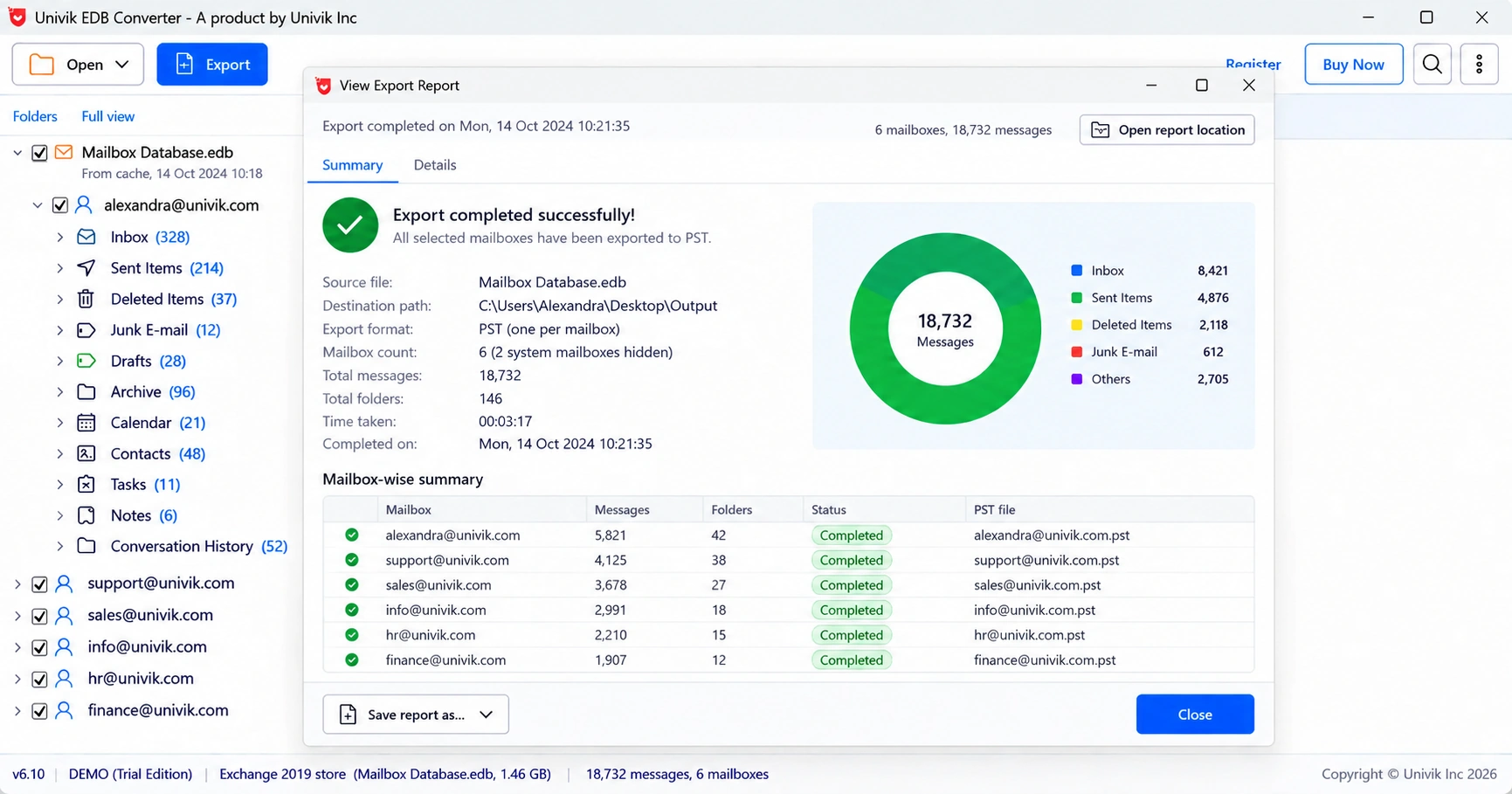
Compare those counts with the mailbox sizes users expect before anyone runs a repair on the original.
- -1018 means a page failed its checksum when Exchange read it back.
- Storage is the usual cause, so fix the disk path before anything else.
- eseutil /k on a copy counts the bad pages.
- DAG page patching or a backup restore fixes it with no loss.
- Without those, save the mail from a copy before a hard repair removes the pages.
Open a copy of the database that throws -1018 and see how much mail is still readable. The trial saves 10 messages per folder.
Free Download See all featuresQuestions about Jet error -1018

Leena Taylor Paul wrote this guide with the Univik team, which has shipped Windows mail tools since 2013. This guide covers Exchange Jet error -1018 and how to recover mail from databases with bad pages. Last checked October 2026. Stuck? Contact our support team.