Open the .edb in an offline reader, save each mailbox as its own PST, then open that PST in Outlook.
Exchange writes PST files only from a mounted database through New-MailboxExportRequest. With no server left, or a database that refuses to mount, the file has to be read directly. Plan for one PST per mailbox and keep each under 50 GB.
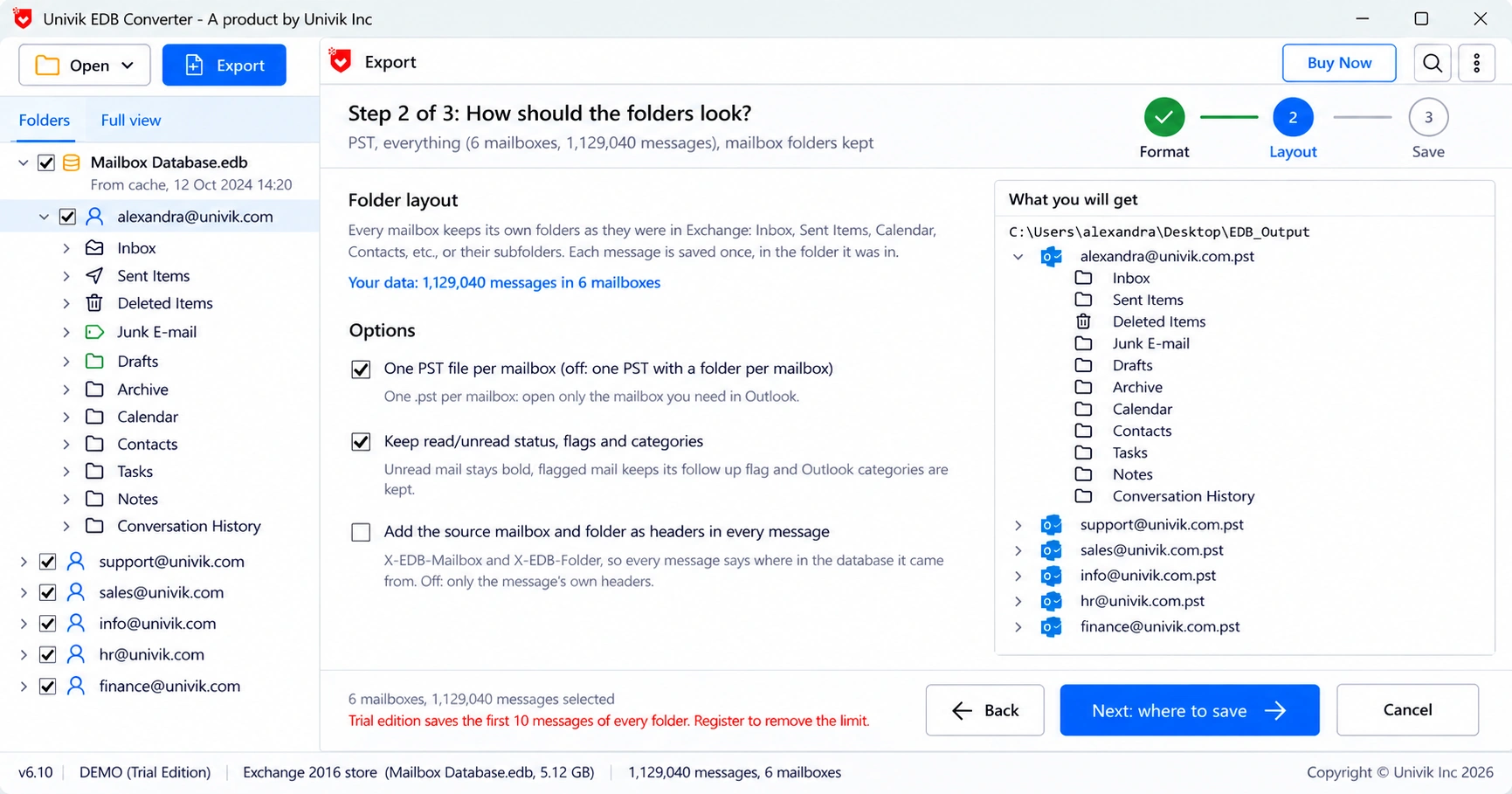
You have an Exchange database file and someone wants their mail back in Outlook. EDB to PST is the usual answer, because Outlook opens PST without fuss. This guide sticks to the Outlook side of the job: how the files should be laid out, how big they can get and how to check them in Outlook. This guide shows how to export EDB to PST with the right layout.
Can Exchange convert an EDB file to PST on its own?
Only while the database is mounted on a working server. Exchange then exports one mailbox at a time to a network share with the New-MailboxExportRequest cmdlet. Our New-MailboxExportRequest guide shows the role, share and command it needs.
A loose .edb file on a disk cannot be exported that way. If the database will not mount, or there is no server left, read the file with a tool that understands the database format.
Should you make one PST per mailbox or one big PST?
Make one file per mailbox. It keeps each person's mail apart and keeps sizes down. One combined file with a folder per mailbox only suits a small database you want to search in one place.
| Layout | Good for | Watch out for |
|---|---|---|
| One PST per mailbox | Handing mail back to each user, migration, legal per custodian | Many files to track on a big database |
| One PST, a folder per mailbox | A small database you search as one set | Hits the size limit fast and mixes people |
“Give every mailbox its own PST. When legal asks for one person in two years, you hand over one file instead of searching a 200 GB one.”
How big can a PST file get?
Outlook 2010 and later create Unicode PST files with a default ceiling of 50 GB. Admins can raise it in the registry, but large data files get slow and are harder to repair. Split big mailboxes instead.

- Under 20 GB: opens fast in Outlook, nothing to plan.
- 20 to 50 GB: works, but keep a second copy before you import.
- Over 50 GB: split it. Our PST splitting guide covers the options.
The export can split as it writes, so you never end up with one file that Outlook refuses.
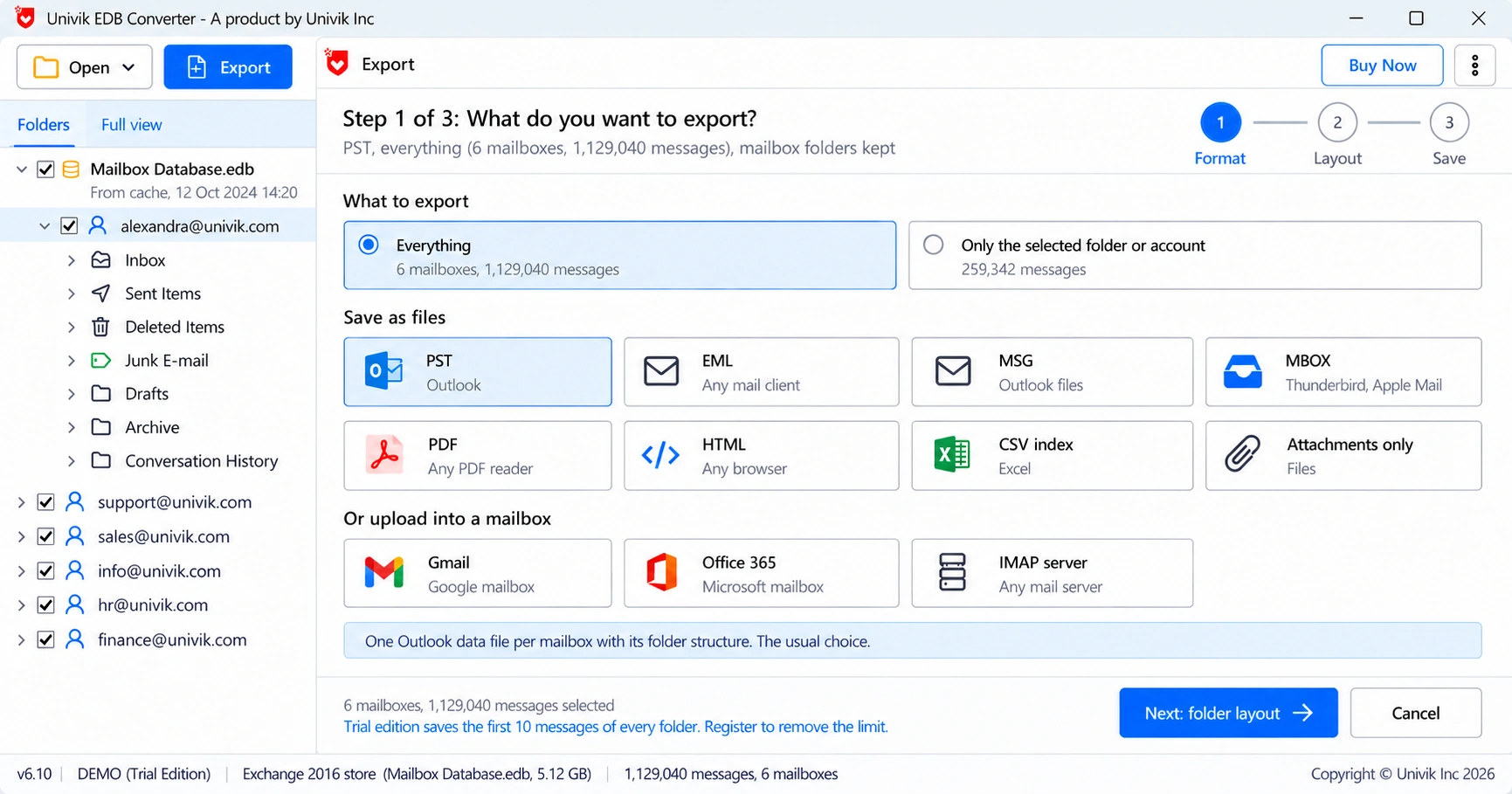
How do you convert EDB to PST step by step?
Each step of this EDB to PST run uses Univik EDB Converter, which reads Exchange 2000 to 2019 databases on Windows 11 or 10. It opens a clean database read-only, so the source file stays as it was.
How do you open the converted PST in Outlook?
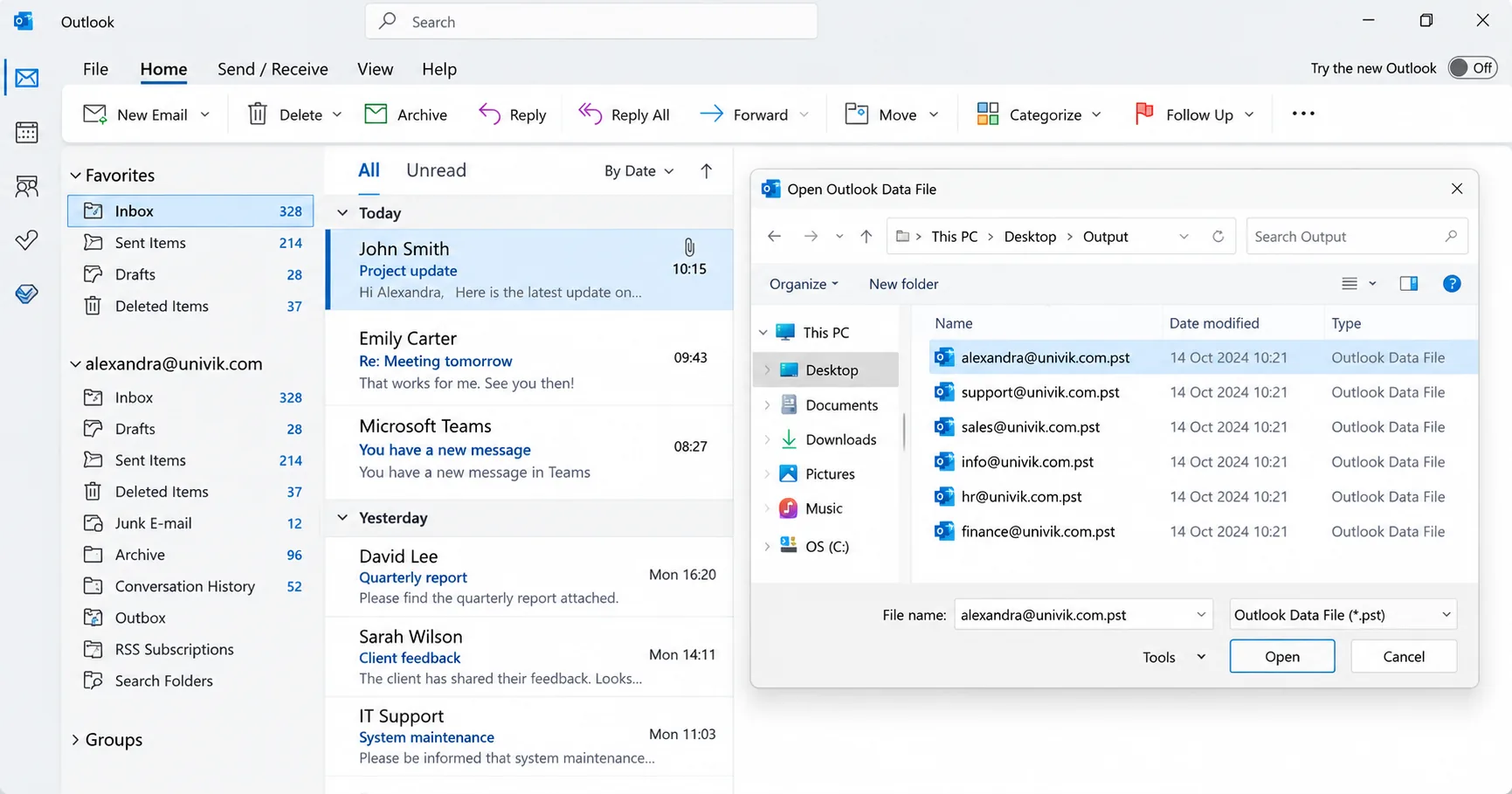
In classic Outlook choose File, then Open & Export, then Open Outlook Data File. The file appears as a second mailbox in the folder pane. To merge it into an existing mailbox instead, use Import/Export and pick Outlook Data File (.pst).
Moving the mail into Microsoft 365 rather than a desktop Outlook? Our guide on importing PST to Office 365 covers the upload, or skip the PST with a direct EDB to Office 365 import.
What should you test on a trial before you buy?
Every EDB tool has a trial. Run the same checks on each one with your own database, not a sample file. These are the checks we use ourselves.
- Does it open your file at all, including one in dirty shutdown with no logs?
- Does it open the source read-only, or does it want to repair it in place?
- Do the mailbox and folder counts match what users remember?
- Are read and unread state, follow-up flags and categories kept?
- Do calendar, contacts and tasks come through, not only mail?
- Can it split output files by size?
- Does the output open in your own Outlook build without errors?
- Does it give a report of what was written and what was skipped?
- How many PCs does one licence cover?
A tool that fails check 2 should not touch your only copy. Make a backup first in any case.
- Exchange exports PST only from a mounted database on a running server.
- A loose or unmountable .edb needs an offline reader for EDB to PST.
- Use one PST per mailbox and keep files under the 50 GB Outlook default.
- Open the result through Open Outlook Data File, or import it to merge.
- Test any trial on your own database and insist on read-only access to the source.
Run the trial on your own database and open the PST in Outlook before you pay. It saves 10 messages per folder.
Free Download See all featuresQuestions about EDB to PST conversion

Leena Taylor Paul wrote this guide with the Univik team, which has shipped Windows mail tools since 2013. This guide covers turning Exchange mailbox databases into PST files and opening them in Outlook. Last checked October 2026. Stuck? Contact our support team.