New-MailboxExportRequest saves a mounted mailbox to a PST on a UNC share once you hold the Mailbox Import Export role.
It is free and built into Exchange 2010 through Exchange SE. It needs a running server, a mounted database, a UNC path the Exchange Trusted Subsystem group can write to and a user that still exists.
This is the free, Microsoft way to turn an Exchange mailbox into a PST. It works well when its conditions are met and fails with short, puzzling errors when they are not. Here is the full setup, the filters people search for and the fixes for the errors we see most.
What permission does New-MailboxExportRequest need?
No admin has it by default, not even Organization Management. Assign the role to your account, then close and reopen the Exchange Management Shell so the new cmdlets load.
New-ManagementRoleAssignment -Role "Mailbox Import Export" -User "admin@contoso.com"If the shell says the term New-MailboxExportRequest is not recognized, this role is the missing piece.
“New-MailboxExportRequest is the right tool while the server is healthy. Most failed exports we hear about come down to a missing role or a share permission.”
How do you set up the share for the PST file?
The export runs inside the Mailbox Replication Service on the server, not in your session. So the path must be a UNC share that the server can reach.

- Create a folder. Create a folder on a file server or on the Exchange server itself, for example D:\PST.
- Share it. Share the folder under the name PST.
- Grant rights. Give the Exchange Trusted Subsystem group Read/Write on both the share and the folder.
- Use the UNC path. Use the path \\FS01\PST in every export command.
A local path such as C:\PST is rejected, and missing rights for Exchange Trusted Subsystem cause access denied errors.
How do you export a mailbox to PST with PowerShell?
The basic command takes a mailbox and a file path:
New-MailboxExportRequest -Mailbox jane@contoso.com -FilePath "\\FS01\PST\jane.pst"To export by date, add a content filter with one cut-off date. Microsoft's reference says a single request cannot filter between two dates. The date format follows the server culture, so test on a small mailbox first.
New-MailboxExportRequest -Mailbox jane@contoso.com -FilePath "\\FS01\PST\jane-before-2025.pst" `
  -ContentFilter "(Received -lt '01/01/2025')"
For the online archive or a single folder tree:
New-MailboxExportRequest -Mailbox jane@contoso.com -IsArchive -FilePath "\\FS01\PST\jane-archive.pst"
New-MailboxExportRequest -Mailbox jane@contoso.com -IncludeFolders "#Inbox#/*" -FilePath "\\FS01\PST\jane-inbox.pst"
How do you check, fix and clean up export requests?
Requests run in the background. Check progress, read failure reports and remove finished requests:
Get-MailboxExportRequest | Get-MailboxExportRequestStatistics
Get-MailboxExportRequest -Status Failed | Get-MailboxExportRequestStatistics -IncludeReport | fl Report
Get-MailboxExportRequest -Status Completed | Remove-MailboxExportRequest
Common problems and their fixes:
| Symptom | Likely cause | Fix |
|---|---|---|
| Cmdlet not recognized | Role not assigned or shell not reopened | Assign Mailbox Import Export and reopen the shell |
| Access denied on the PST path | Exchange Trusted Subsystem lacks rights | Grant Read/Write on share and folder |
| Stuck in Queued | Mailbox Replication Service busy or stopped | Check the service and the queue on that server |
| Failed on corrupt items | Bad items in the mailbox | Rerun with -BadItemLimit and read the report |
| Mailbox not found | User deleted, mailbox disconnected | Reconnect or restore the mailbox first |
What do the common export request error messages mean?
Six error messages cause most failed exports. Each one names its cause if you know where to look:
| Error message | Likely cause | Fix |
|---|---|---|
| StalledDueToSource_DiskLatency | Source database disk too slow, so Exchange throttles the request | Run fewer exports at once and schedule them after hours |
| The file could be locked | Wrong UNC path, missing share rights or a second request writing to the same PST | Test the UNC path and give each request its own PST name |
| Couldn't connect to the source mailbox | MAPI blocked for that mailbox or a stuck RPC Client Access service | Check Get-CASMailbox, then restart RPC Client Access |
| File size is less than header size | A PST with that name already sits in the folder | Delete or rename the old PST and run the request again |
| Couldn't find the Enterprise Organization container | Mailbox Import Export role missing from your account | Assign the role with New-ManagementRoleAssignment |
| Database associated with active MailboxExport requests | Old requests still point at the database you want to remove | Run Get-MailboxExportRequest | Remove-MailboxExportRequest |
Each of these messages shows up in the request report or in the shell when the request is created. The disk latency stall clears by itself once the load drops, while the other five need the fix in the table before a new request will run.
When does New-MailboxExportRequest not work at all?
The cmdlet only talks to a mounted database on a live server. It cannot help when:
- the database is dismounted, dirty or damaged
- the server is gone or the organization was retired
- the mailbox was purged after its retention period
- all you have is an .edb file copied from somewhere
In those cases the PST has to come from the file itself, as shown in how to convert EDB to PST. For mailboxes of people who left, see exporting a disconnected mailbox.
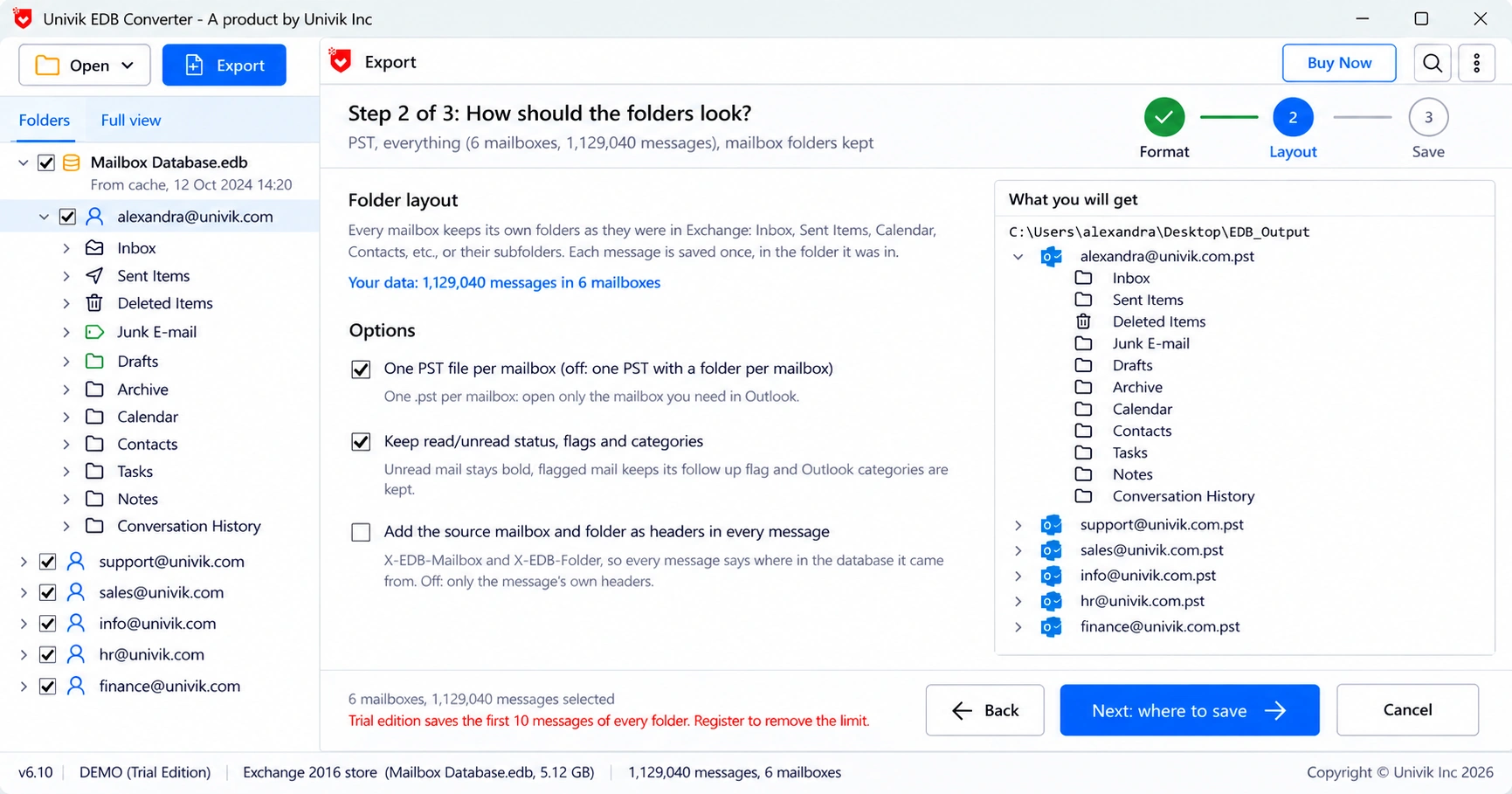
Univik EDB Converter reads the .edb directly, so none of the four limits above apply.
- Assign the Mailbox Import Export role and reopen the shell before the first export.
- Write to a UNC share that Exchange Trusted Subsystem can read and write.
- Use -ContentFilter for a cut-off date, -IsArchive for archives and -IncludeFolders for folders.
- Check requests with Get-MailboxExportRequestStatistics and remove them when done.
- The cmdlet needs a mounted database and a live mailbox, nothing less.
When the cmdlet cannot reach the mailbox, open the .edb copy and save it as PST. The trial saves 10 messages per folder.
Free Download See all featuresQuestions about New-MailboxExportRequest

Leena Taylor Paul wrote this guide with the Univik team, which has shipped Windows mail tools since 2013. This guide covers exporting Exchange mailboxes to PST with New-MailboxExportRequest. Last checked October 2026. Stuck? Contact our support team.