If the disks holding the .edb files survived, the mailboxes survived. Rebuild the server or read those files directly.
Setup /Mode:RecoverServer rebuilds a lost Exchange server from the settings kept in Active Directory, on a machine with the same name and Windows version. It does not bring back mailboxes; you mount the old databases afterwards. When a rebuild is not possible, open the .edb files offline and export the mail.
The server will not boot, the RAID controller died or Windows is beyond repair. Exchange itself keeps most of its configuration in Active Directory, and the mail lives in .edb files on disk. So when an Exchange server crashed like this, you face two separate problems: getting a working server back and getting the mailbox databases back onto it.
What should you check first after an Exchange server crash?
Find out whether the database files survived before you touch anything else. If the Exchange server crashed but its data disks are intact, you have a rebuild job. Damaged data disks make it a recovery job.
- Locate each .edb file and its log folder. On Exchange 2013 and later the default is Program Files\Microsoft\Exchange Server\V15\Mailbox, in a folder named after the database.
- Copy every .edb file with all of its transaction logs (E00, E01 and so on, one prefix per database) and its .chk file to another disk before any repair.
- Check what backups exist and how old they are.
- If ransomware encrypted the files, stop here and follow our ransomware recovery guide instead of a rebuild.
- Note the server name, Windows version, drive letters and Exchange cumulative update. The first three must match. The same cumulative update is best, but the latest one also works.

“Copy the database files off the dead server before anyone reinstalls anything. The rebuild can wait an hour; the only copy of the mail cannot.”
Which recovery route fits your crash?
The route depends on what still works: Active Directory, other Exchange servers and the data disks.
| Situation | Route | Guide |
|---|---|---|
| Hardware or Windows died, data disks fine | Rebuild with Setup /Mode:RecoverServer, then mount the databases | This page |
| Server was a DAG member | Remove it from the DAG, rebuild, add it back | This page |
| Another Exchange server with the same Exchange and Windows Server versions runs in the organization | Mount the databases on that server | Move the database to another server |
| Only a backup of the database is left | Restore it and copy mailboxes out | Recovery Database limits |
| No server can be rebuilt, or Active Directory is gone too | Read the .edb files offline and export the mail | This page |
Users who need to send mail today can get a temporary empty database on another server while the old one is recovered. Microsoft calls this dial tone portability.
How do you rebuild a crashed Exchange server with RecoverServer?
Setup /Mode:RecoverServer is how Microsoft lets you rebuild Exchange server installs: it reads the lost server's configuration from Active Directory and installs Exchange with it. Microsoft lists the conditions in Recover Exchange servers:
- the same server name as the lost server
- the same Windows Server version
- the same drive letters for the mounted databases
- an account in Domain Admins and Organization Management
- Reset the computer account. In Active Directory Users and Computers, reset the computer account of the crashed server.
- Build the replacement. Install the same Windows Server version, give the machine the same name and join it to the same domain.
- Install prerequisites. Add the Windows features and runtimes your Exchange version needs, and match the old drive letters.
- Run Setup in recovery mode. Mount the Exchange ISO and run Setup.exe with /Mode:RecoverServer, adding /TargetDir if Exchange was not in the default path.
- Bring back the databases. Put the surviving .edb files and logs at their old paths, check them with eseutil /mh and mount them.
Since the September 2021 cumulative updates, Setup needs /IAcceptExchangeServerLicenseTerms_DiagnosticDataON or /IAcceptExchangeServerLicenseTerms_DiagnosticDataOFF. The examples use the OFF switch:
E:\Setup.exe /IAcceptExchangeServerLicenseTerms_DiagnosticDataOFF /Mode:RecoverServer
E:\Setup.exe /IAcceptExchangeServerLicenseTerms_DiagnosticDataOFF /Mode:RecoverServer /TargetDir:"D:\Program Files\Exchange"
Use the same cumulative update the server ran. If you do not have that media, Microsoft says to use the latest one.
How do you bring the databases back after the rebuild?
RecoverServer brings back the server, not the mail. Put the surviving database files and logs at the paths they had before, check their state and mount them:
eseutil /mh "D:\DB01\DB01.edb"
Mount-Database DB01
Get-MailboxDatabase -Status | Format-Table Name,Mounted
A database that shows Dirty Shutdown needs its logs replayed first, as covered in our dirty shutdown guide. Two more things to redo after the rebuild:
- RecoverServer assigns self-signed certificates. Import your public certificate again or Outlook users see warnings.
- Custom settings that lived on the server itself, outside Active Directory, need to be set up again.
What if the crashed server was in a DAG?
Take the dead server out of the database availability group first, rebuild it, then add it back with Add-MailboxDatabaseCopy, which seeds the copies again. Write down any replay lag settings before you remove the copies. A crashed member is offline, so remove it with -ConfigurationOnly and then evict it from the Windows failover cluster by hand.
Remove-MailboxDatabaseCopy DB1\MBX1
Remove-DatabaseAvailabilityGroupServer -Identity DAG1 -MailboxServer MBX1 -ConfigurationOnly
# evict MBX1 from the Windows failover cluster
# reset the computer account, then run Setup /Mode:RecoverServer on the rebuilt MBX1
Add-DatabaseAvailabilityGroupServer -Identity DAG1 -MailboxServer MBX1
Add-MailboxDatabaseCopy -Identity DB1 -MailboxServer MBX1
The other DAG members keep serving the mailboxes during the rebuild, so users notice little if the copies were healthy.
What if the crashed server cannot be rebuilt?
Read the database files directly. RecoverServer needs Active Directory, the same Windows version and Exchange install media, either the same cumulative update or the latest one. When any of those is missing, or the company has moved on from Exchange, the .edb files are still a complete record of every mailbox.
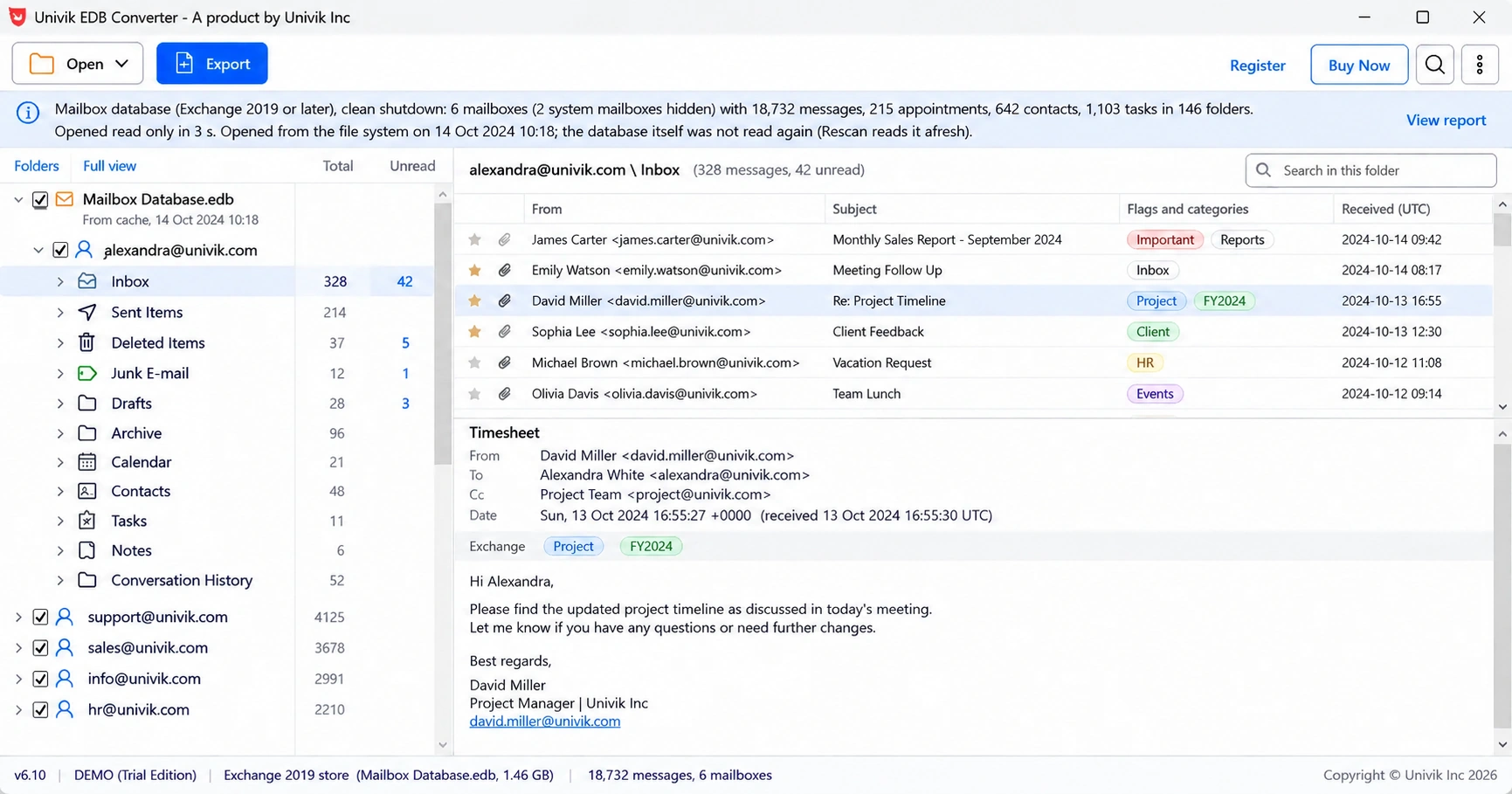
Univik EDB Converter opens the copied .edb on any Windows PC with no Exchange installed. It replays the logs when you give it the log folder, and saves each mailbox as PST or uploads it to Office 365.
- Exchange keeps most server settings in Active Directory and the mail in .edb files.
- Setup /Mode:RecoverServer rebuilds the server but does not restore mailboxes.
- The rebuilt server needs the same name, Windows version and drive letters.
- Mount the surviving databases afterwards and reimport the public certificate.
- When no rebuild is possible, read the .edb files offline and export the mail.
Open a copy of the .edb from the crashed server and see every mailbox before you plan the rebuild. The trial saves 10 messages per folder.
Free Download See all featuresQuestions about a crashed Exchange server

Leena Taylor Paul wrote this guide with the Univik team, which has shipped Windows mail tools since 2013. This guide covers rebuilding a crashed Exchange server and getting its mailbox databases back. Last checked October 2026. Stuck? Contact our support team.