EML opens in most mail apps and MSG keeps every Outlook property. MBOX puts a whole folder in one file.
EML and MSG write one file per message, which suits legal review and single-message sharing. MBOX writes one file per folder, which suits moving a mailbox into a non-Outlook mail client. For opening the mail in Outlook with calendars and contacts, PST stays the better choice.
PST is the usual output from an Exchange database, but not every job ends in Outlook. A lawyer wants single messages. A team is moving to Thunderbird. A script needs plain files to parse. Each of these points to a different format. Here is how EML, MSG and MBOX differ and when an EDB to EML, MSG or MBOX export makes sense.
Which format should you choose: EML, MSG or MBOX?
Choose by the app that will open the files and by how many files you are ready to handle.
| Format | One file holds | Opens in | Best for |
|---|---|---|---|
| EML | One message, in standard internet format | Outlook (classic and new) and most standards-based mail apps | Sharing single messages, archives, scripts |
| MSG | One Outlook item with its Outlook properties | Outlook for Windows; new Outlook with a qualifying Microsoft 365 plan | Legal review in Outlook, keeping Outlook fields |
| MBOX | A whole folder of messages | Thunderbird, Apple Mail and other mbox clients | Moving mail to a non-Outlook client |
| PST | A whole mailbox with folders | Outlook | Opening the full mailbox in Outlook |
PST has its own guide on converting EDB to PST.
“Ask who will open the files before you pick a format. A reviewer in Outlook wants MSG; a team leaving Outlook wants MBOX.”

When does EDB to EML make sense?
EML is the right pick when the mail must open in many different apps. An .eml file holds one message in the internet message format defined by RFC 5322, with attachments encoded as MIME parts, so most standards-based mail apps can read it.
- Microsoft documents that new Outlook opens .eml files with a double-click, with no subscription needed for that format.
- New Outlook can also bulk import .eml files into a mailbox folder. Microsoft lists a 14 MB limit per file and reads only the top level of the chosen folder.
- The plain text structure makes EML easy to index, search and process with scripts.
When is MSG the better choice than EML?
Choose an EDB to MSG export when the mail will be read in Outlook and the Outlook-specific fields matter. Microsoft's [MS-OXMSG] specification describes an .msg file as one stored Message object, and any property present on that object is also present in the file.
- Categories, flags and other MAPI properties travel inside the file.
- An .msg can hold an email, an appointment, a contact or a task.
- New Outlook opens .msg files only with a qualifying Microsoft 365 subscription, so check the reviewer's setup first.
For legal work that needs PDF instead, see our guide to Exchange mailboxes to PDF.
When should you export EDB to MBOX?
Export to MBOX when the mail is moving to a client other than Outlook. An mbox file stores a sequence of messages that the mail client treats as one folder, so one Exchange folder becomes one file.
- Fewer, larger files are easier to copy than hundreds of thousands of single messages.
- RFC 4155 notes that mbox has no single authoritative specification, and clients write slightly different variants. Test one folder in the target client first.
- Calendars and contacts do not fit the mbox format. Keep a PST for those.
How do you export EDB mailboxes to EML, MSG or MBOX?
Work on a copy of the database and pick the format in the first export step.
- Copy the database. Move a duplicate of the database to a Windows PC, with the log folder when the shutdown was not clean.
- Open the copy. Open the copied .edb and pick the mailboxes or folders you need.
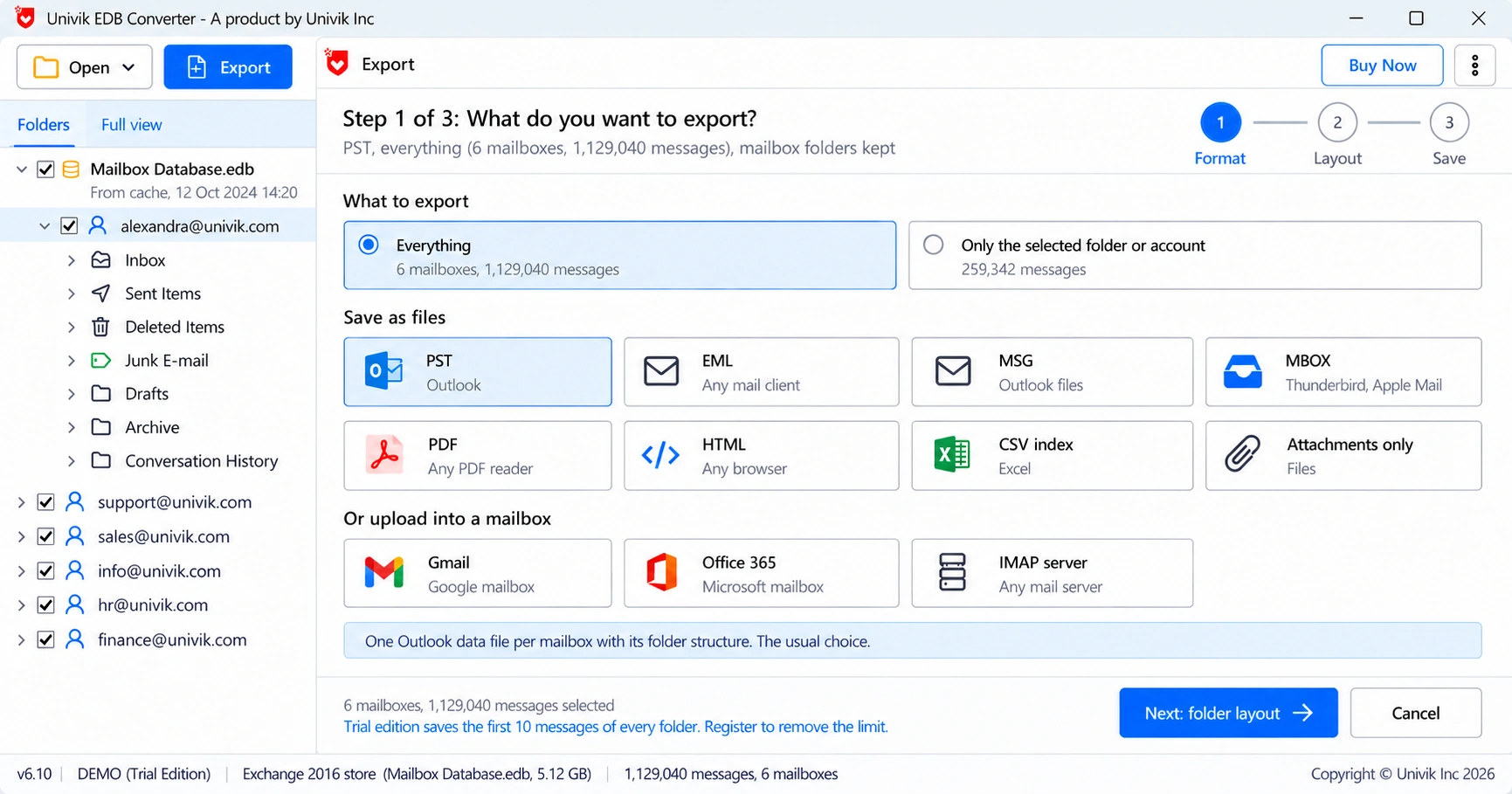
- Pick the format. In export step 1, choose EML, MSG or MBOX under Save as files.
- Choose the output folder. Save to a short path such as D:\Export so deep folder trees stay under the Windows path limit.
- Check the result. Open a few files in the target app and compare message counts with the source folders.
Univik EDB Converter lists EML, MSG and MBOX next to PST, PDF, HTML and CSV in step 1. It reads the copy without Exchange installed.
What should you watch out for with per-message formats?
EML and MSG create one file per message, so a large database produces a very large number of files.
- Windows limits most paths to 260 characters (MAX_PATH). Deep folder trees plus long subjects can pass that, so export to a short root folder.
- Count the messages per folder before and after the export to confirm nothing was skipped.
- Keep the source copy until the target app has opened the files.
If the database will not open cleanly, start with our dirty shutdown guide.
- EML holds one message in standard internet format and opens in most mail apps.
- MSG holds one Outlook item with all of its Outlook properties.
- MBOX holds a whole folder and suits Thunderbird and Apple Mail.
- Per-message formats create many files, so export to a short path.
- PST stays the better choice for full mailboxes with calendars in Outlook.
Open a copy of your .edb and save a test folder in the format your team needs. The trial saves 10 messages per folder.
Free Download See all featuresQuestions about EDB to EML, MSG and MBOX

Leena Taylor Paul wrote this guide with the Univik team, which has shipped Windows mail tools since 2013. This guide compares EML, MSG and MBOX as outputs from an Exchange database and shows when each one fits. Last checked October 2026. Stuck? Contact our support team.