A Recovery Database restores mailboxes only from Exchange 2016 or later databases in the same AD forest.
Microsoft Learn states it plainly: an RDB takes 2016 and later mailbox databases only, the target mailbox must sit in the same forest and one RDB can be mounted per server. An Exchange 2010 or 2013 file, or one from a company that no longer exists, needs another route.
A mailbox was deleted, a database is lost or a backup restore went wrong. You have the .edb file and the usual advice is to mount it as a Recovery Database and copy the mail out. That works well when the conditions fit. When they do not, the mount fails with errors that do not say why. Here is where the line sits.
What is an Exchange Recovery Database?
A Recovery Database, or RDB, is a special mailbox database you create on a Mailbox server to hold a restored copy of a production database. Users cannot connect to it and no mail flows through it. Its only job is to let you copy mailboxes or items from it into live mailboxes.

The RDB replaced the Recovery Storage Group used in Exchange 2007 and earlier.
When does a Recovery Database work?
Check four conditions before you copy anything. Microsoft lists them on its Recovery databases page.
| Condition | What Microsoft requires | What breaks it |
|---|---|---|
| Database version | Exchange 2016 and later only | An Exchange 2010 or 2013 .edb |
| Target mailbox | Same Active Directory forest as the database | A database from another or a deleted organization |
| Database state | Clean Shutdown before mounting | Dirty shutdown with missing logs |
| Server | A running Mailbox server, one RDB mounted at a time | No Exchange server left |
If any row breaks, the RDB route is closed and no setting will open it. That is the answer to the common question about mounting an Exchange 2010 database on Exchange 2016: it is not supported.
“If the database is older than 2016 or comes from another forest, stop trying to mount it. That evening is better spent reading the file.”
How do you restore a mailbox from a Recovery Database?
Use the Exchange Management Shell on a 2016, 2019 or SE Mailbox server in the same organization. The job takes five steps.
- Create the RDB. Run New-MailboxDatabase with -Recovery, a name, the server and the folders for the .edb and logs.
- Copy the files. Copy the restored .edb file and its logs into those folders.
- Check the state. Run eseutil /mh. If it shows Dirty Shutdown, replay the logs with eseutil /r until it reads Clean Shutdown.
- Mount and list. Restart the Information Store with Restart-Service MSExchangeIS, then mount the RDB and list its mailboxes with Get-MailboxStatistics.
- Restore the mailbox. Run New-MailboxRestoreRequest to copy the mailbox into a live target, then remove the RDB.
The commands for steps 1, 3, 4 and 5 look like this:
New-MailboxDatabase -Recovery -Name RDB1 -Server MBX1 -EdbFilePath "E:\RDB1\DB01.edb" -LogFolderPath "E:\RDB1\Logs"eseutil /mh "E:\RDB1\DB01.edb"Restart-Service MSExchangeIS
Mount-Database RDB1
Get-MailboxStatistics -Database RDB1 | ft DisplayName,ItemCount
New-MailboxRestoreRequest -SourceDatabase RDB1 -SourceStoreMailbox "Jane Smith" -TargetMailbox jane@contoso.com -TargetRootFolder "Recovered"Soft recovery is covered in detail in our dirty shutdown guide. Watch restore progress with Get-MailboxRestoreRequest.
Why will your old EDB not mount as a Recovery Database?
Match the symptom to the cause before you spend an evening on it.
- Mount fails on an Exchange 2010 or 2013 file. The database format is older than an RDB on 2016 or later accepts. Exchange will not upgrade it for you.
- The source came from another forest. Microsoft supports restores only into a target mailbox in the same forest as the database.
- Mount fails with a log error. The copy is in dirty shutdown and the logs it needs are missing or out of sequence.
- There is nowhere to create the RDB. The organization was decommissioned or the only server died with it.
What can you do when the Recovery Database route is closed?
Read the file without Exchange. An offline reader parses the database pages directly, so version, forest and server no longer matter. Univik EDB Converter opens Exchange 2000 to 2019 databases this way and works on a copy when the file is dirty.
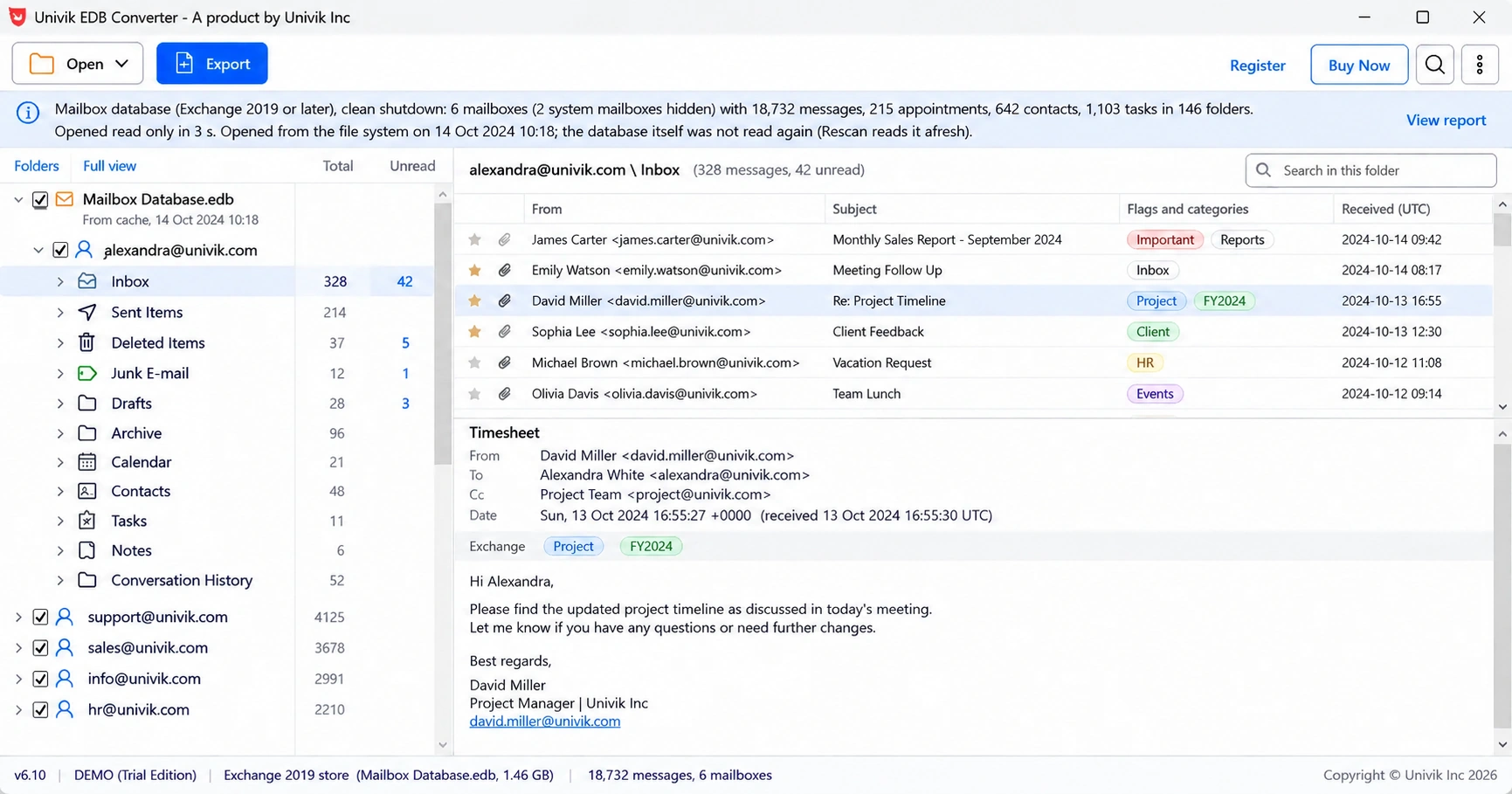
From there you can save one mailbox as PST and import it with Outlook, or upload it straight into a live mailbox. Our guide to converting EDB to PST covers the file layout.
- A Recovery Database restores mailboxes from a copied .edb inside the same Exchange organization.
- Microsoft supports RDBs for Exchange 2016 and later databases only.
- The target mailbox must sit in the same Active Directory forest as the database.
- The copy must reach Clean Shutdown before it mounts, and that needs the logs when it is dirty.
- When any condition fails, read the file offline instead of fighting the mount.
Load a copy of the database and see every mailbox, whatever Exchange version or forest it came from. The trial saves 10 messages per folder.
Free Download See all featuresQuestions about Exchange Recovery Databases

Leena Taylor Paul wrote this guide with the Univik team, which has shipped Windows mail tools since 2013. This guide covers Exchange Recovery Databases and what to do when an old .edb file cannot be mounted. Last checked October 2026. Stuck? Contact our support team.